247
────────────────────────────────────────────────────
12.3 Functions That Use the Modem (2)
────────────────────────────────────────────────────
2.3.3 Setting the 3166
NOTE
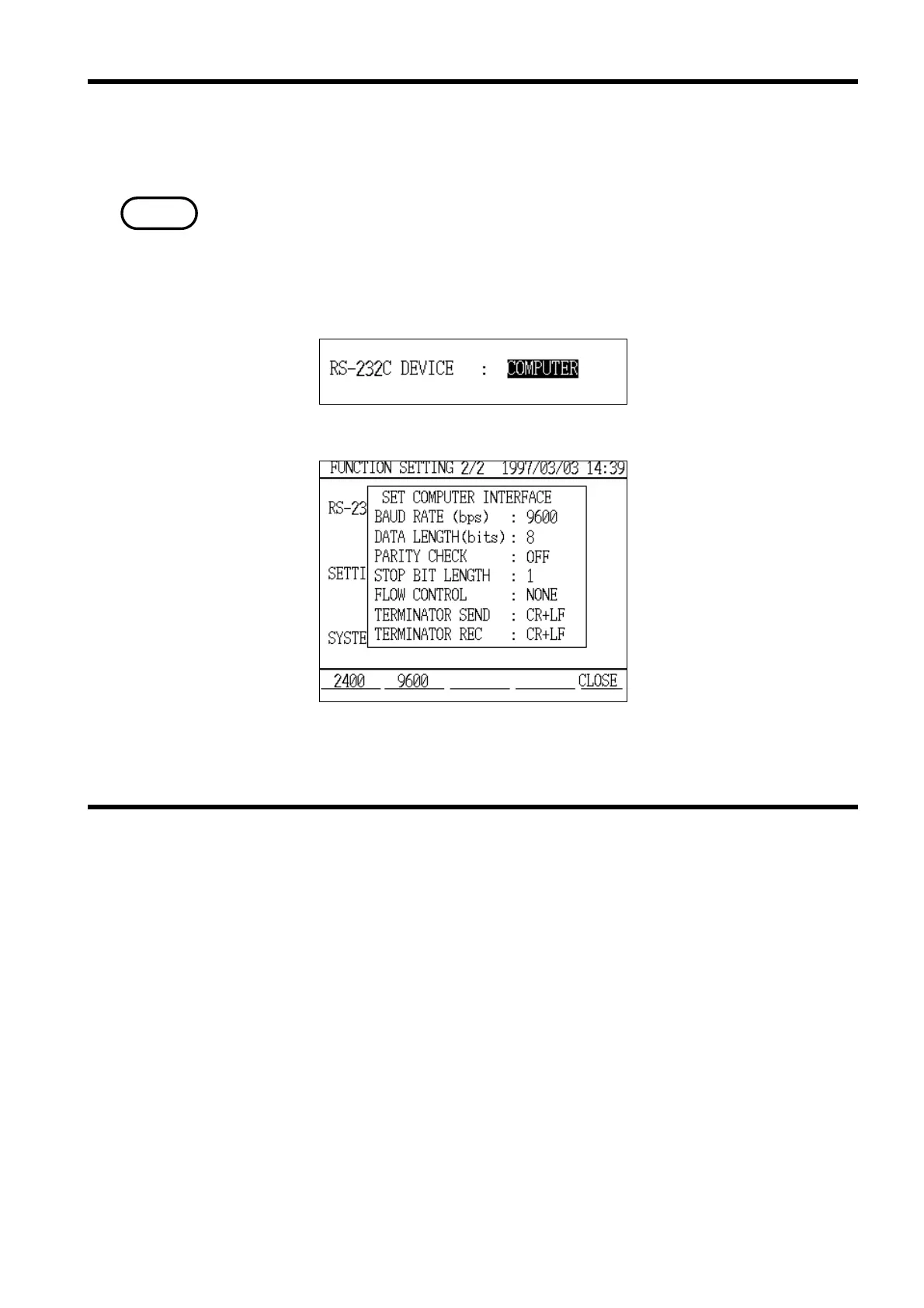
RS-232C Device Setting
Personal Computer Setting Window
2.3.4 Setting the Modem Connected to the 3166
(1) In "Setting" mode, set the "RS-232C device" to "Personal Computer".
Note that the setting is NOT "Modem."
Then set the personal computer interface settings as necessary. Using the
initial values is recommended.
For details on how to make these settings, refer to section 8.2.11, "RS-232C
Device."
(2) Be certain to set "CR+LF" as the delimiter on the receiving side.
The modem connected to the 3166 needs to be set for automatic answering
beforehand. An example setting procedure is described below; these settings
are made through the personal computer.
(1) Connect the modem that is to be connected to the 3166 to the personal
computer, using a straight cable.
(2) Turn on the modem and then start up the personal computer.
(3) Start up the terminal software.
(4) Set the communication speed between the modem and the terminal to 9600
bps.
(5) Input the following through the personal computer terminal:
ATZ[Enter]
ATQ0E0&C1&D2&W[Enter]



 To Next Page