APPENDIX 2
────────────────────────────────────────────────────
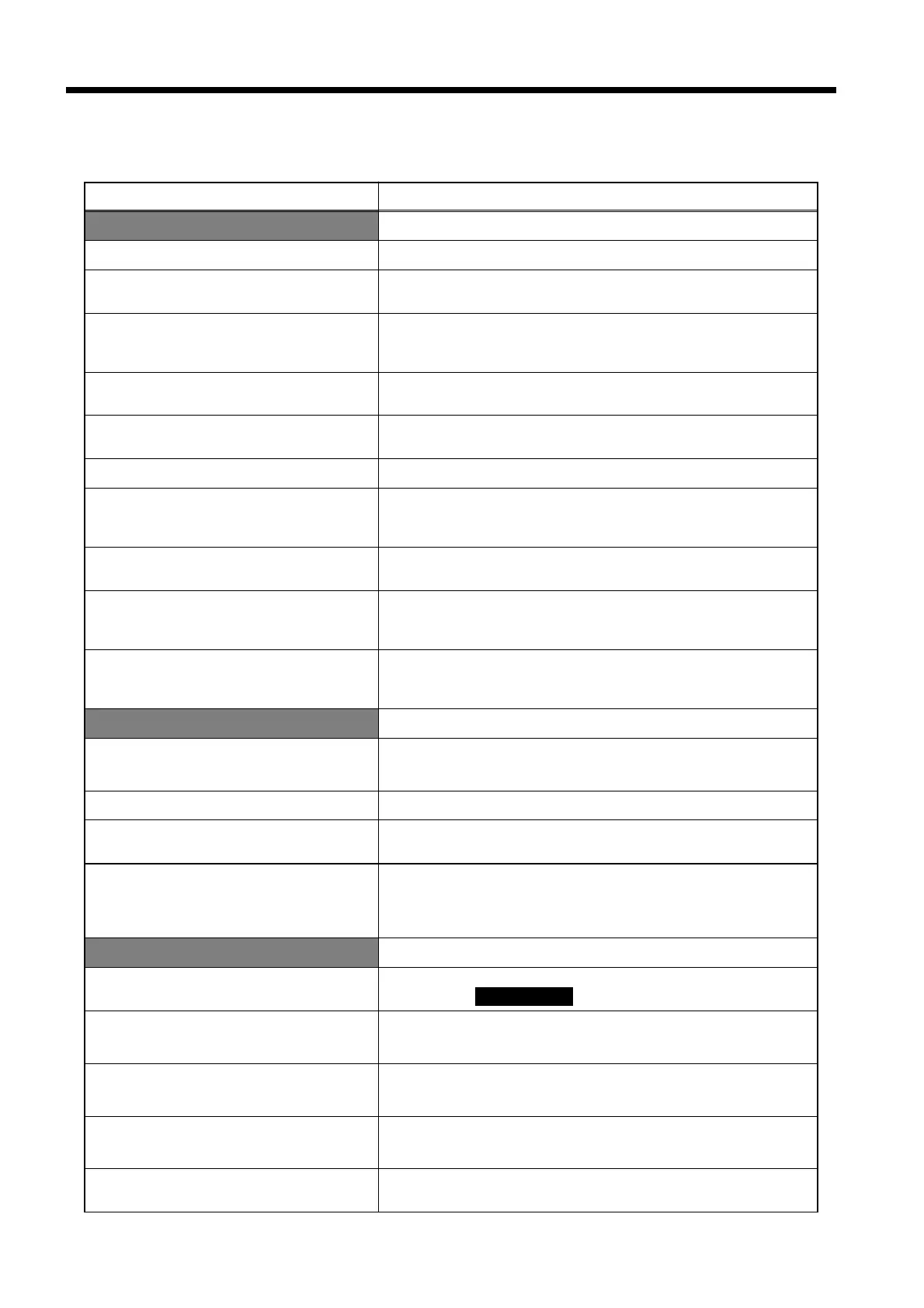
Appendix 1 Error Messages
────────────────────────────────────────────────────
Message Remedy
Floppy disk-related
File names cannot include spaces.
Do not use spaces in file names.
Saving data.
Data is in the process of being saved to the floppy disk.
Wait for a few moments.
Save completed.
Data is saved to the floppy disk.
(The date and time at which the data was saved is also
displayed.)
Disk is write-protected.
The floppy disk is write-protected; release the write-
protection in order to save data on the disk.
File error.
For an unknown reason, the floppy disk save/load operation
could not be performed. Execute the operation again.
9595 FDD unit not connected.
The 9595 FDD UNIT is not connected.
Could not open file.
For an unknown reason, the specified file could not be
opened. Execute the operation again. Confirm that a floppy
disk has been properly inserted.
File is not exist.
The setting file or measurement file does not exist on the
floppy disk.
File error occurred. Cannot outpu
data.
This message is displayed when data could not be output
because an error occurred in either the setting data file or
the measurement data file.
File already exist.
This message is displayed when the file name was changed
to the name of a file that already exists. Set a different file
name.
Setting screen-related
Can’t alter settings when measuring
or with data in memory.
When changing the settings, first perform a data reset on the
measurement screen.
Can’t alter settings while holding.
When changing the settings, first release the hold condition.
Can’t alter settings with keylock on.
When changing the settings, first release the key lock
condition.
Can’t alter settings in standby.
When changing the settings, first terminate the measuremen
process and then perform a data reset. Note that although
the "print/save items" and the "FD auto output" setting can
be changed, additional integration will not be possible.
Measurement screen-related
Measurement data was reset.
This message is displayed when the data was cleared by
pressing the DATA RESET key.
Can’t return unless the hold is
released.
Release the hold and then execute the operation before
returning to the "initial" screen.
Can’t return without performing a
data reset.
Perform a data reset before returning to the "initial" screen.
Integration start/stop times are
invalid.
The integration start/stop times are in the past compared
time. Can’t start integrated measurement.
Can’t start integrated measurement.
Integrated measurement cannot start (because integration
has ended).
Appendix 1 Error Messages



 To Next Page