APPENDIX 3
────────────────────────────────────────────────────
Appendix 1 Error Messages
────────────────────────────────────────────────────
1
2
3
4
5
6
7
8
9
10
11
12
13
14
15
PP
IND
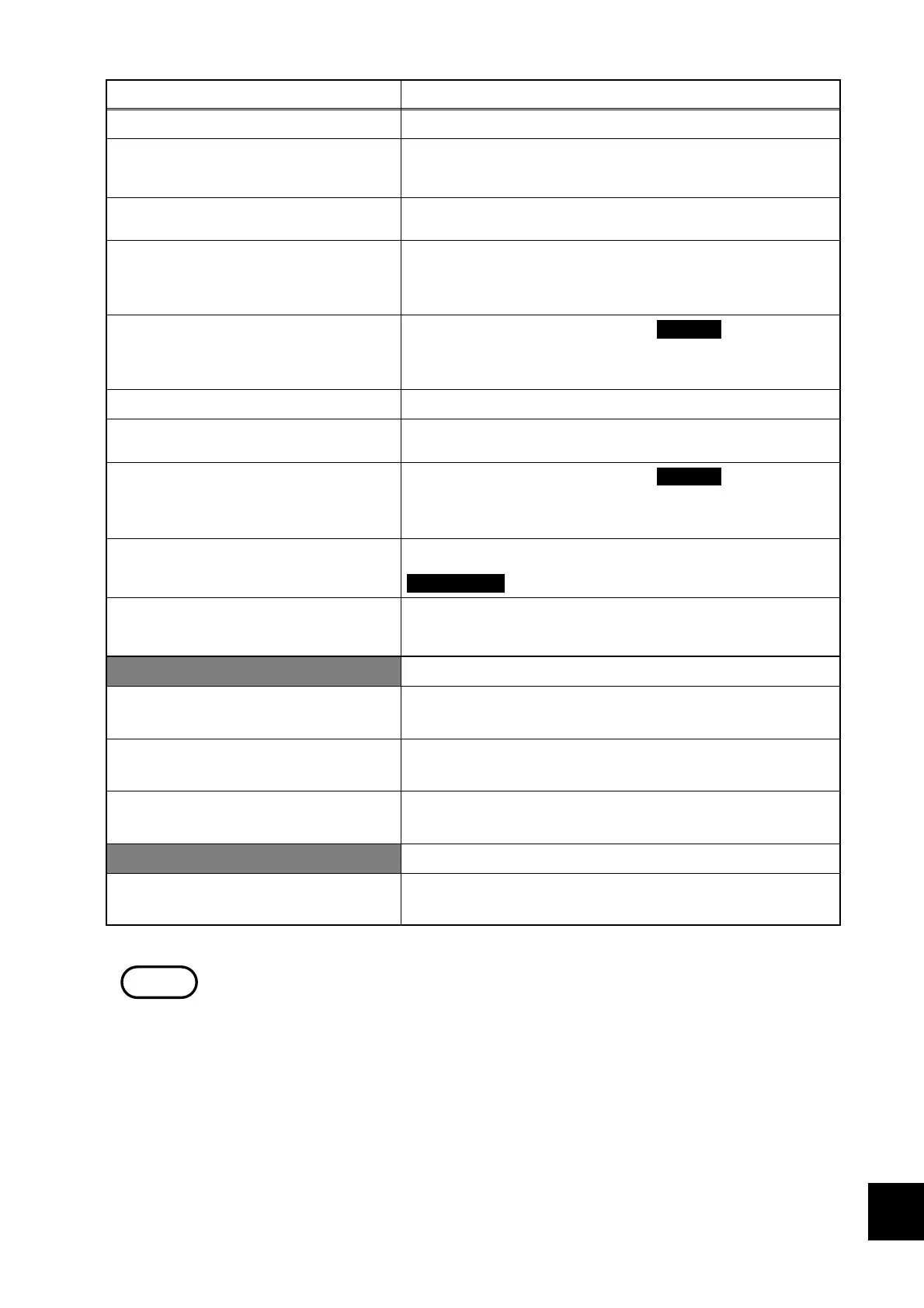
Message Remedy
OK to stop integration?
This inquiry appears when stopping integrated measurement
Integrated measurement ended.
This message appears when integrated measurement ended
at the set time.
(Displayed when additional integration is not possible.)
Will end according to timer.
This message is displayed when integrated measurement is
to end after the time set by the timer.
Additional integration permitted.
This message is displayed when there are still integrated
values remaining in integrated measurement. If additional
integration is not to be performed, execute a data reset
before starting the next measurement.
Can’t return without stopping
integration and resetting the data.
This warning is displayed when the RETURN key was
pressed while integrated measurement was still in progress.
Stop measurement and execute a data reset before
returning to the "initial" screen.
OK to stop demand measurement?
This inquiry appears when stopping demand measurement.
Invalid demand start time.
The set start time is in the past compared to the current
time. Reset the start time as a future time.
Can’t return without stopping
demand measurement and resetting
the data.
This warning is displayed when the RETURN key was
pressed while demand measurement was still in progress.
Stop measurement and execute a data reset before
returning to the initial screen.
Can’t start demand measurement.
There is still data from the last measurement stored in
memory. Before starting demand measurement, press the
DATA RESET key to clear the data.
A power failure occurred.
This warning is displayed when a power failure occurred.
(If a printer is connected, the date and time is output.If a
printer is connected, the date and time is output.)
Interface-related
Please set RS-232C connection to
printer.
When outputting data to the printer, set "printer" as the
device connected to the RS-232C interface.
Use numbers, hyphens and comma
to input TEL numbers.
Input telephone numbers in a format such as "0268-28-
0575". ("0268280575" is also permissible.)
Use letters, numbers and symbols
for input.
Other message
Executing a system reset restores
all of the factory settings.
Except for the data and time settings when the power meter
is shipped from the factory.
NOTE
This message disappears when a key is pressed.



 To Next Page