Copier Network Functions
6
IC-402 6-12
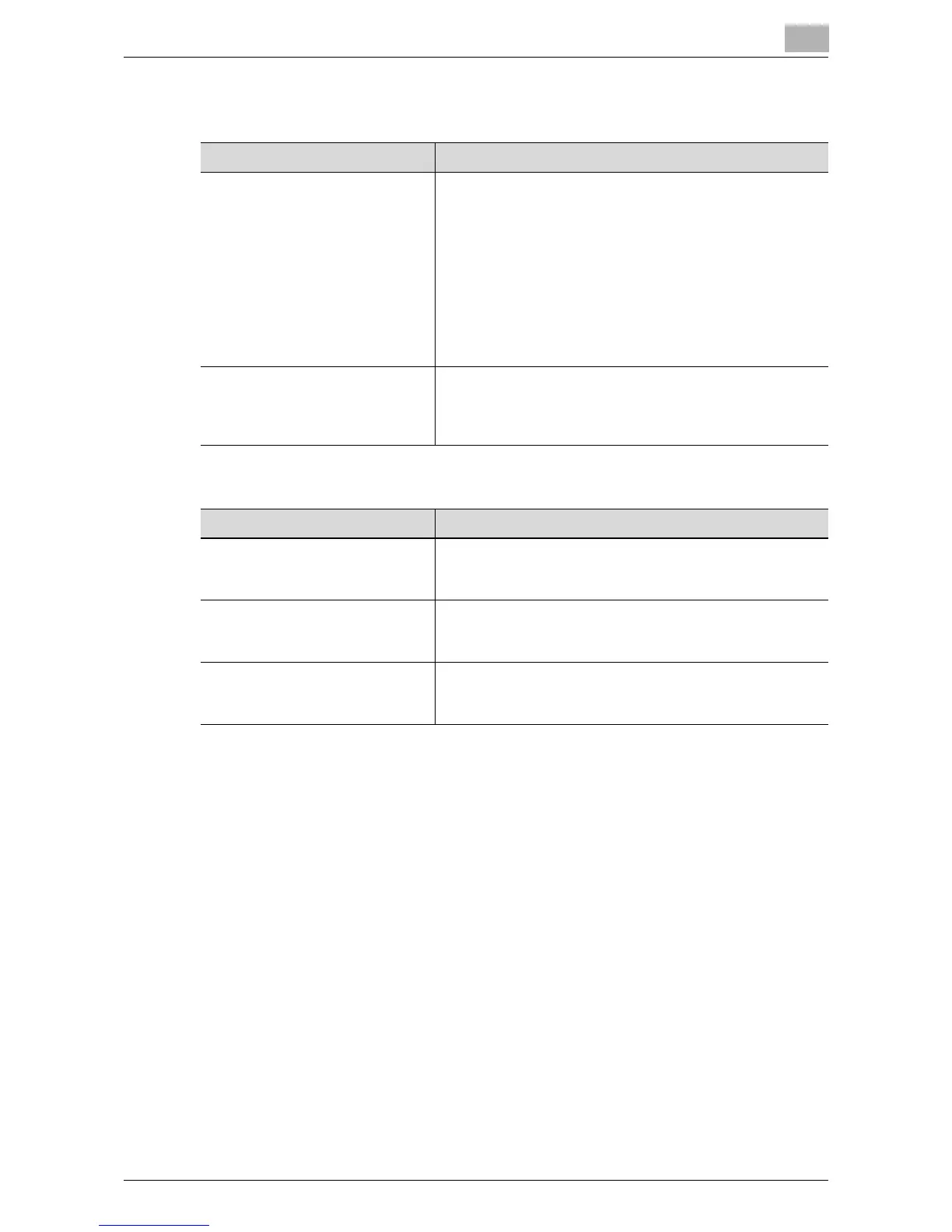
Setting Up LDAP screen 5/6
Setting Up LDAP screen 6/6
Item Description
Select Server Authentication
Method
Select the method to be used during server authentication.
Use The Setting Value: Authenticates the settings specified
in Setting Up LDAP screen 6/6.
[User Authentication]: When using the LDAP search func-
tion, a user name and password is requested. If a user is
logged onto the copier with external authentication, the
user name used with external authentication is automati-
cally entered in the LDAP server logon screen. This user
name can also be changed.
[Dynamic Authentication]: When using the LDAP search
function, a user name and password is requested.
Use referral Select whether to use the referral setting. When referral is
used, the search base that was specified in LDAP Sever
Setting searches the top and bottom levels as the starting
point.
Item Description
Login Name Sets the login name used to connect to the LDAP server.
Use the keyboard that appears in the touch panel to type in
the name (up to 255 characters).
Password Sets the password used to connect to the LDAP server.
Use the keyboard that appears in the touch panel to type in
the password (up to 128 characters).
Domain Name Sets the domain name used to connect to the LDAP server
as necessary. Use the keyboard that appears in the touch
panel to type in the name (up to 64 characters).













 To Next Page