Copier Network Functions
6
IC-402 6-35
6.10 Time Adjustment Settings
The copier’s system clock can be correctly adjusted via the network.
Time Adjustment Parameters
The time adjustment parameters are as follows:
After specifying this setting, touch [1 System Setting] in the Administrator
Setting, touch [3 Date/Time Setting], and then set the date.
Periodic automatic adjustment is not performed.
To specify time adjustment settings
1 In the Administrator Setting screen, touch [5 Network Setting]. (Refer to
page 1-17 for more details.)
2 In the Network Setting screen, touch [6 Detail Setting].
3 In the Detail Setting screen, touch [2 Time Adjustment Setting].
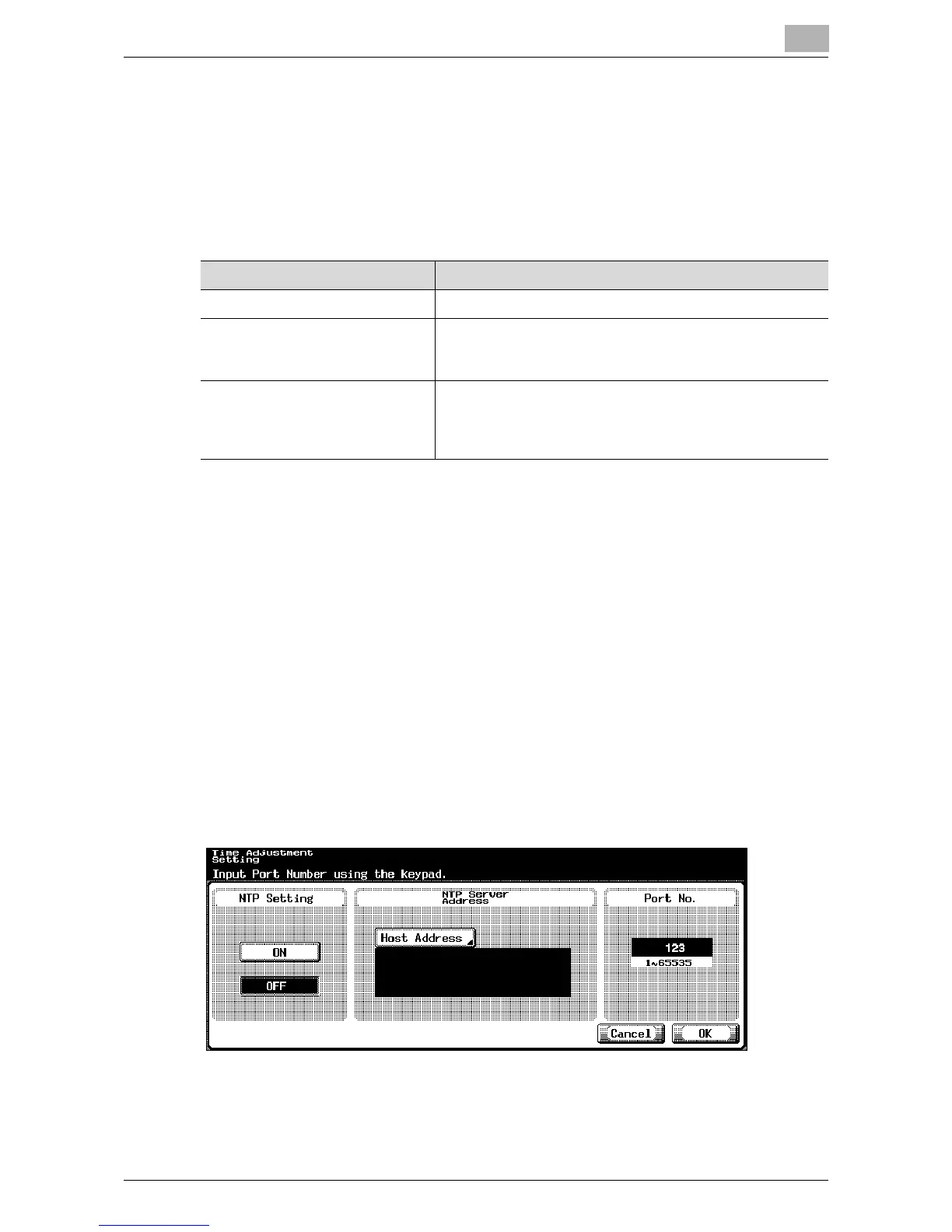
The Time Adjustment Setting screen appears.
4 Specify the desired settings.
5 Touch [OK].
The device information is set.
Item Description
NTP Setting Specify whether to turn on the NTP.
NTP Server Address Sets the IP address of the NTP server. For details on spec-
ifying the settings, refer to “NTP Server Address” on
page 6-36.
Port No. Set the port number used to communicate with the NTP
server. To change the value, press the [C] (clear) key, and
then use the keypad to type in the value (between 1 and
65535).













 To Next Page