Scanning Documents
2
IC-402 2-52
2.7 Specifying the Scan Settings
Available Settings
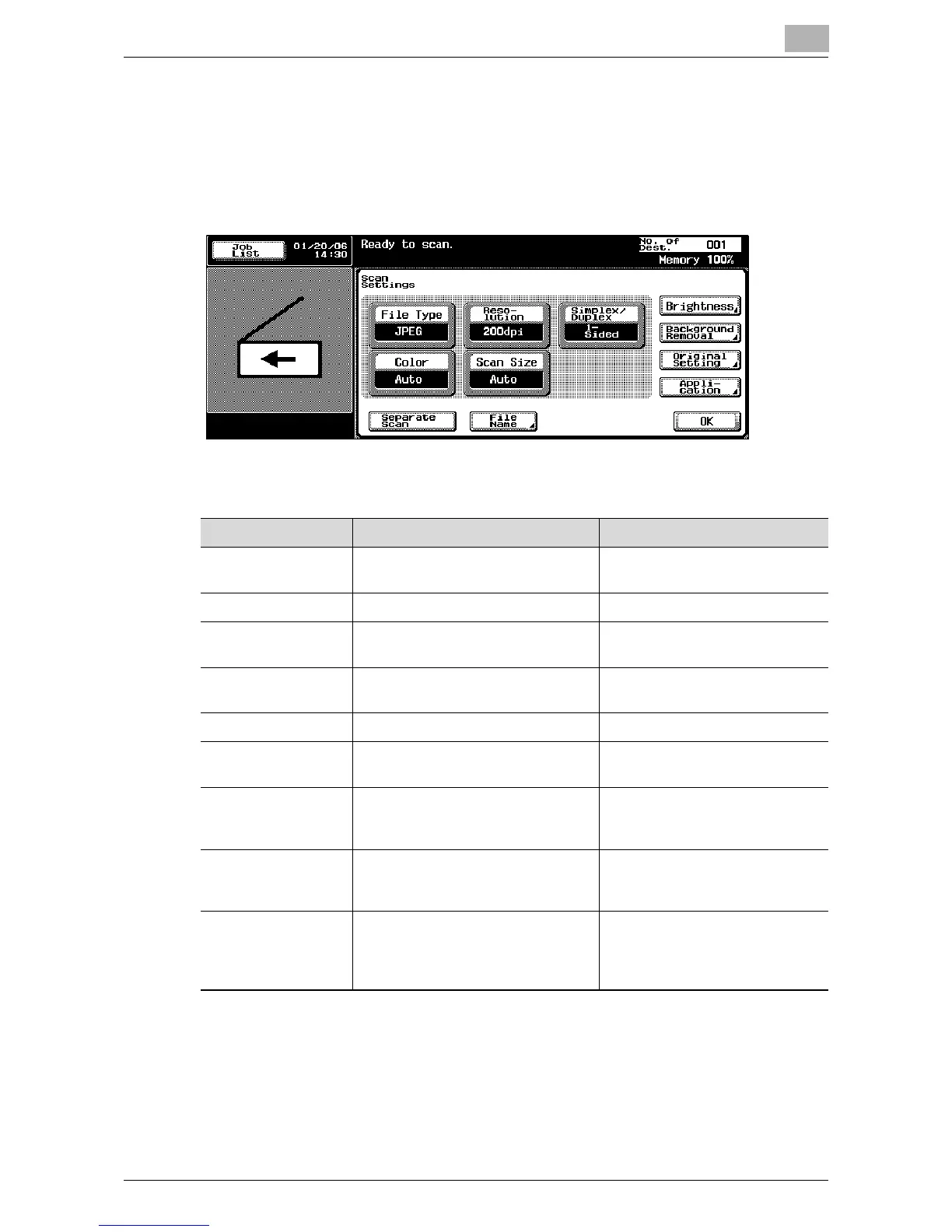
Detailed scan settings can be specified by touching [Scan Settings] in the
Scan mode screen.
The settings that can be specified are as follows:
Item Description Reference
File Type Selects the file type for saving the
scanned data.
“File Type” on page 2-54
Resolution Selects the scan resolution. “Resolution” on page 2-56
Simplex/Duplex Selects whether to scan one side of
the document or both sides.
“Simplex/Duplex” on page 2-57
Color Sets whether to scan in color or
black and white.
“Color” on page 2-58
Scan Size Sets the paper size to be scanned. “Scan Size” on page 2-60
Brightness Adjusts the brightness of the docu-
ment.
“Brightness” on page 2-62
Background
Removal
Adjusts the density of the
background (blank areas) of the
document.
“Background Removal” on
page 2-62
Original Setting Specifies the type of document that
is loaded, for example, if it contains
mixed sizes or is a thick document.
“Original Setting” on page 2-64
Application Provides functions for adjusting the
print image, for example, for
scanning books and for erasing the
surrounding area.
“Book Scanning (Application)” on
page 2-66
“Frame Erase (Application)” on
page 2-68













 To Next Page