Using PageScope Web Connection
7
IC-402 7-18
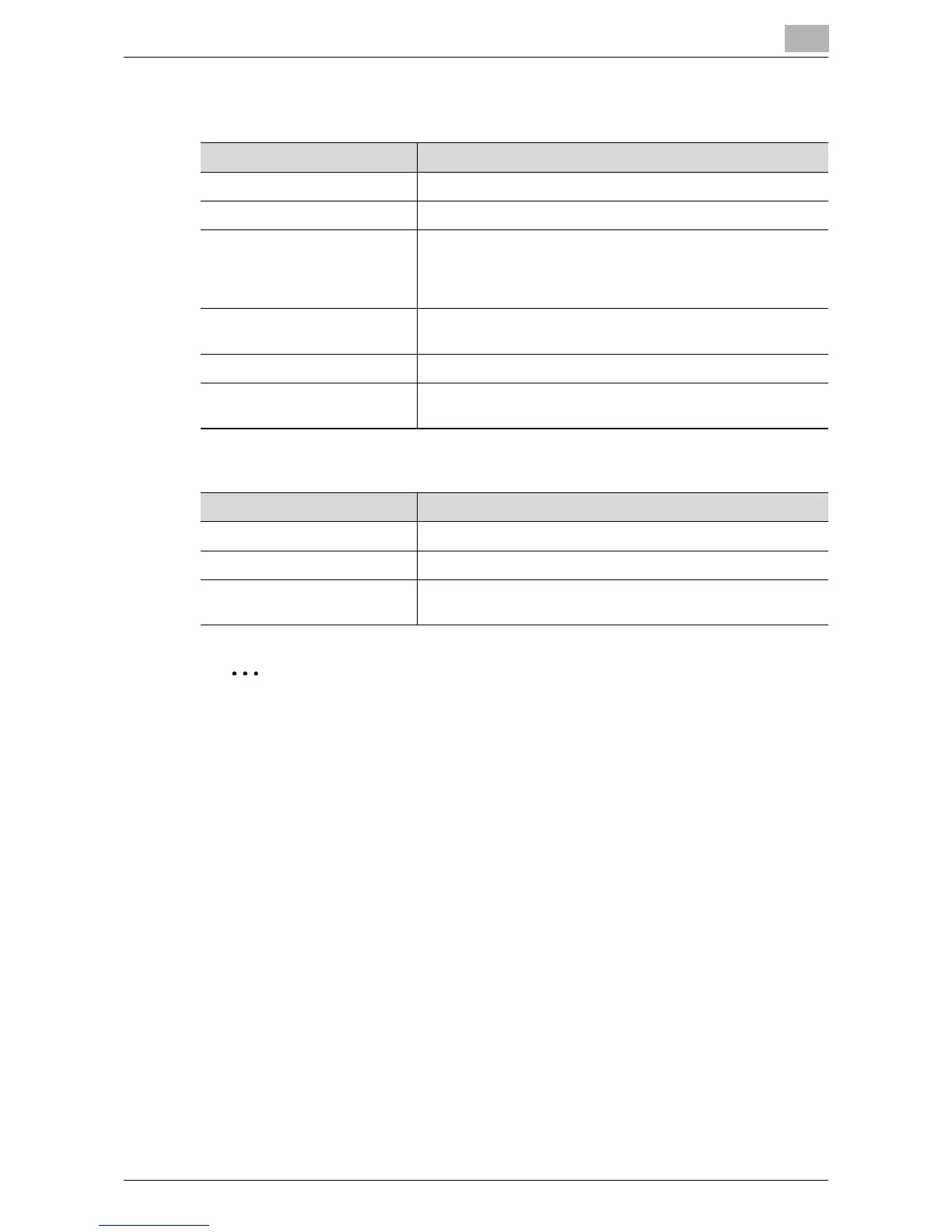
When “SMB” is selected
When “User Box” is selected
2
Note
Correctly type in the mailbox name using uppercase and lowercase let-
ters.
For details on registering fax destinations, refer to the User’s Guide [Net-
work Scanner Operations] included with the copier.
Item Description
Name Enter the name of the destination (up to 24 characters).
Index Select the search word for searching destinations.
Host Address Enter the IP address or host name of the destination computer
(up to 80 characters). Enter the host name using capital
letters. When entering the host name, select the “Please
check to enter host name.” check box.
File Path Enter the destination file path using capital letters (up to 80
characters).
User ID Enter the user ID of the destination PC (up to 80 characters).
Password Enter the password used to log on to the destination
computer (up to 14 characters).
Item Description
Name Enter the name of the destination (up to 24 characters).
Index Select the search word for searching destinations.
User Box Name Enter the name of the mailbox on the hard disk of the image
controller (up to 12 characters).













 To Next Page