Using PageScope Web Connection
7
IC-402 7-27
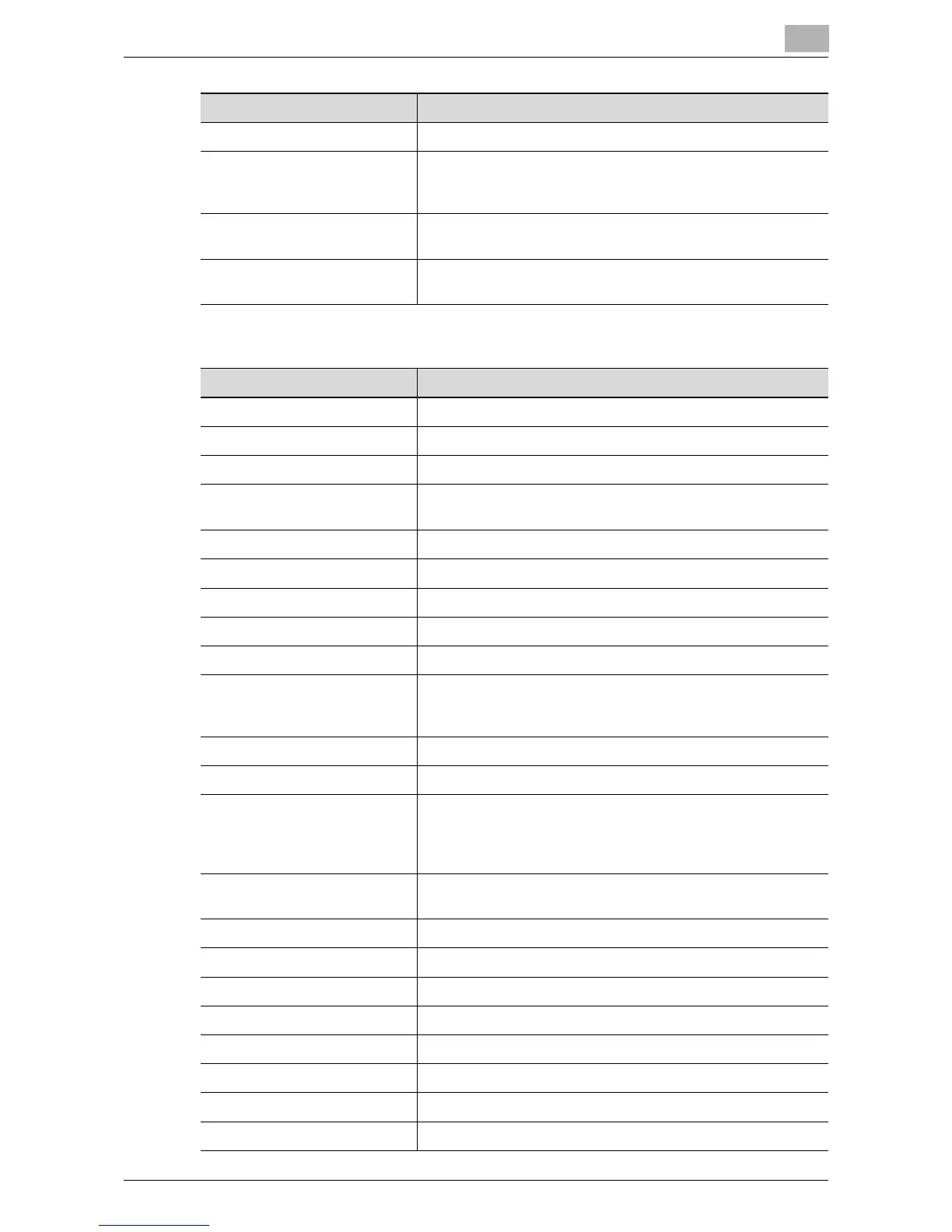
When “User Box” is selected
Method If book scanning is enabled, select the scanning method type.
Center Erase Specify the width of the center of the document spread that is
to be erased when “Book Scanning” is set to “ON” and “Book
Spread” is selected beside “Method”.
Bind Destination Specify the binding position when “Book Scanning” is set to
“ON” and “Book Separation” is selected beside “Method”.
Erase Specify the width of the perimeter of the document to be
erased.
Item Description
Item Description
No. Enter the registration number.
Name Enter the registration name (up to 24 characters).
Select from Address Book Enter the destination e-mail address directly.
Direct Input Enter the name of the mailbox on the hard disk of the image
controller (up to 12 characters).
Resolution Select the resolution.
File Type Select the file format.
Scan Setting Select the unit of the data to be saved.
Simplex/Duplex Select “1-Sided”, “2-Sided”, or “Cover + 2-Sided”.
Brightness Select the brightness.
Color Select the color mode. The file formats that can be saved may
be limited depending on the color settings. For details, refer to
“File Type” on page 2-54.
Separate Scan Enable/disable the “Separate Scan” function.
Background Removal Adjust the background darkness.
Scan Size Select the original size (“Auto”, “Standard Size”, “Custom
Size”).
For “Custom Size”, specify the horizontal and vertical
scanning sizes.
E-Mail Notification The upload destination of the file can be notified to the spec-
ified address.
Destination Click the list button to select the notification addresses.
File Name Enter the file name (up to 26 characters).
Original Direction Select the orientation of the original document.
Bind Select the original binding position.
Special Original Specify whether to specify a mixed original document.
Thick Original Select whether to enable a thick original document.
Book Scanning Select whether to enable book scanning.
Method If book scanning is enabled, select the scanning method type.













 To Next Page