ON-BOARD DIAGNOSTIC
K73
K
End Of Sie
DTC P0733
A6E567001030W15
Diagnostic procedure
8 VERIFY REPAIR OF DTC P0732
• Make sure to reconnect all disconnected
connectors.
• Clear DTC using WDS or equivalent.
• Start engine.
• Warm up transaxle.
• Drive vehicle under the following conditions at
least 4 times for more than 1 seconds.
ATF temperature: 20 °
°°
°C {68 °
°°
°F} or above
Drive in D range, 2nd gear
Vehicle speed (VSS PID): 3.8 km/h {2.4
mph} or above
• Are any DTCs present?
Yes Replace PCM, then go to next step.
No Go to next step.
9 VERIFY AFTER REPAIR PROCEDURE
• Perform After Repair Procedure.
(See K52 AFTER REPAIR PROCEDURE.)
• Are any DTCs present?
Yes Go to applicable DTC inspection.
No Troubleshooting completed.
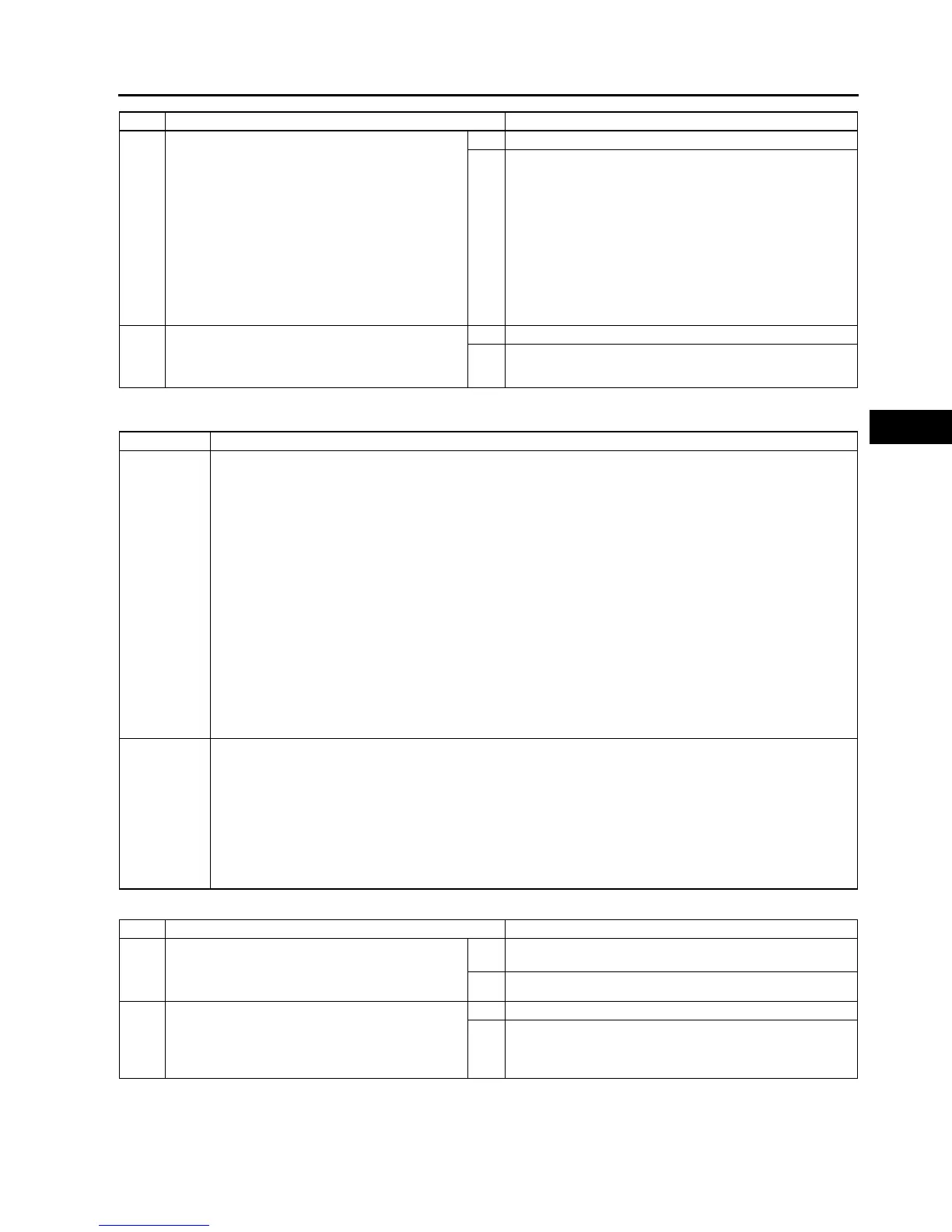
STEP INSPECTION ACTION
DTC P0733 Gear 3 incorrect (Incorrect Gear Ratio Detected)
DETECTION
CONDITION
• PCM monitors revolution ratio of forward clutch drum revolution to differential gear case revolution when
the following monitoring conditions are met. If revolution ratio is below 0.863 or above 1.249, PCM
determines that there is malfunction.
Monitoring condition:
ATF temperature 20 °
°°
°C {68 °
°°
°F} or above.
Driving in 3 GR in D range.
Engine run.
Turbine speed within 2254,988 rpm.
Differential gear case (output) revolution speed 35 rpm or above.
Any of the following not generated: DTC P0500, P0706, P0707, P0708, P0712, P0713, P0715, P0751,
P0752, P0753, P0756, P0757, P0758, P0761, P0762, P0763, P0766, P0767, P0768, P0771, P0772,
P0773.
Diagnostic support note:
• This is a continuous monitor (CCM).
• MIL does not illuminate.
• HOLD indicator light flashes if PCM detects the above malfunction condition during first drive cycle.
• FREEZE FRAME DATA is not available.
• Pending code is not available.
• DTC stored in the PCM memory.
POSSIBLE
CAUSE
• ATF level low
• Deteriorated ATF
• Shift solenoids A or C stuck
• Pressure control solenoid stuck
• Line pressure low
• 3-4 clutch slipping
• Forward clutch slipping
• Control valve stuck (Bypass, TCC or 3-4 shift valve)
• Oil pump
• PCM malfunction
STEP INSPECTION ACTION
1 VERIFY RELATED REPAIR INFORMATION
AVAILABILITY
• Check for related Service Bulletins availability.
• Is any related repair information available?
Yes Perform repair or diagnosis according to available repair
information.
No Go to next step.
2 CHECK ATF CONDITION
• Check ATF condition.
(See K12 AUTOMATIC TRANSAXLE FLUID
(ATF) INSPECTION.)
• Is it okay?
Yes Go to next step.
No Replace ATF, then go to Step 8.



 To Next Page