Scan to E-Mail
4
VarioLink 2221/2821/3621 4-43
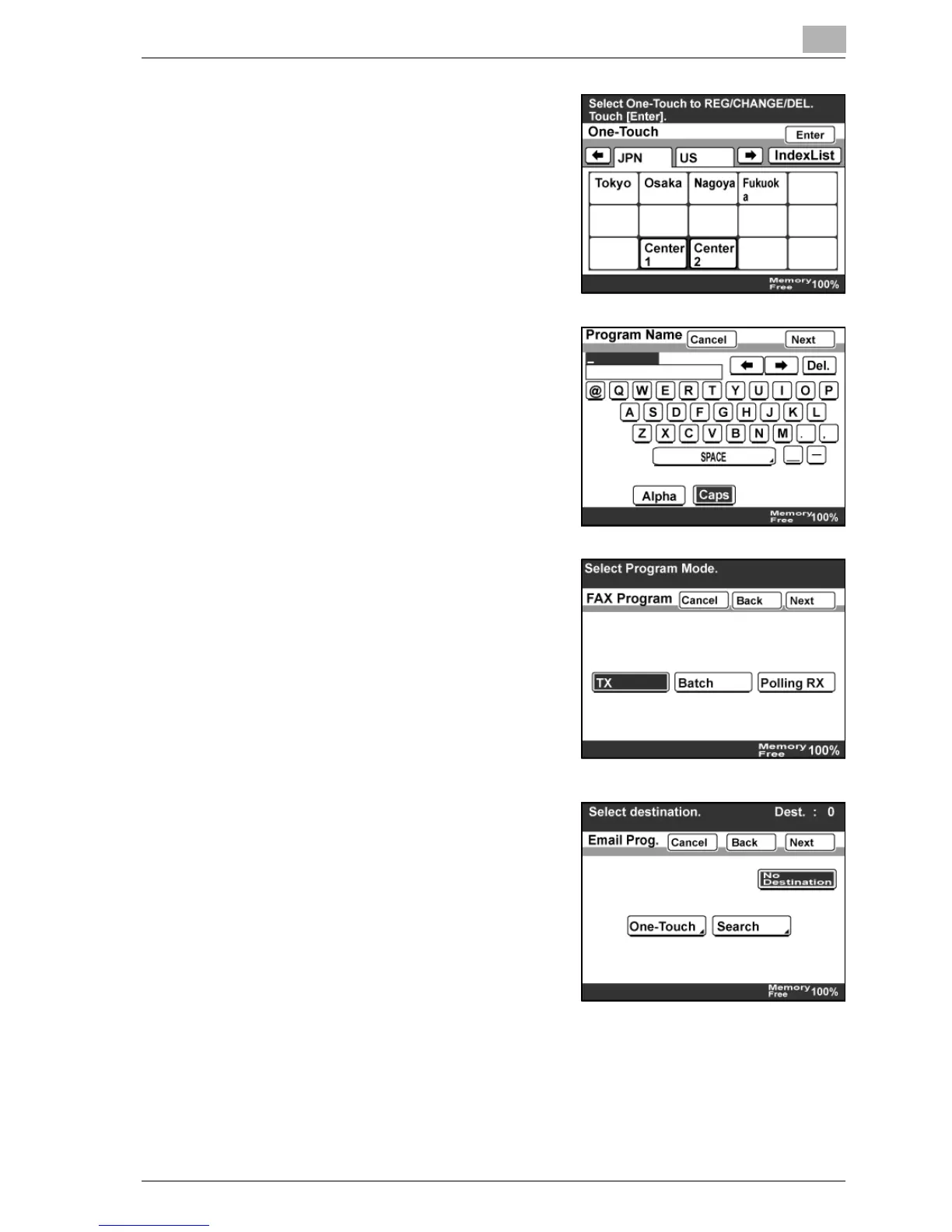
5 Touch the one-touch dial button to
be registered.
– Touch an Index tab or [Index
List], then the desired one-touch
dial button.
6 Type in the program name which will
appear on the one-touch dial button,
and then touch [Next].
– The program name can contain
up to 12 characters.
7 If the optional fax kit has been
installed, select the transmission
type, and then touch [Next].
8 Specify the destination.
– To specify the destination with a
one-touch dial button, touch
[One- Touch], touch the one-
touch dial button for the desired
destination, and then touch
[Enter].
– To specify the destination with a
one-touch search, touch
[Search], specify the destination, and then touch [Enter].
– If no destination is to be registered, touch [No Destination].
9 Touch [Next].



 To Next Page