R&S
®
ZVA / R&S
®
ZVB / R&S
®
ZVT GUI Reference
Channel Menu
Operating Manual 1145.1084.12 – 30 325
Mixer Power Cal... opens a dialog to perform a power calibration of the signal sources and of the
IF receiver.
Mixer Cal... initiates a two-port calibration of the extended test setup including the two additional
mixers and the lowpass or highpass filter.
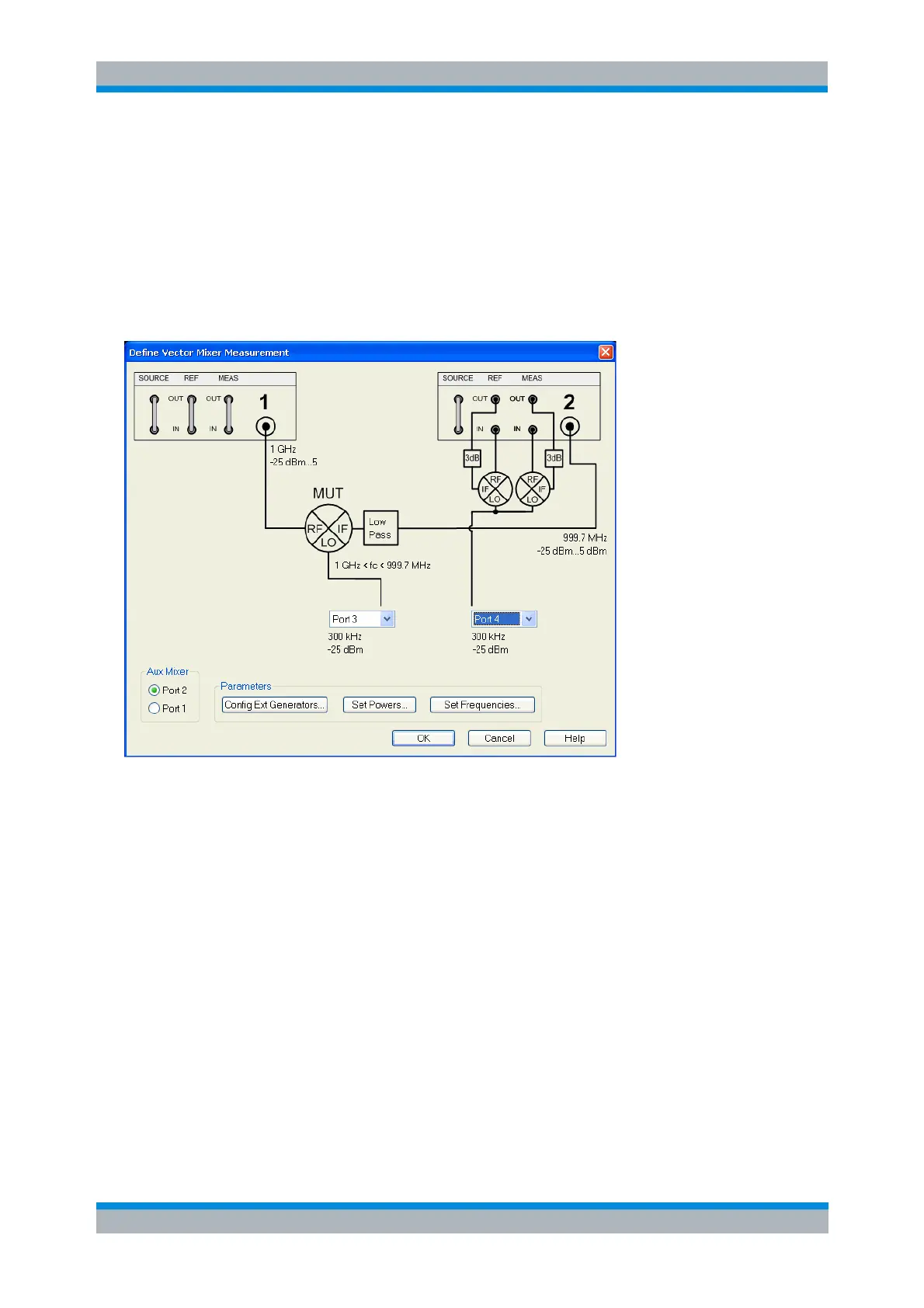
Define Vector Mixer Meas...
Opens a configuration dialog for the mixer input signals and indicates the extended test setup.
In the upper part the Define Mixer Measurement dialog shows a diagram with the test setup for vector
mixer measurements. Below the dialog provides the following control elements:
Two port selection lists contains all analyzer ports or external generators which can provide the
local oscillator (LO) signals. Ports no. 1 and 2 are always used for the RF signal and the
measured IF signal (mixing product), so they are not included in the lists. Generators must be
configured explicitly in the System Configuration – External Generators dialog before they appear
in the lists. None means that a LO generator is not controlled by the analyzer.
A power splitter is required to supply both the MEAS and the REF mixer ("Aux Mixer") with a LO
signal (termed "Aux LO") from a single source. With a second splitter or a 3-way splitter, it is
possible to supply all three mixers from a single source.
Aux Mixer selects one of two alternative test setups, with the MEAS and REF mixers connected to
either port 2 or port 1.
Config Ext. Generators... opens the System Configuration – External Generators dialog for adding
and configuring external generators.
Set Powers... opens a dialog to control the power of the RF and the LO signals.
Set Frequencies... opens a dialog to control the frequency of the RF and the LO signal and the
analyzer (IF signal) frequency.



 To Next Page