R&S
®
ZVA / R&S
®
ZVB / R&S
®
ZVT GUI Reference
Channel Menu
Operating Manual 1145.1084.12 – 30 326
For network analyzers with upper frequency limits above 20 GHz, the lower IF frequency limit is 600
MHz, if the MEAS and REF mixers are connected to port 2. Change the test setup if the IF frequency falls
below this limit.
[SENSe<Ch>:]FREQuency:CONVersion:MIXer:LOINternal <port_no>
[SENSe<Ch>:]FREQuency:CONVersion:MIXer:LOEXternal <gen_no>
[SENSe<Ch>:]FREQuency:CONVersion:MIXer:AINTernal NONE |
<port_no>
[SENSe<Ch>:]FREQuency:CONVersion:MIXer:AEXTernal NONE |
<gen_no>
[SENSe<Ch>:]FREQuency:CONVersion:MIXer:APORt <port_no>
Activate Vector Mixer Meas, Reset Frequency Conversion
The softkey Vector Mixer Meas activates the vector mixer mode, where the analyzer ports provide
different source frequencies. Reset Frequency Conversion disables all frequency-converting
measurements, including e.g. an active scalar mixer, mixer delay, or harmonic distortion measurement.
A Mix label in the channel list indicates that a frequency-converting mode is active.
[SENSe<Ch>:]FREQuency:CONVersion VMIXer | FUNDamental
Vector Mixer Test Setups
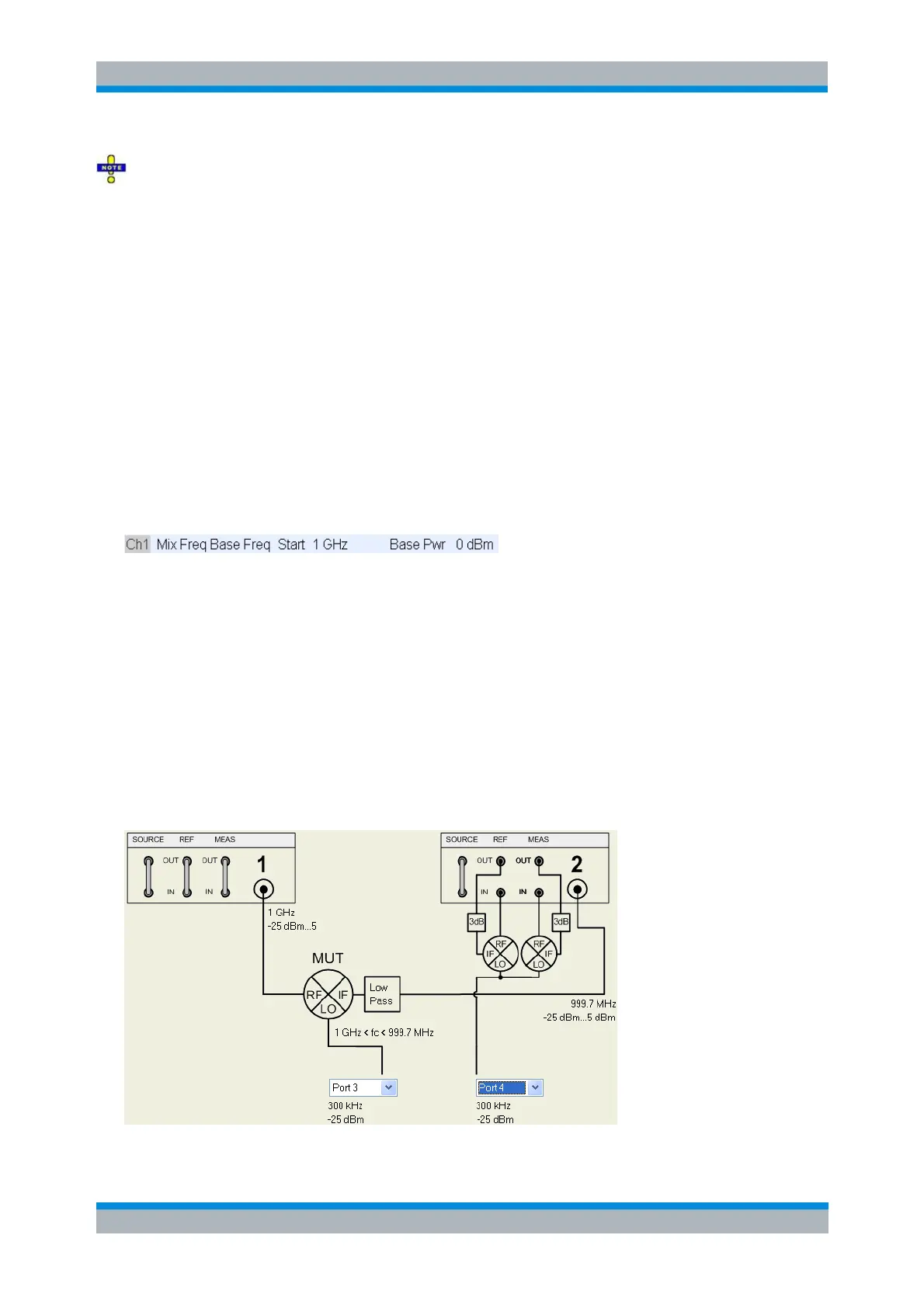
The mixer signal diagram shows the test setup including the mixer under test (MUT) and the two
additional mixers ("Aux mixer")), the RF and LO signals, the mixing product (IF) with the necessary low or
high pass filter, and the current frequency and power ranges for all signals. The diagram appears in the
Define Vector Mixer Measurement dialog.
The mixer diagram changes along with the selected position of the MEAS and REF mixers. The example
below corresponds to Aux Mixer: Port 2. The alternative diagram is symmetric, with the MEAS and REF
mixers connected to port 1. See background information Finding the best test setup below.



 To Next Page