D.7
Date Code 20100129 Instruction Manual SEL-751A Relay
DNP3 Communications
DNP3 in the SEL-751A
In both the unsolicited report-by-exception and quiescent polling methods
shown in Table D.5, you must make a selection for the PUNSOLn setting.
This setting enables or disables unsolicited data reporting at power up. If your
DNP3 master can send a message to enable unsolicited reporting on the
SEL-751A, you should set PUNSOLn to No.
While automatic unsolicited data transmission on power up is convenient, this
can cause problems if your DNP3 master is not prepared to start receiving data
immediately on power up. If the master does not acknowledge the unsolicited
data with an Application Confirm, the device will resend the data until it is
acknowledged. On a large system, or in systems where the processing power
of the master is limited, you may have problems when several devices
simultaneously begin sending data and waiting for acknowledgement
messages.
The SEL-751A allows you to set the conditions for transmitting unsolicited
event data on a class-by-class basis. It also allows you to assign points to event
classes on a point-by-point basis (see Configurable Data Mapping on
page D.13). You can prioritize data transmission with these event class
features. For example, you might place high-priority points in event class 1
and set it with low thresholds (NUMEVEn and AGEEVEn settings) so that
changes to these points will be sent to the master quickly. You may then place
low priority data in event class 2 with higher thresholds.
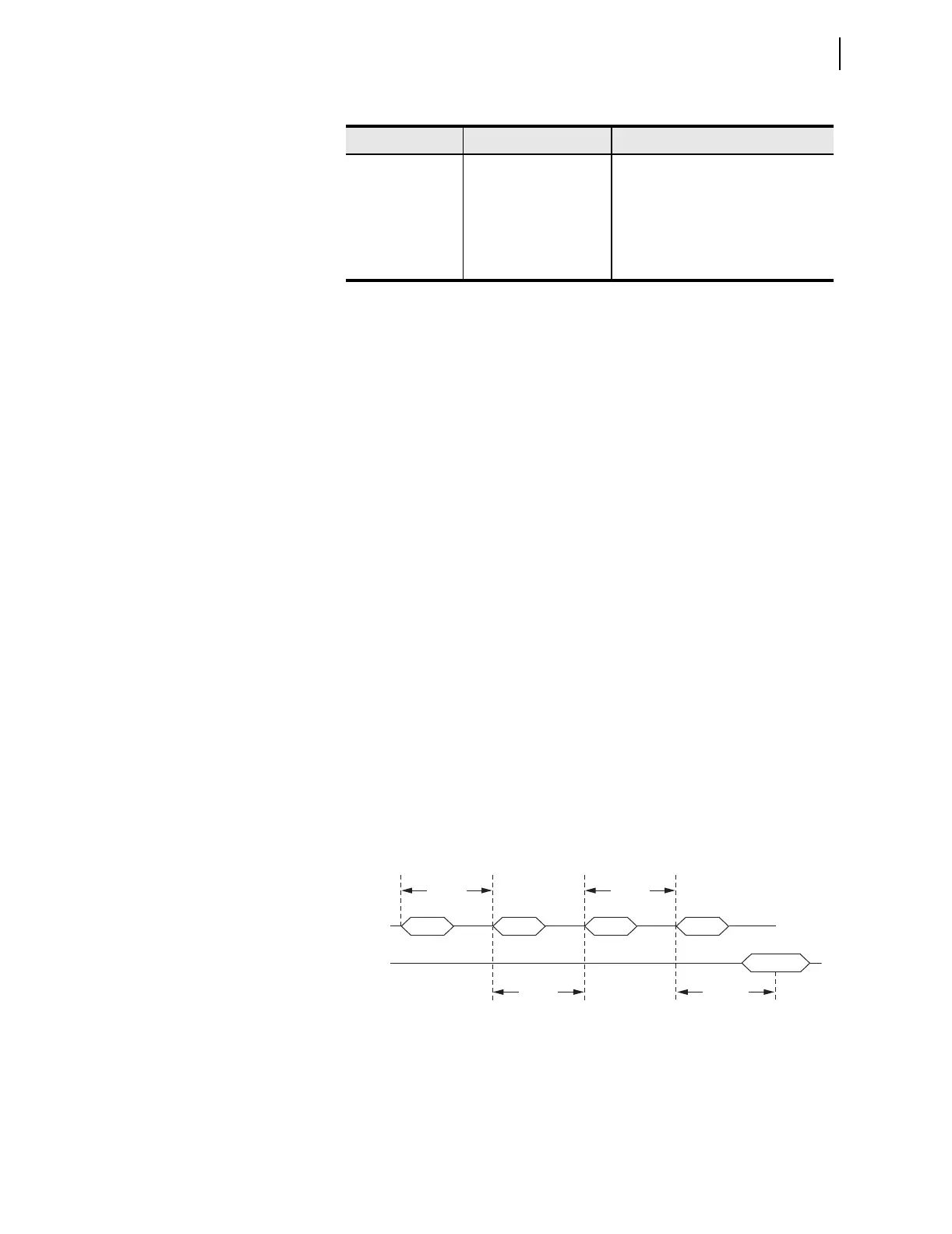
If the SEL-751A does not receive an Application Confirm in response to
unsolicited data, it will wait for ETIMEOn seconds and then repeat the
unsolicited message. In order to prevent clogging of the network with
unsolicited data retries, the SEL-751A uses the URETRYn and UTIMEOn
settings to increase retry time when the number of retries set in URETRYn is
exceeded. After URETRYn has been exceeded, the SEL-751A pauses
UTIMEOn seconds and then transmits the unsolicited data again. Figure D.1
provides an example with URETRYn =2.
Figure D.1 Application Confirmation Timing With URETRY n = 2
Unsolicited report-
by-exception
Class 0 occasionally,
optional Class 1, 2, 3 less
frequently; mainly relies
on unsolicited messages
Set ECLASSBn, ECLASSCn,
ECLASSAn to the desired event class;
set UNSOLn to Yes and PUNSOLn to
Yes or No
Quiescent Class 0, 1, 2, 3 never;
relies completely on
unsolicited messages
Set ECLASSBn, ECLASSCn,
ECLASSAn to the desired event class;
set UNSOLn and PUNSOLn to Yes.
Table D.5 DNP3 Access Methods (Sheet 2 of 2)
Access Method Master Polling SEL-751A Settings
RX DATA
(Event Data Confirmation)
TX DATA
ETIMEOn
Retry RetryRetry
Confirmation
UTIMEOn
UTIMEOn
ETIMEOn



 To Next Page