5 Operation
Working with attachments
F1
F2
6321_003-013
1
Controlling the attachments with
fingertip
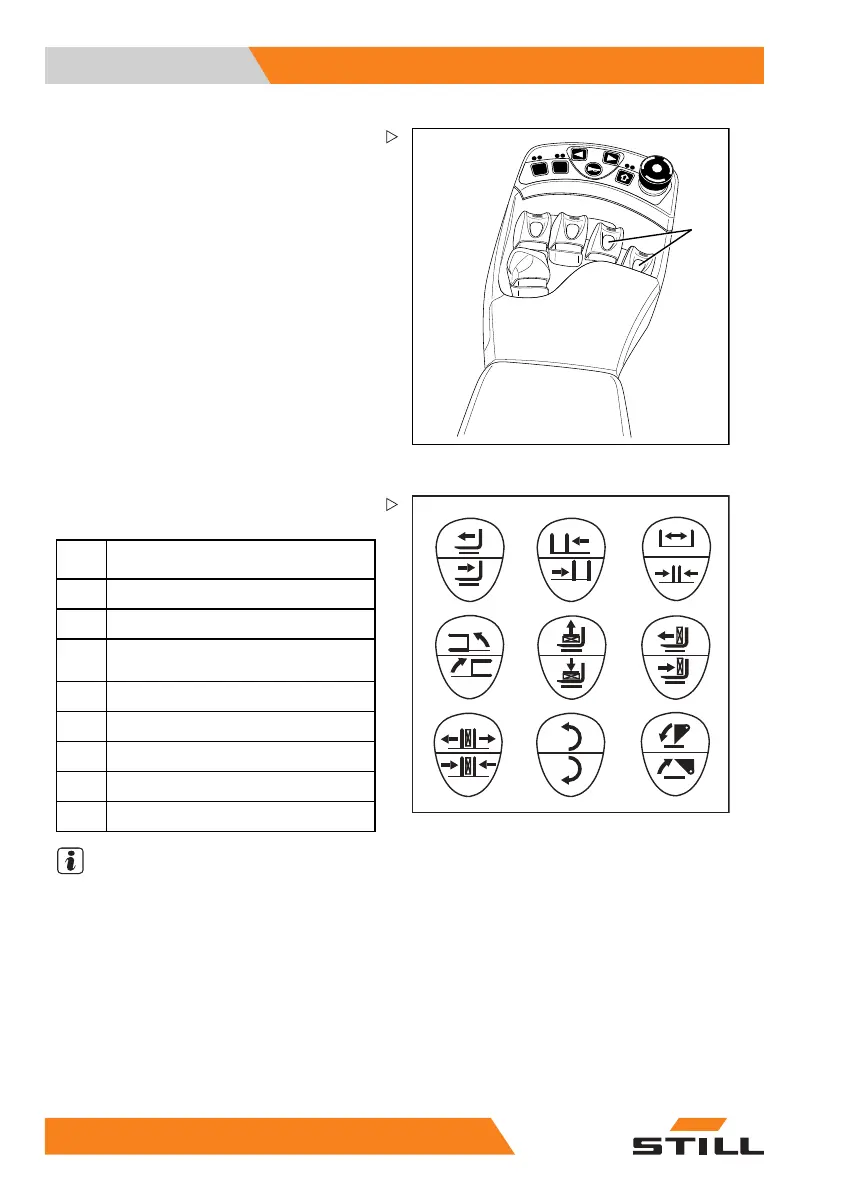
The attachments (variant) are controlled in
this version using the operating levers (1).
The pictograms on the operating levers always
show the functions that are activated by that
lever.
– Move operating lever (1) f
orwards.
The attachment moves in the direction of
movement shown in the upper part of the
pictogram.
– Move operating lever (1) backwards.
The attachment moves in
the direction of
movement shown in the lo
wer part of the
pictogram.
6210_003-031
23
6
4
7
9
10
5
8
– Note the following attachment functions and
pictograms.
2
Move side shift frame or forks
forwards/backwards
3
Move sideshift to the
left/to the right
4
Adjust fork arms: ope
n/close
5
Swivel lift mast or forks to the left/to
the right
6
Release/clamp load retainer
7
Push off/pull i
n load
8
Open/close cla
mps
9
Turn to the left/to the right
10
Tip shovel over/tip shovel back
NOTE
The pictograms shown correspond to the
attachments fitted to this truck at the factory. If
an attachment with other functions is fitted, the
pictograms must be checked for the correct
representation and changed if necessary.
– Contact the authorised service centre if
required.
18
8 55048011501 EN - 12/2015



 To Next Page