5 Operation
Operating the display and operatin
gunit
12 3
ABE_Softkeytasten_V2
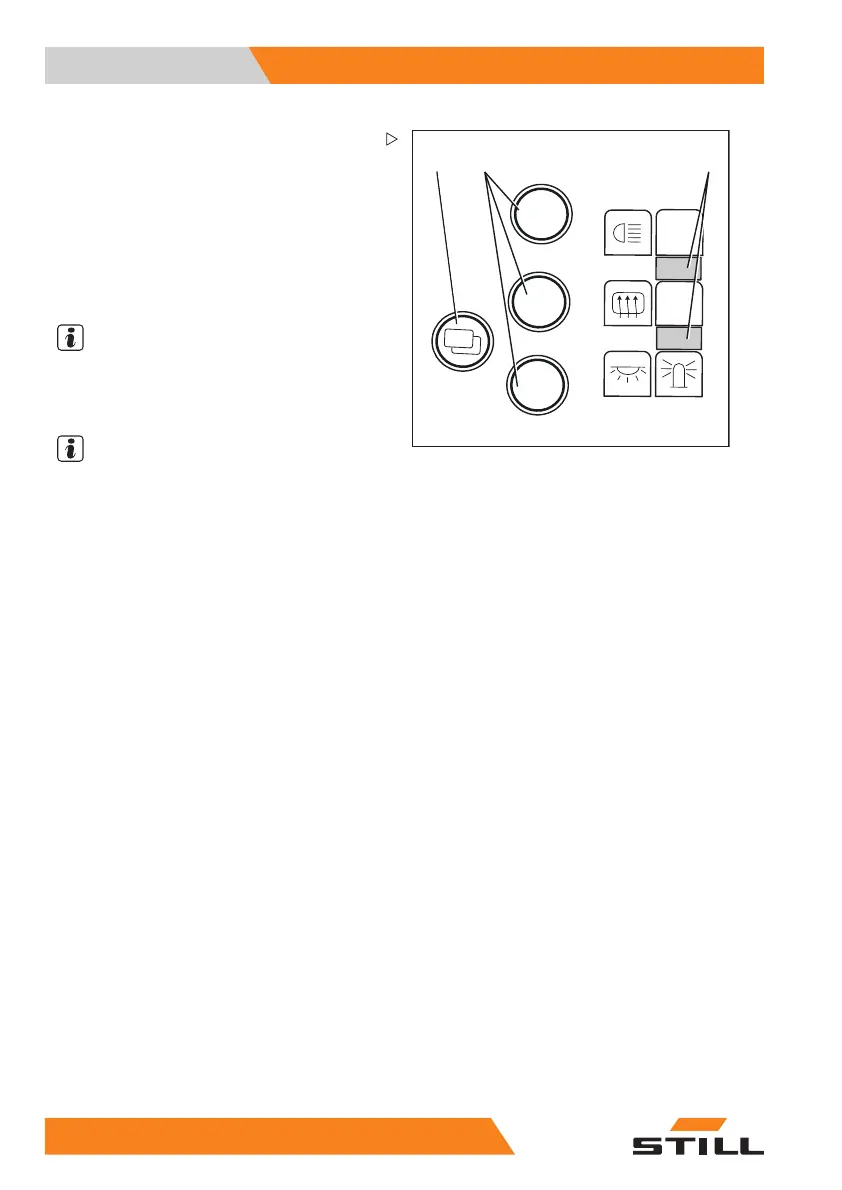
A grey bar (3) highlights the active soft key
column, i.e. the soft keys in this column can be
operated. To change the soft key column:
– Briefly press the "Menu change button"(1).
The grey bar jumps to the other soft key
column. The required soft keys are now
active and the functions assigned to them
can be switched on and off using the
corresponding soft key buttons (2).
NOTE
In order to shift between the individual menus
of the display operating unit, press the "Menu
change button" (1) for approx. 1 second.
NOTE
The functions of the tw
o soft key columns
depend on the individu
al equipment of the
truck. Therefore, the
soft keys on your display
operating unit may var
y to those shown here.
Configuring Blue-Q e
fficiency mode
The following opera
ting modes can be se-
lected to activate t
he Blue-Q efficiency mode:
STANDARD
• Blue-Q is turned off whenever the truck
is commissioned. The driver can use the
Blue-Q button to switch efficiency mode on
and off at any time while the truck is being
operated
FIXED
• Blue-Q is switched on permanently when-
ever the truck is commissioned and during
truck operation. The driver cannot turn effi-
ciency mode off
FIXED-FLEX
• Blue-Q is turned
on whenever the truck
is commissioned
. The driver can use the
Blue-Q button to
switch efficiency mode on
and off at any tim
e while the truck is being
operated
22
4 55048011501 EN - 12/2015



 To Next Page