Operation 5
Handling the battery
2
1
4
3
5060_003-142
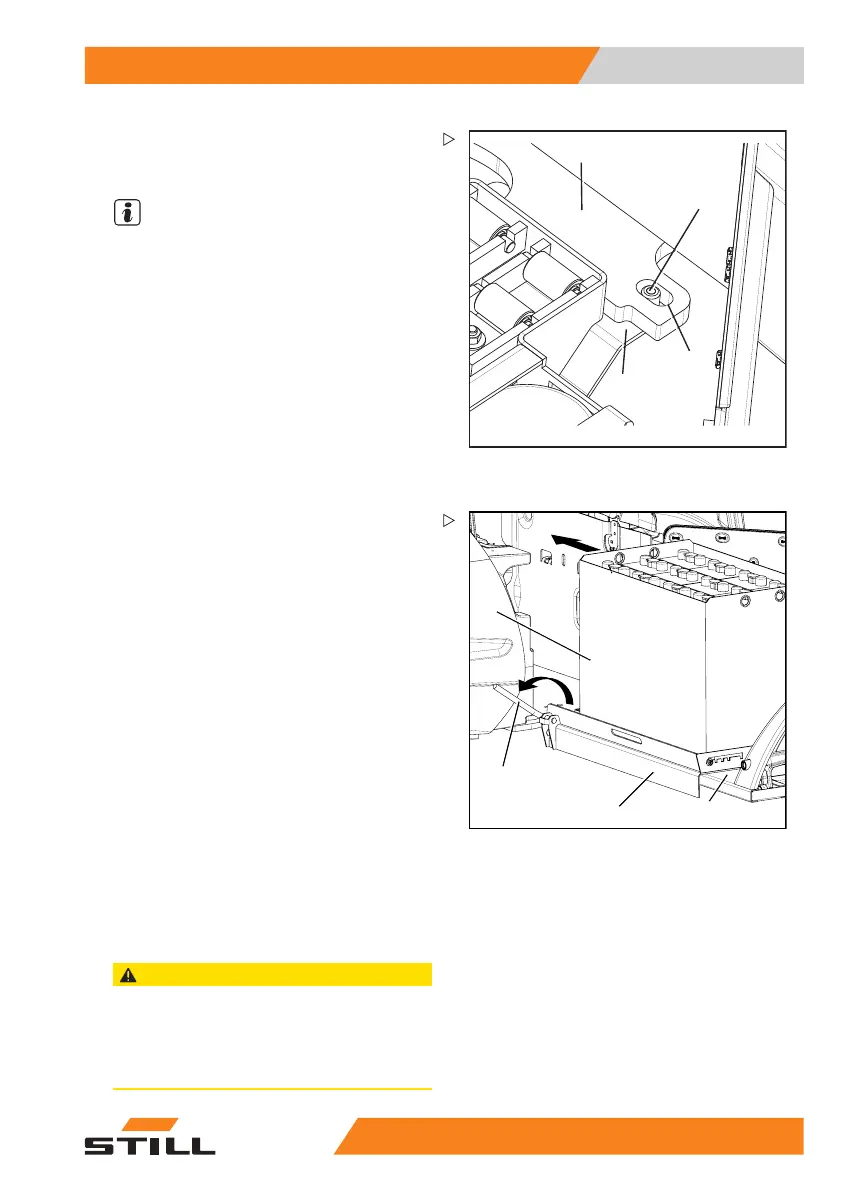
– Position the hand pallet truck so that the
external roller channel is in front of the
battery compartment of the truck.
NOTE
The forks of the hand pallet t
ruck should be
lowered sufficiently far th
at the guide bolt (1)
can be slid under the bottom
plate (4) of the
forklift truck.
– Position the guide bolt (1) directly under-
neath the slotted hole (2).
– Lift the forks of the hand pallet truck and
guide the guide bolt into the slotted hole until
the stop plate (3) is against the underside of
the truck’s bottom plate (4).
– Apply the parking brake o
n the hand pallet
truck to secure it agains
t rolling away.
5060_003-152
5
6
7
8
– Fully open the safety lever (7) by moving it
in the direction of the arrow.
– Carefully slide the battery (8) from the
external roller channel (6) fully into the
battery compartment.
– Lower the forks of the h
and pallet truck
(5) until the guide bol
t of the stop plate is
completely clear of th
e slotted hole in the
bottom plate.
– Release the parking brake of the hand pallet
truck and remove the hand pallet truck.
– Perform these activities after installing the
battery; see the chapter entitled "Changing
the battery using the internal roller channel".
Battery inst
allation or battery
replacemen
t without onboard
devices
CAUTION
Possible risk of injury or risk of damage to compo-
nents.
The installation or replacement of the battery
without truck-internal devices requires special tools
and specially trained staff.
55
048011501 EN - 12/2015 277



 To Next Page