5 Operation
Operating the display and operatin
gunit
8
9
0
6
7
4
3
5
7312_003-054_en_V3
1
2
3
4
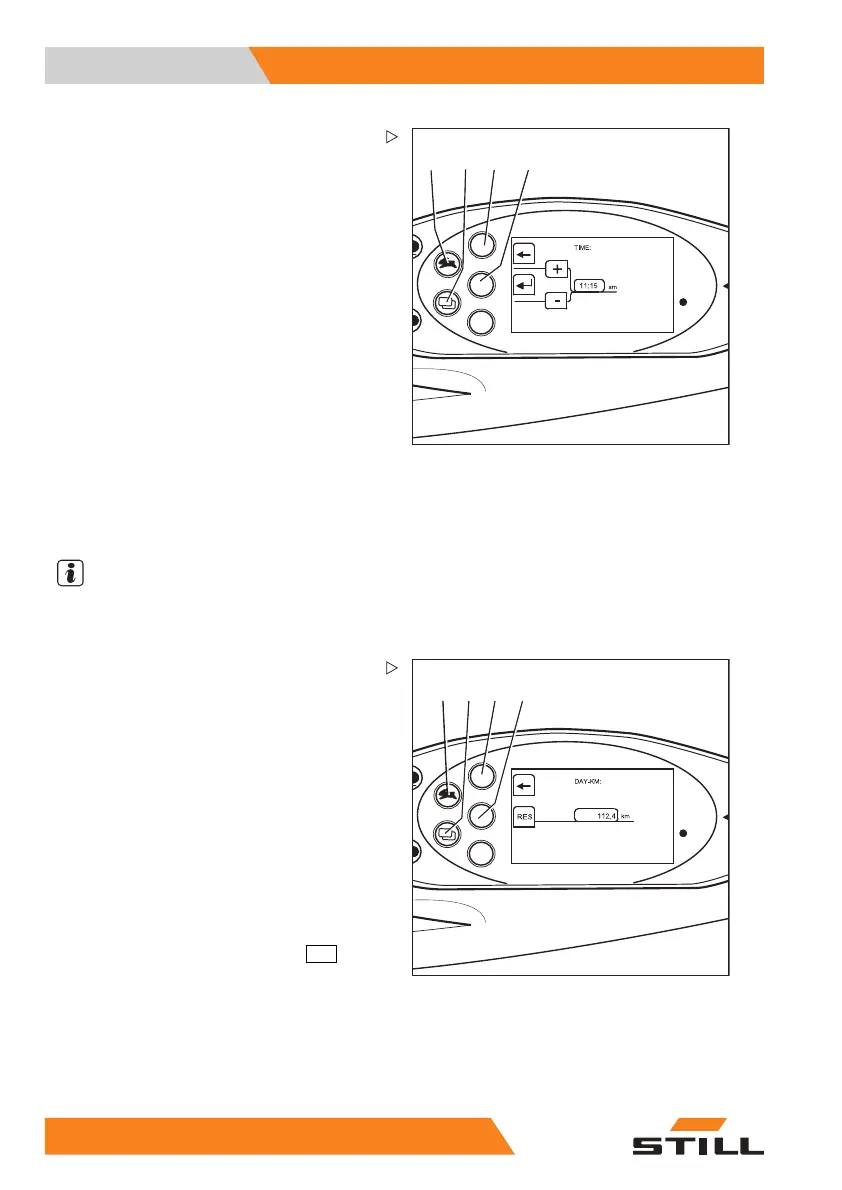
Setting the date or time
– Switch to the "CONFIGURATION"
menu; see ⇒ Chapter "Adjusting the dis-
plays", P. 5-217.
– Press the drive program key (1) or menu
selection key (2) until the option
TIME
appears.Confirm your selection by pressing
the Return key (4).
The "TIME" menu appears.
– Press the drive program button (1) or the
menu change button (2) until the desired
time appears in the display.
As the buttons are held down for longer, the
scrolling speed increases in three levels.
– Confirm the time set by pre
ssing the Return
key (4).
– Use the arrow key (3) to exit the menu and
return to the next higher level.
NOTE
Thedateissetinasim
ilar manner.
8
9
0
6
7
4
3
5
7312_003-055_en_V4
12
34
Resetting the daily
kilometres and
daily operating ho
urs
The daily number o
f kilometres and daily
operating hours d
isplays can be reset to zero:
– Switch to the "CONFIGURATION"
menu; see ⇒ Chapter "Adjusting the dis-
plays", P. 5-217.
– Press drive program button (1) or menu
selection button (2) until the
DAY-KM
option appears. Confirm your selection
by pressing the Return key.
The "DAY KM" menu
appears.
– Reset the values by pressing the
RES
(4)
button.
– Use the arrow key (3) to exit the menu and
return to the next higher level.
22
2 55048011501 EN - 12/2015



 To Next Page