5 Operation
Working with attachments
5060_003-040_V2
2
1
1
3
5060_003-041
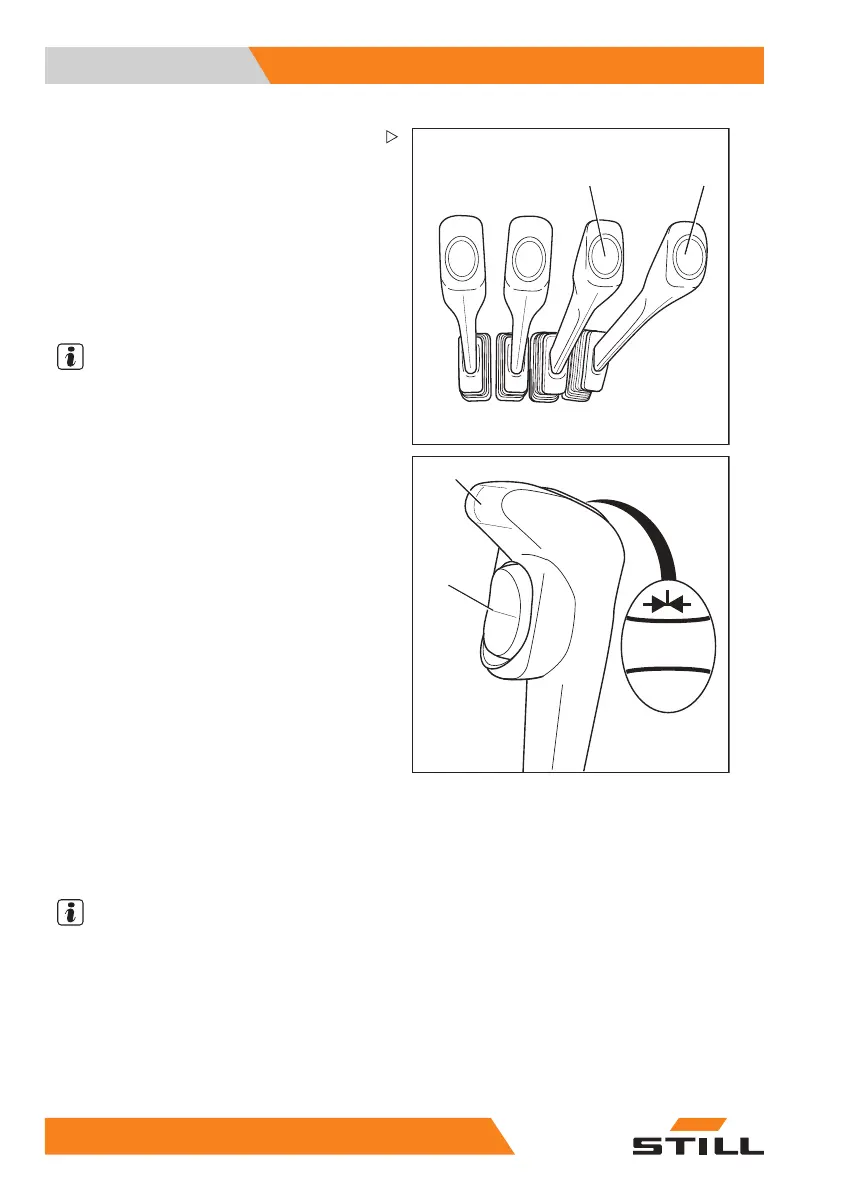
Controlling attachments using
multi-lever operation and the
5th function
The attachments (variant) are controlled in
this version using operating levers (1) and (2).
On the operating lever (1) you can, with the
aid of switch (3), initiate a function changeover
so that this operating lever then controls the
"5th function".
NOTE
The "5th function" designation refers to the
fact that the four operating levers control
four functions, while the "5th function" can
be controlled by switching functions.
The top and bottom part
s of the pictograms on
the operating levers a
lways show the function
that is activated by th
at lever. The upper part
of the pictogram shows
that the attachment is
equipped with the 5th f
unction.""
The meanings are as follows:
– Move operating lever forwards:
The attachment moves
in the direction of
movement shown in the
centre part of the
pictogram.
– Move operating lever backwards:
The attachment moves in the direction of
movement shown in the lower part of the
pictogram.
– Actuate the switch
The additional function of the attachment is
activated and can be controlled as the "5th
function" with the operating lever.
NOTE
Please see the op
erating instructions of the
fitted attachmen
t for the movements/actions
resulting from u
sing this "5th function".
17
2 55048011501 EN - 12/2015



 To Next Page