Operation 5
Operating the display and operatin
gunit
7312_003-056_en_V3
ESC
12 3
Adjusting the displays
NOTE
The parking brake must alway
s be engaged
when you adjust the displays
. The displays
cannot be adjusted if the par
king brake is not
engaged.
NOTE
When adjusting the displays, do not actuate
the hydraulic system operating devices. If you
do, entry is interrupted and the display returns
to the operating display.
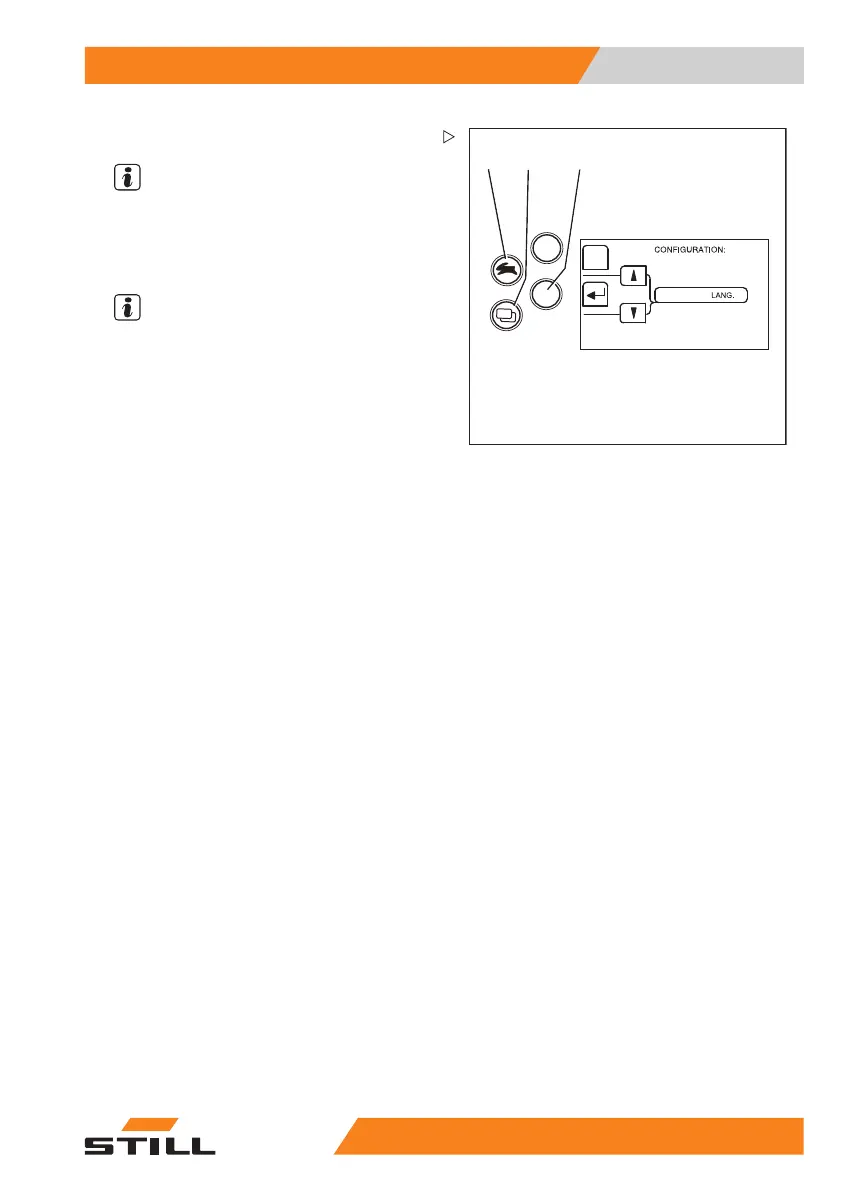
The displays are adjus
ted in the
CONFIGU-
RATION
menu.
– Turn the key switch to position "I".
– Press the drive program button (1) and the
menu change button (2) at the same time.
The display changes t
othe
PASSWORDmenu.
– Press the return key (3).
The display changes to the
CONFIGURA-
TION
menu.
The following settings are possible and can be
found in the corresponding chapter:
• Setting the date and
time
• Resetting the daily kilometres and daily
operating hours
• Setting the language
• Configuring Blue Q
Symbols in the di
splay
Messages
To show operating messages, warning
messages or error messages in the display,
text messages and symbols are used.
55
048011501 EN - 12/2015 217



 To Next Page