Overviews 4
Operating devices and display elem
ents
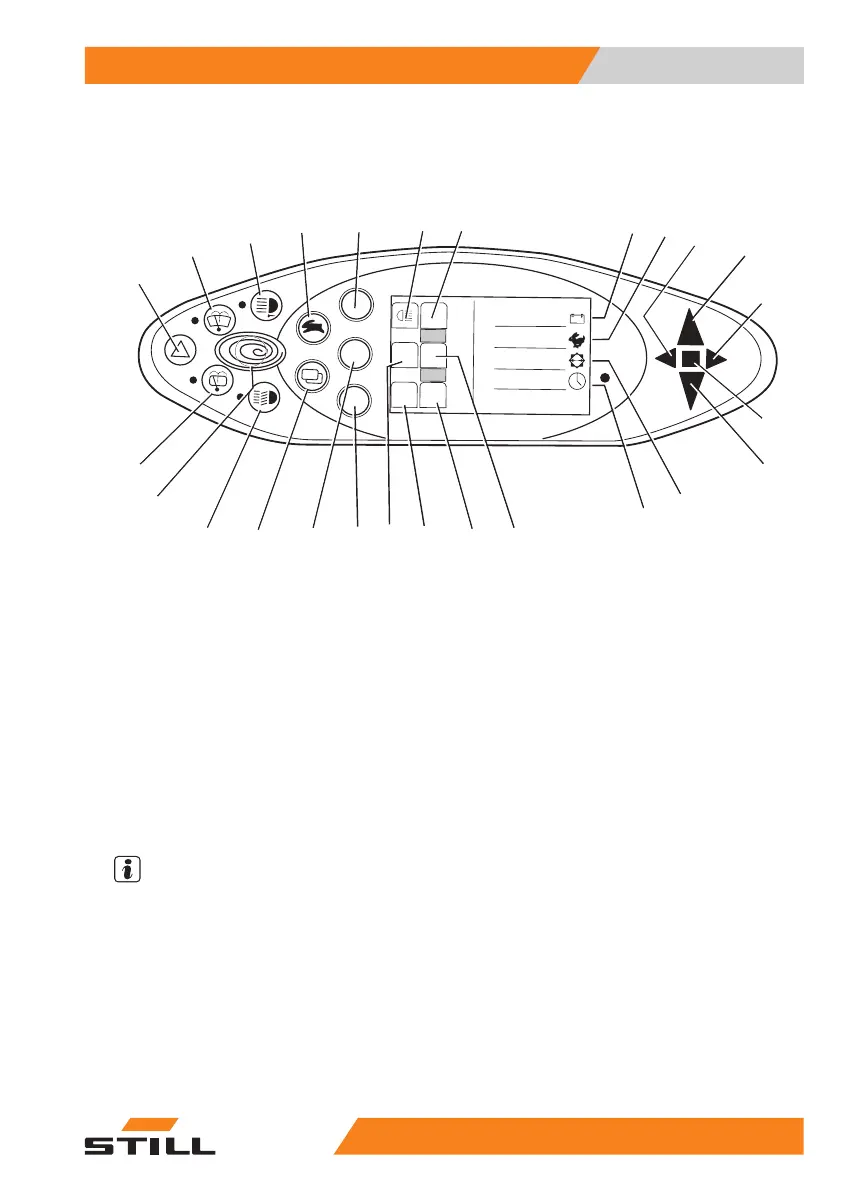
Operating devices and display elements
Display and operating unit
8
9
6
7
2
0
1
3
5
%
75
2
90°
12:15
5060_003-087
1
2
3
4
56
7
8
9
10
11
12
13
14
15
16
17
18
19
20
21
22
23
24
25
26
1 Hazard warni
ng system button
2 Front winds
creen wiper button
3 Front worki
ng spotlight button
4 Drive prog
ram selector button
5 Rear work
ing spotlight button
6 Rear wor
king spotlight symbol
7 Not ass
igned
8 Batte
ry charge display (percent)
9Drive
programme display (numerical)
10 Left
direction indicator light
11 For
ward travel display
12 Rig
ht direction indicator light
13 Ma
lfunction display
14 Reverse trav
el display
15 Steering po
sition display (degrees)
16 Time displa
y (digital)
17 Not assign
ed
18 Rotating
beacon display
19 Not assi
gned
20 Not ass
igned
21 Not as
signed
22 Not as
signed
23 Menu
change button
24 Lig
hting button
25 Blu
e-Q button
26 Re
ar window wiper button
NOTE
The buttons (5, 21, 22) and the corresponding
indicators (6, 7, 18, 19, 20) are assigned
according to the auxiliary equipment installed.
The assignment shown here is an example
and may differ from the assignment actually
programmed on the truck. Buttons may be
assigned multiple functions that are called up
according to the menu navigation. For further
information, see the "Operating the display
and operating unit" chapter.
55
048011501 EN - 12/2015 53



 To Next Page