5 Operation
Driving
5060_003-005
1
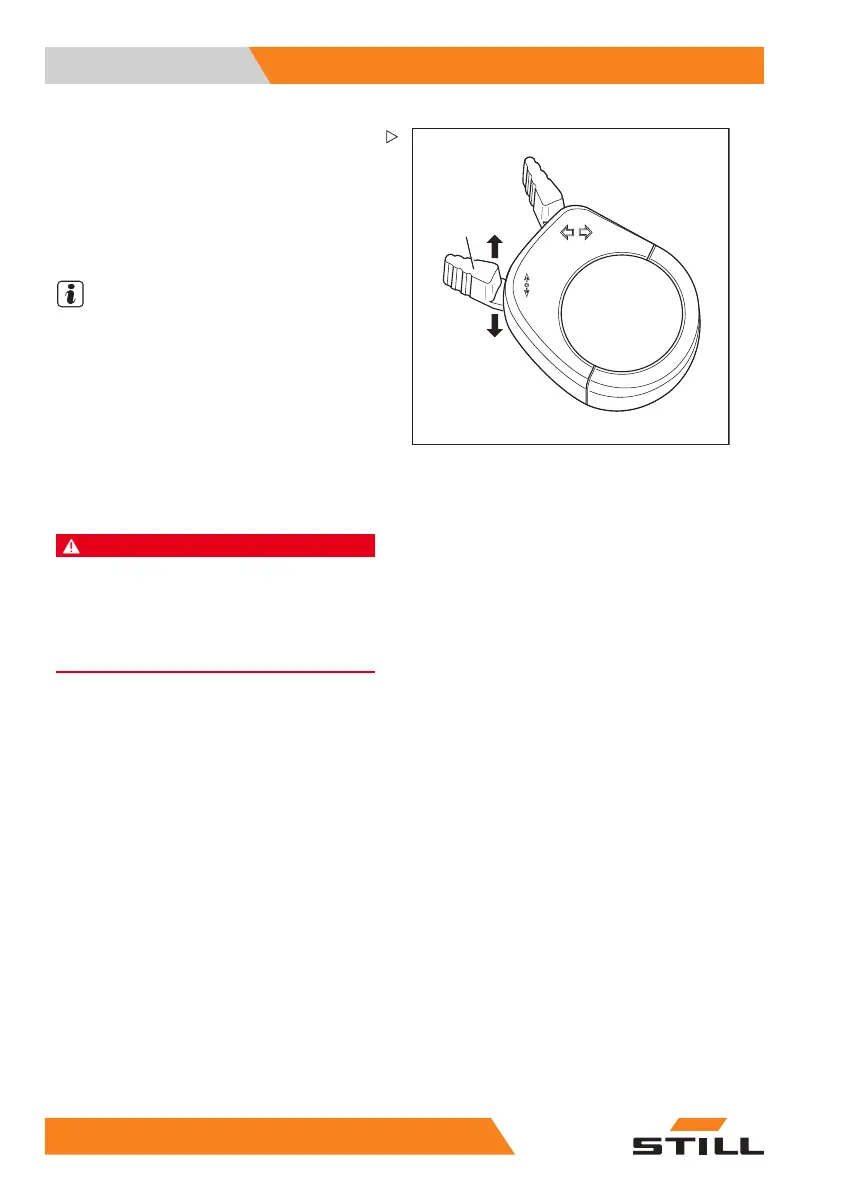
Actuating the drive direction switch,
mini-console version
– For the "forwards" drive direction, push the
drive direction switch (1) forwards.
– For the "backwards" drive dir
ection, push
thedrivedirectionswitch
to the rear.
NOTE
Alternatively, the drive
direction can also be
selected using the drive d
irection switches on
the operating devices.
Starting drive mode
DANGER
Being trapped under a rolling or tipping truck could
cause fatal injuries!
– Sit down on the driver’s seat.
– Fasten the seat belt.
– Activate the available restraint systems.
Observe the information in the chapter entitled
"Safety regulations when driving".
The driver’s seat is equipped with a seat
switch. This checks whether the driver’s seat
is occupied. If it is not occupied or in the case
of malfunction of the seat switch, the truck
cannot be moved and all lift functions are
locked out. In such a case, the message
SEAT SWITCH appears in the operating
unit display; see the chapter entitled "
SEAT
SWITCH
message".
– Lift the fork carriage until the necessary
ground clearance is achieved.
– Tilt the lift mast backwards.
– Release the parking brake.
– Select the desired drive direction.
11
4 55048011501 EN - 12/2015



 To Next Page