Overviews 4
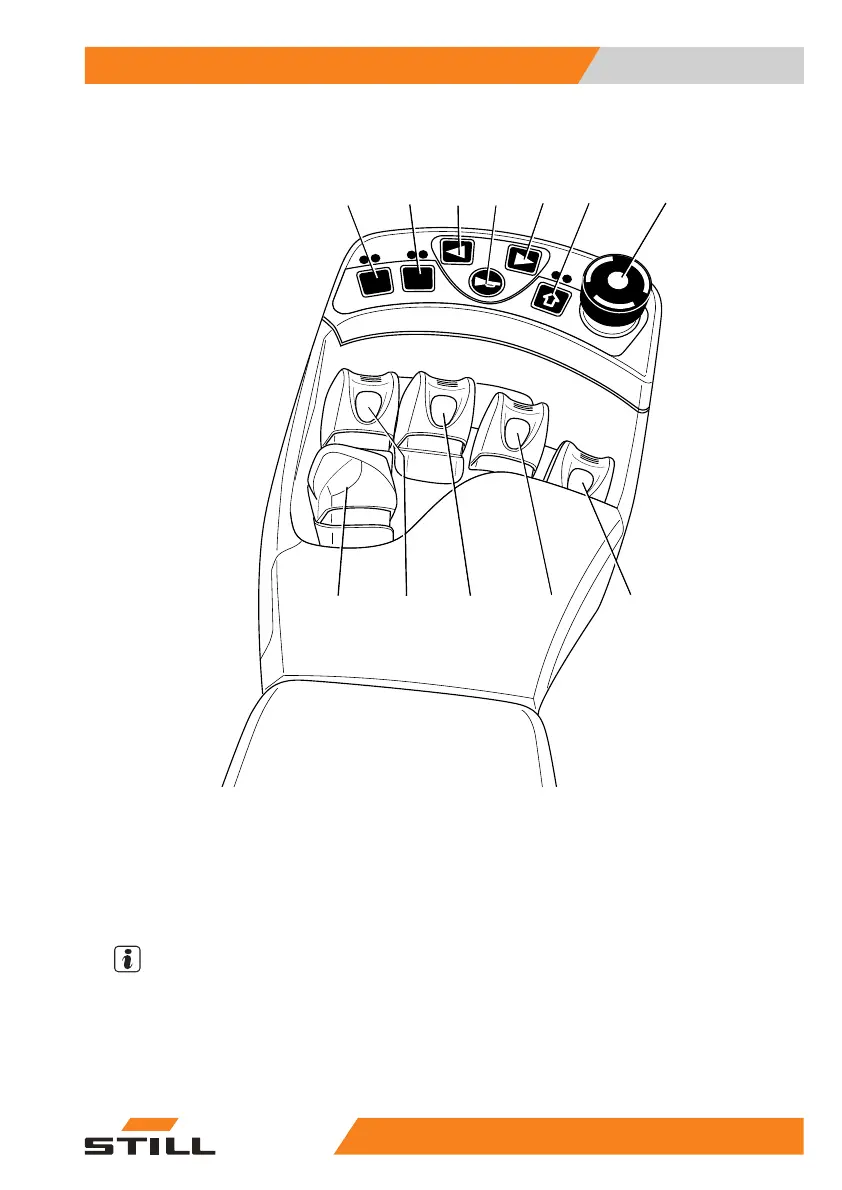
Operating devices and display elem
ents
Fingertip
F1
F2
6321_003-004
1
23456
7
89
10
11
12
1 Function key F1
2 Function key F2
3 Left-hand turn indicator button
4 Signal horn button
5 Right-hand turn indicator button
6 Button for 5th function
7 Emergency stop switch
8 "Attachments" operating lever
9 "Attachments" operating lever
10 "Tilt" operating lever
11 "Lift/lower" operating lever
12 Travel direction switch
NOTE
Depending on the specification, various
electric attachment parts can be controlled
via function keys (1) and (2). Changes must
only be made by the authorised service centre.
55
048011501 EN - 12/2015 61



 To Next Page