Maintenance 6
Providing access to maintenance po
ints
Removing/installing the bottom plate
5060_003-118
4
1
Removing the left bottom plate
CAUTION
There is a risk of short circuit if the
cables are damaged.
– Check the connecting cable for
damage.
– When removing and reinstalling
the bottom plate, ensure that
the connecting cables are not
damaged.
DANGER
WARNING
When closing the bottom plate,
nothing should come between the
bottom plate and the edge of the
chassis. There is a risk of crushing!
– When closing the bottom plate,
make sure nothing is between the
bottom plate and the edge of the
chassis.
NOTE
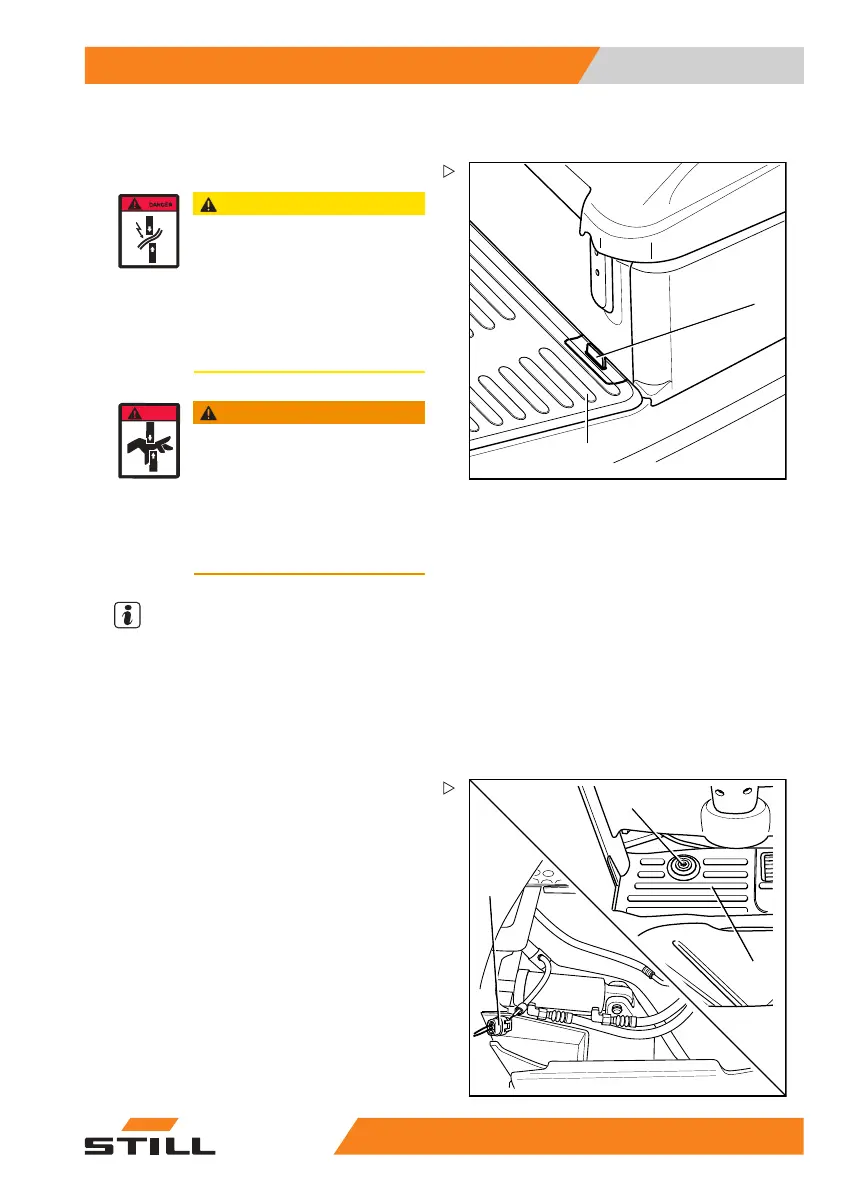
The left bottom plate (1) has a recess which
the operator can insert his fingers into to lift it.
The recess is underneath the rubber covering
(4).
– Fold the rubber covering (4) forwards and
reach into the recess.
2
5060_003-057_V2
3
1
– Lift up the bottom plate (1).
– Disconnect the connecting plug (2) for the
signal horn foot switch (3).
– Remove the bottom plate.
Installing the left bottom plate
– Position the bottom plate.
– Connect the connecting plug for the signal
horn foot switch.
– Close the bottom plate.
55
048011501 EN - 12/2015 311



 To Next Page