Operation 5
Operating the display and operatin
gunit
NOTE
The daily operating hours are r
eset in the
same manner.
8
9
0
6
7
4
3
5
7312_003-058_en_V4
12
34
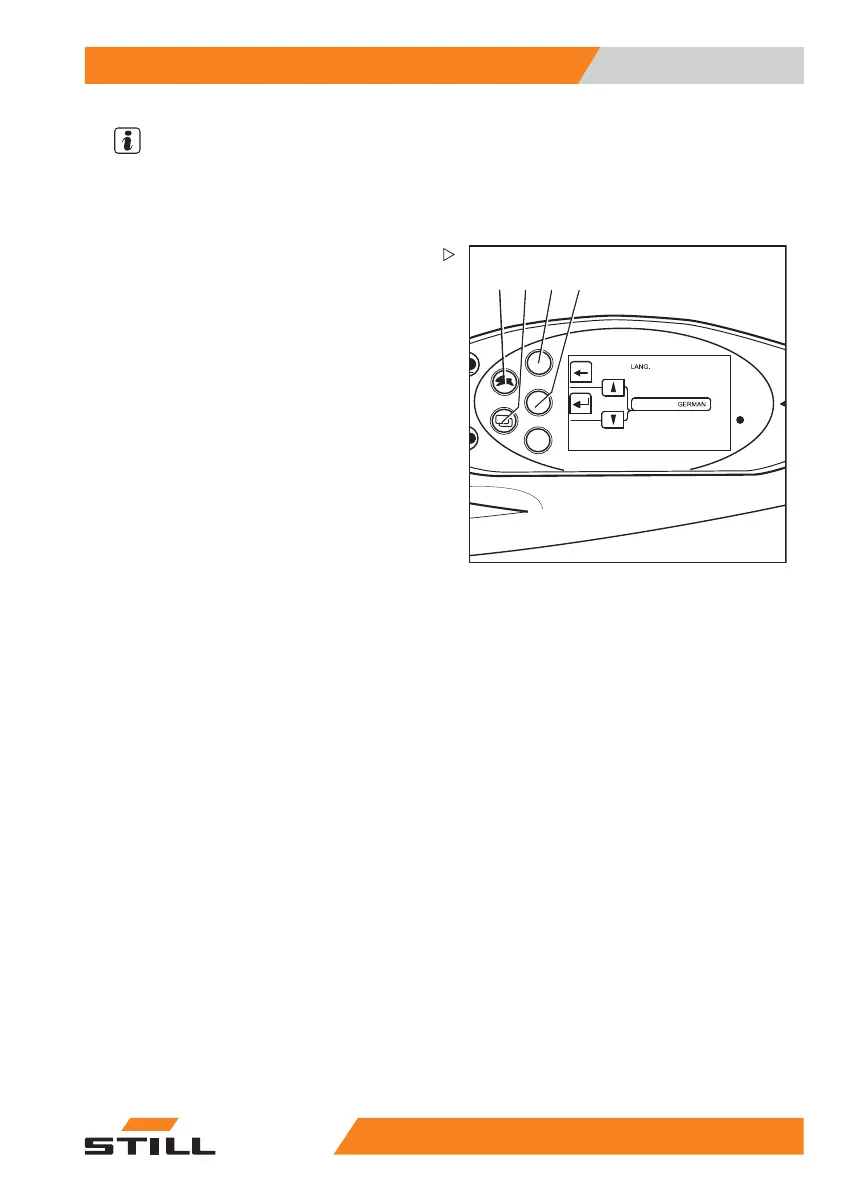
Setting the language
The displays can be shown i
n additional
languages:
– Switch to the "CONFIGURATION"
menu; see ⇒ Chapter "Adjusting the dis-
plays", P. 5-217.
– Press drive program button (1) or menu
selection button (2) until the
LANGUAGE
option appears. Confirm your selection by
pressing Return key(4).
The "LANGUAGE" menu app
ears.
– Press drive program button (1) or menu
change button (2) until the desired language
appears in the display.
– Confirm your selection by pressing the
Return key (4).
– Use arrow key (3) to exi
t the menu and
return to the next high
er level.
Soft key button for o
perating various
equipment variant
s
Therearetwosoftk
ey columns available on
the display operat
ing unit. With these soft
key columns, you ca
n switch the additional
functions on and of
f, e.g. a rotating beacon.
The second soft key
column is only available
if the truck has mor
e than three additional
functions.
55
048011501 EN - 12/2015 223



 To Next Page