5 Operation
Operating the display and operatin
gunit
7312_003-106_V2
6
8
9
7
5
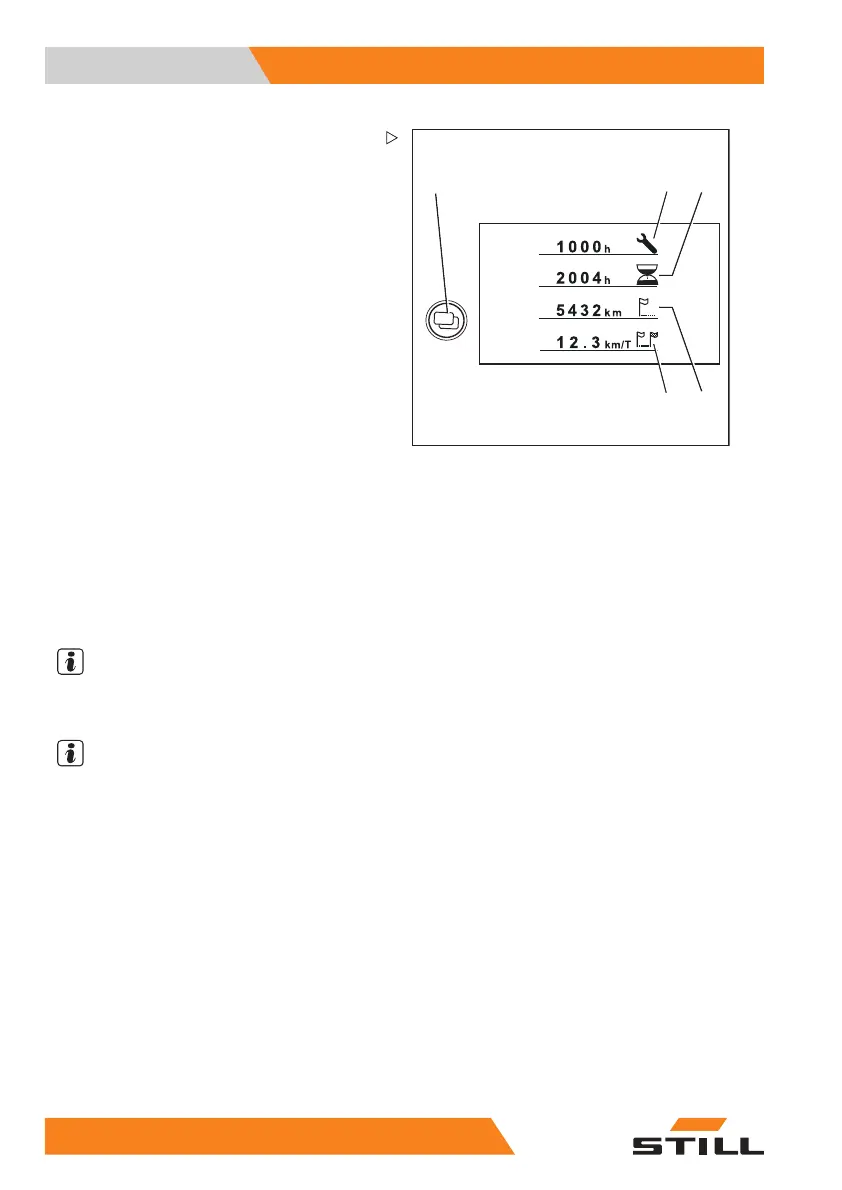
Additional indicators
5 Menu change button
When the menu change button is
pressed, the following additi
onal indi-
cators appear:
6 "Service in" display
Displays the remaining time in operating
hours until the next maintenance opera-
tion is due according to the maintenance
schedule in the maintenance instruc-
tions. Contact the authorised service
centre in good time.
7 Operating hours
Displays the total operating hours
completed by the truck. The hour meter
starts running as soon as the truck is
driven or the working hydraulics are
actuated.
8 Total distance
Displays the total distan
ce driven in
kilometres.
9 Daily kilometres
Displays the kilometres driven for the
day.
NOTE
Ask the authorised service centre about the
speeddrivenindicator.
NOTE
Have all repair and maintenance work perfor-
med by an authorised service centre. This is
the only way to permanently correct defects.
– Inform the authori
sed service centre when
the maintenance in
terval is reached.
21
6 55048011501 EN - 12/2015



 To Next Page