5 Operation
Operating the display and operatin
gunit
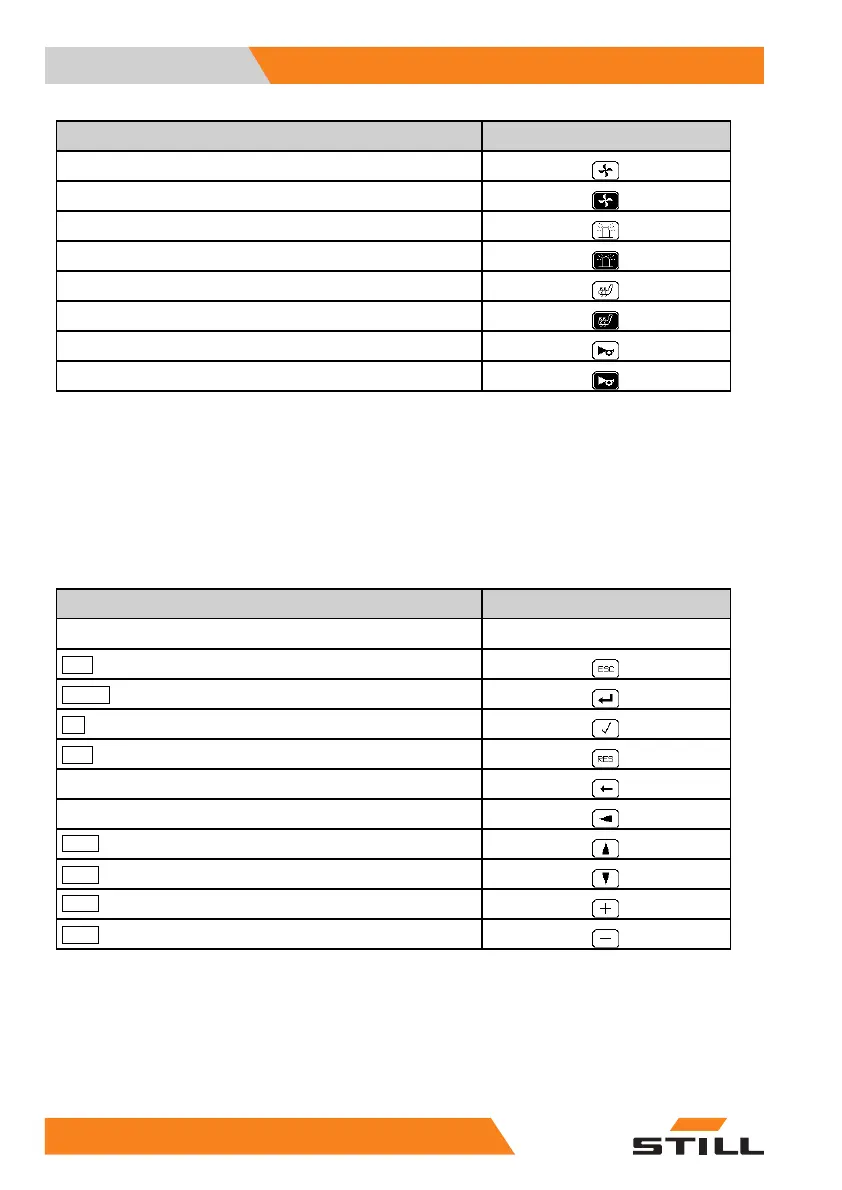
Description
Symbol
Heater blower OFF
Heater blower ON
Rotating beacon OFF
Rotating beacon ON
Seat heater OFF
Seat heater ON
Signal horn OFF
Signal horn ON
.
Symbols for the soft key functions for
menu navigation and for acknowledging
messages
For menu navigation and to acknowledge
messages, the following symbols for the
soft key functions are used on the left of the
display:
Description
Symbol
Empty field
No display
ESC
button to return to the main menu
ENTER
button to confirm
OK
button to confirm
RES
button to reset
Button to return to the main menu
Buttontoret
urn to the previous edit field
Scroll
button to scroll up
Scroll
button to scroll down
Scroll
button to count up
Scroll
button to count down
.
Status L
EDs of the function keys for
additio
nal electrical installations
The current switch status of a button is indi-
cated with LEDs next to the relevant function
key for the additional electrical installation.
22
0 55048011501 EN - 12/2015



 To Next Page