INSTALLATION AND STARTUP
1MANUL220 Belanger, Inc.® * PO BOX 5470. * Northville, MI 48167-5470 * Ph (248) 349-7010 * Fax (248) 380-9681 4-17
Chapter 4 Frame and Carriage Assembly
Adjusting the Sonar Unit
Note: THE SONAR UNIT WORKS BEST WHEN IT IS LEVEL. CONSULT BELANGER®
TECHNICAL SUPPORT FOR ASSISTANCE WITH ANY ADJUSTMENT.
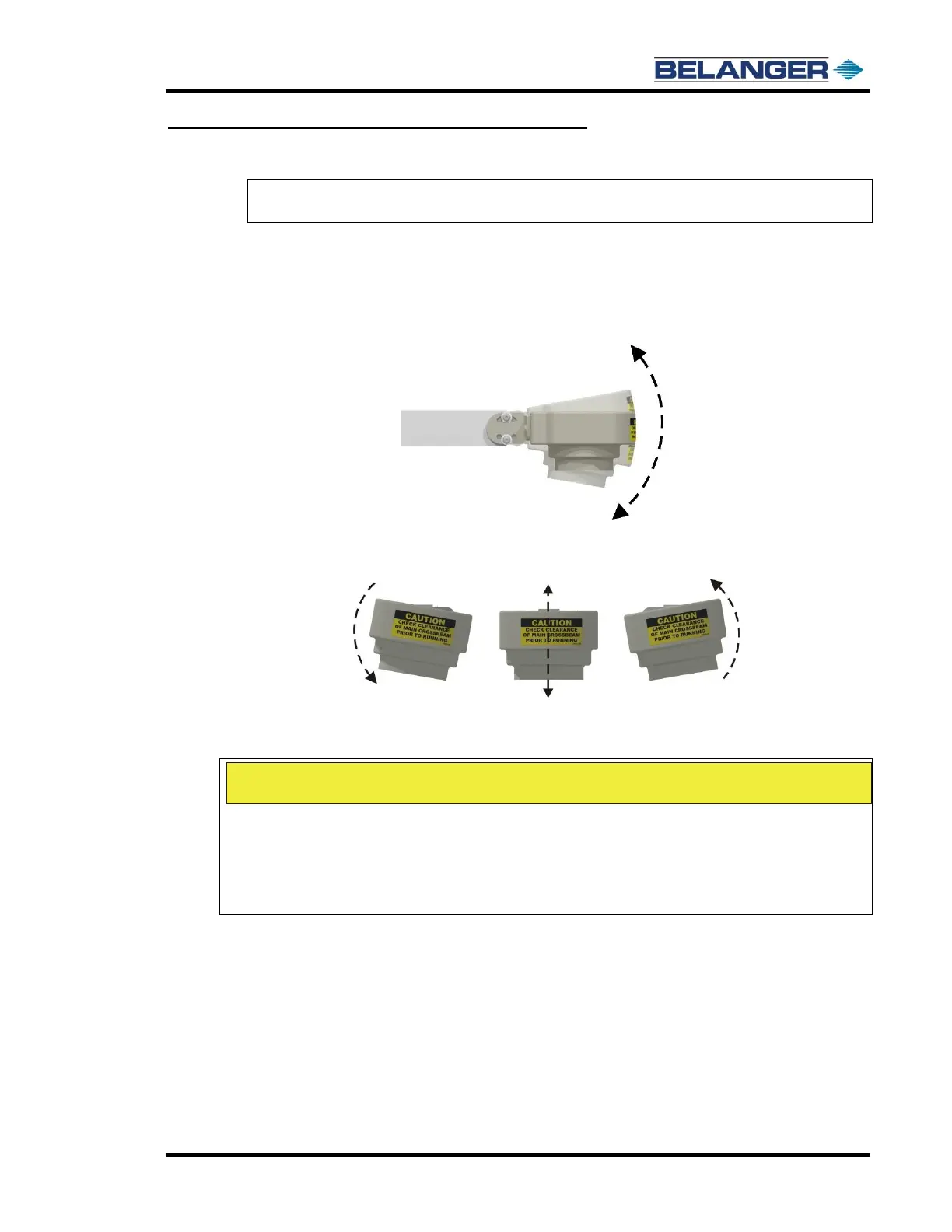
The Sonar Mount can be pivoted on 2 different axes. The instructions on this page will help
you understand the proper way to adjust it.
1) Loosen the setscrews to adjust the vertical positions at the sonar end (Axis 1) as shown in
the side view below.
2) Loosen the setscrews to rotate the end horizontally (Axis 1) as shown above and below.
The Image below shows a “front view”.
3) Adjust the Sonar Unit until it is level with the floor (front to rear of vehicle) and tilted 1º
toward center of vehicle (left to right).











 To Next Page