INSTALLATION AND STARTUP
15-14 Belanger, Inc.® * PO BOX 5470 * Northville, MI 48167-5470 * Ph (248) 349-7010 * Fax (248) 380-9681 1MANUL220
Chapter 15 Wheel Cleaning and CTA Options
Deluxe Wheel Stinger® with On-Board CTA Installation
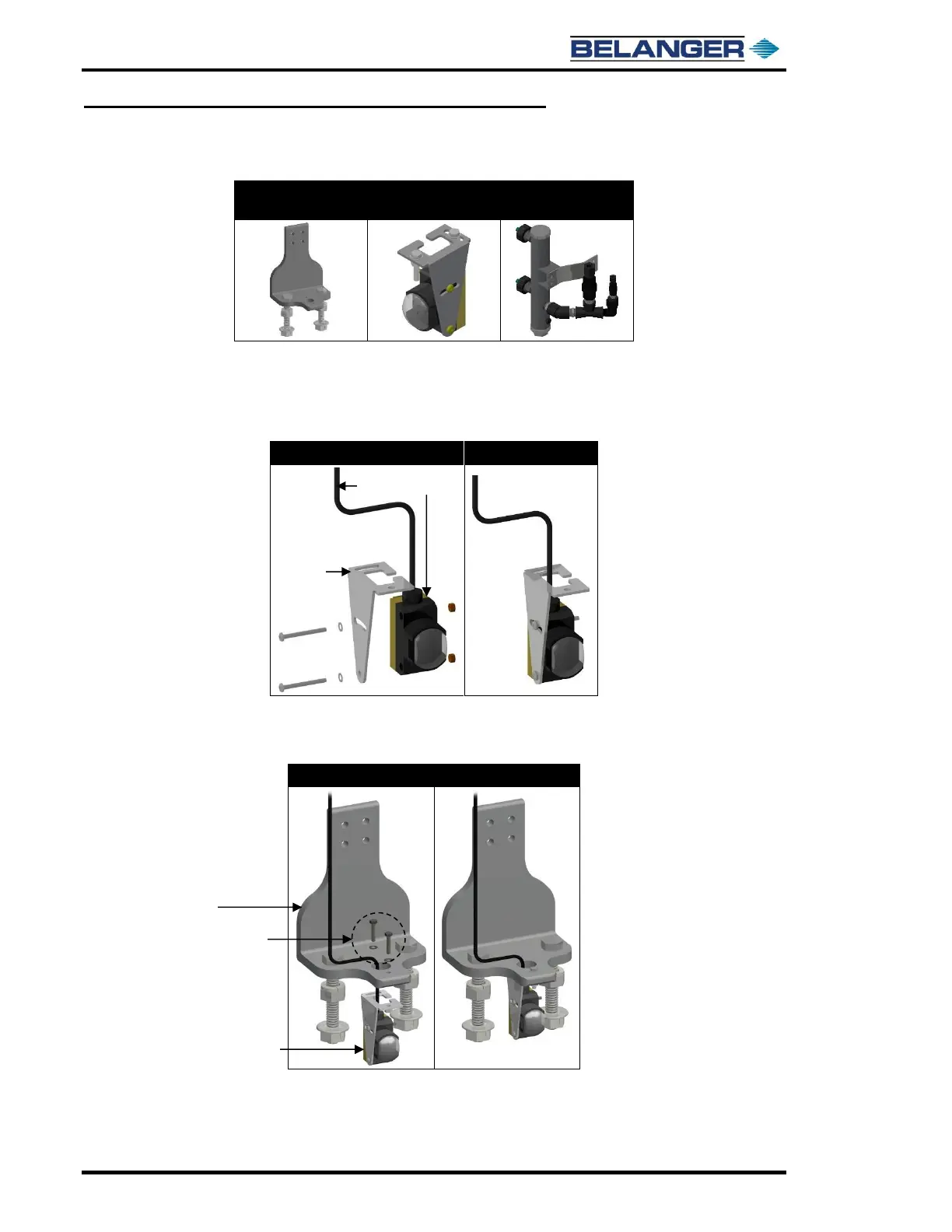
1) Locate the following parts.
Cover Support
Mount Assembly
2) Locate the Tire Locator Assembly if it is part of your system.
3) If the Tire Locator Assembly is part of your system, attach the Emitter and Receiver
Photo Eyes to the supplied brackets. Be sure to run the 5m cord through the opening on
top of the bracket as shown below.
4) If the Tire Locator is part of your system, attach it to the Wheel Stinger® Cover Support
Mount Assembly using the supplied fasteners. Be sure to run the 5m cord through the
Stinger Cover Support Mount as shown below.
Supplied Fasteners (2)
and Washers (2)
(Size 8-32)
Cover Support
Mount Assembly











 To Next Page