Commissioning B 3
ekrPro Com
60
web guide controller EDV No.: MD.191.01.05/1.6.x Chapter: B 3
with analog sensors Date: 23.11.2007 Page: 59/73
B 3.7.5.9 Dig. IO Config. - Configuration of the
digital inputs and outputs
B 3.7.5.9.1 Configure –
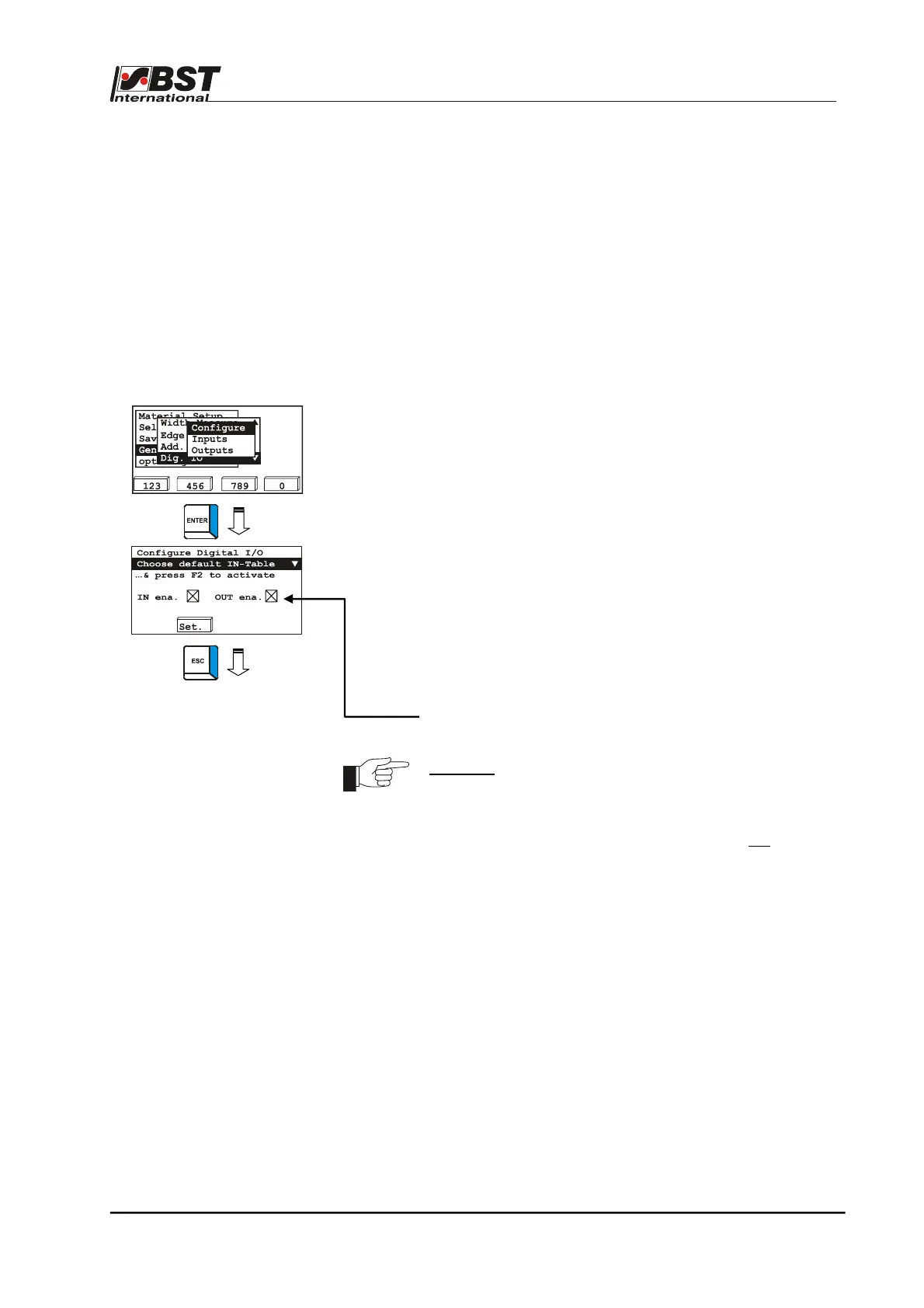
selection of digital input table and activation of inputs/outputs
You can select from two tables in this dialog window. Both
contain various assignments for the digital inputs (see Point
B 3.7.5.9.3).
The tables are created so that they cover most of the
applications controllable using digital inputs, which helps
avoid time-consuming configurations.
Specific adjustments can, however, still be carried out if
required.
The procedure is described under Point B 3.7.5.9.2.
1. Select Dig. IO in General Setup and then select the
Configure sub-directory afterwards.
Confirm the respective selection by pressing ENTER.
2. Select the required input table. The Dig.In Table 1
(Default Table) and Dig.In Table 2 (Special Shifted
Center) tables are available for selection.
The input assignment for each table is represented in
Point B 3.7.5.9.3. Confirm the selection with the F2 (Set.)
key.
3. Press the ESC button to exit the window.
Both digital inputs and outputs can be switched off for initial
startup. Please deactivate the appropriate checkboxes to do
this.
Attention!
Any activated Ext.Lock functionality will be
cancelled by deactivating the IN ena. checkbox.
Thus, the actuator can carry out positioning
movements.
The controller release is, however, not
influenced.
B 3.7.5.9.2 Inputs –
Digital inputs
When necessary this sub-menu permits changing of the assignment
of various functions to the digital inputs of the controller. Moreover
the respective signal pattern (bit mask), which must be applied to the
digital inputs (terminals 74 – 85) in order to activate a particular
function, can be changed.
The procedure for changing the factory-set standard configurations
of the digital inputs is explained in the following two examples,
based on the Dig.In Table 1 (Default Table).



 To Next Page