AS Autosampler Operator’s Manual
172 Doc. 065051-03 1/08
5.17 Replacing the Well Plate Tray Thermal Pads
Replace the two thermal pads (P/N 064999) on the well plate tray annually.
1. Remove the well plates from the tray.
2. Starting at a corner, peel off the existing thermal pad from the tray. The pad is
made of a sticky material, but there is no adhesive attaching it to the tray.
3. Remove the pad from the other
side of the tray.
4. Remove the new thermal pads
from their bags.
5. Thermal pads are shipped with
protective covering on both
sides. One side is clear and the
other is patterned. Peel off the
clear covering from the pad.
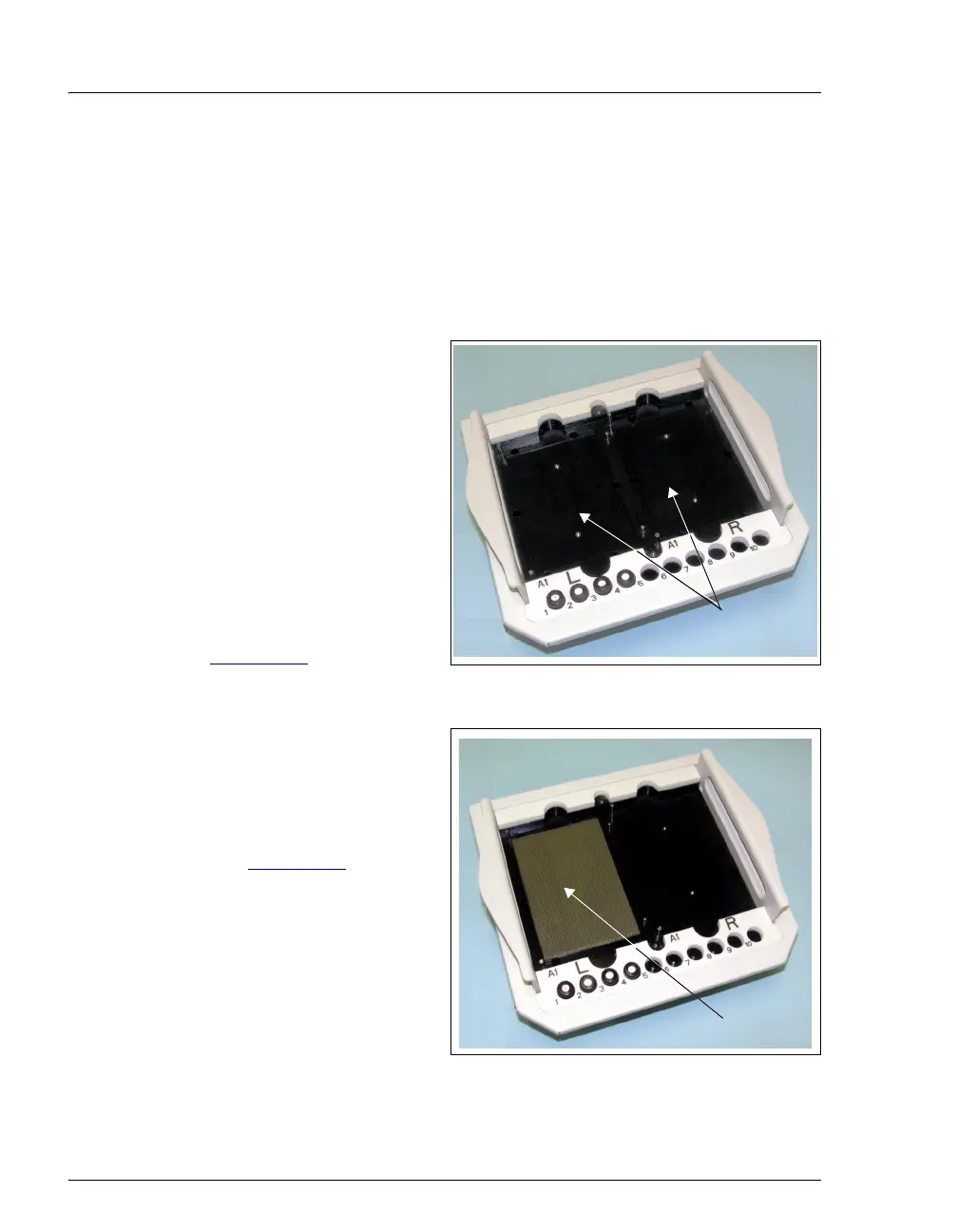
6. Note the two slightly recessed
rectangles on the well plate tray
(see Figure 5-38
).
Figure 5-38. Well Plate Tray with Thermal Pads Removed
7. Turn over the pad and align the
edges of the pad with the edges
of the recessed rectangle on the
left side of the tray. Place the
pad (sticky side down) in the
tray (see Figure 5-39
).
8. Peel off the protective covering
from the top of the pad.
9. Install the remaining thermal
pad on the right side of the tray.
Figure 5-39. Well Plate Tray with One Thermal Pad Installed
Recessed Areas
for Thermal Pads
Thermal Pad



 To Next Page