Programming 23
Programming With The Remote Codepad
When programming the control panel via the remote codepad, the system must be in the
disarmed state with no alarm memory present.
To access the Installer’s Programming Mode, enter the four digit followed by
the button. The factory default Installer Code is
1234
. Two beeps will be heard
and both the
AWAY
and the
STAY
indicators will flash simultaneously to indicate that you have
entered Installer’s Programming Mode.
When entering Installer’s Programming Mode, you will be automatically positioned at
“LOCATION 000”, the beginning of the Primary Telephone Number for Receiver 1.
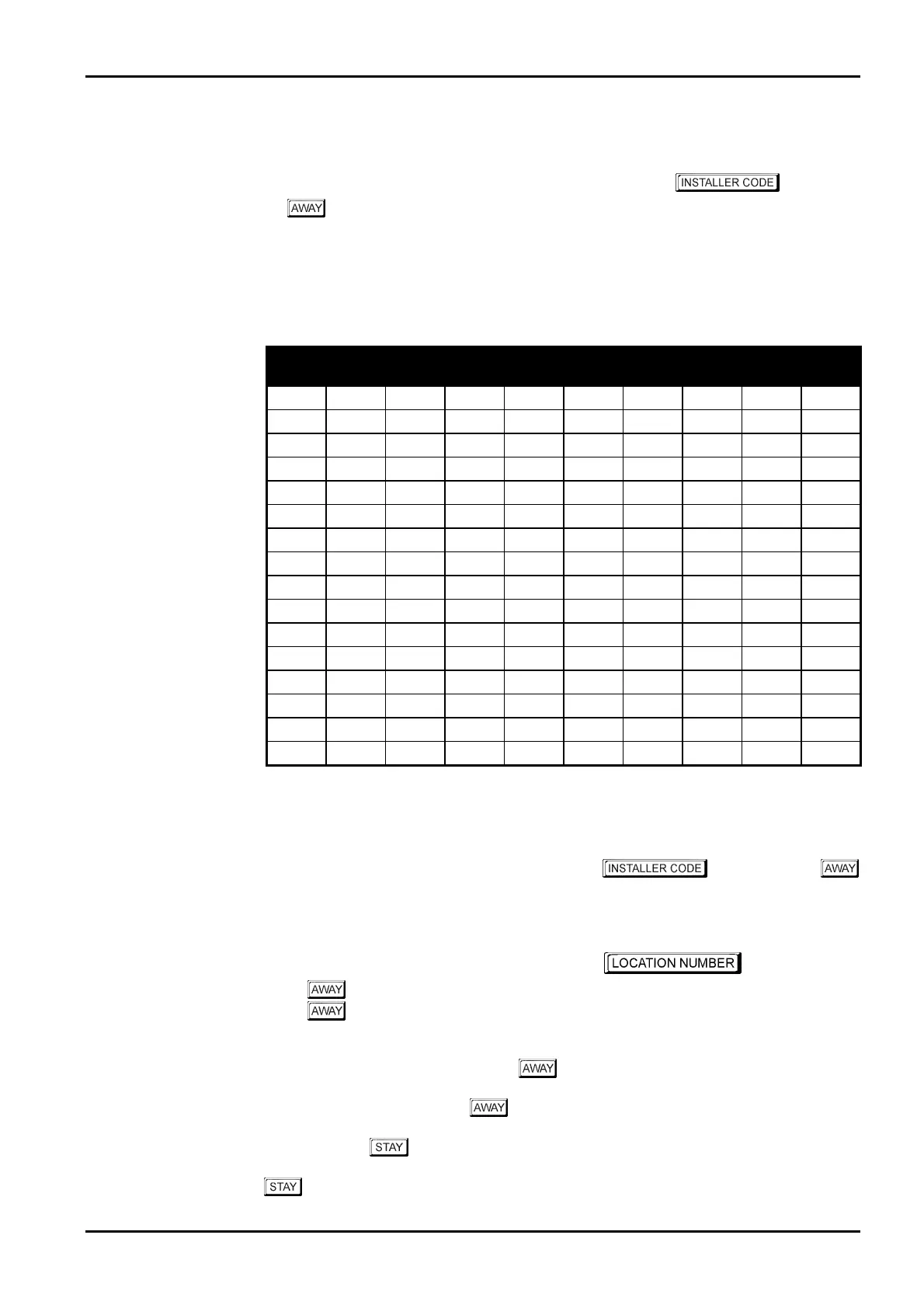
Data
Value
Zone 1
Indicator
Zone 2
Indicator
Zone 3
Indicator
Zone 4
Indicator
Zone 5
Indicator
Zone 6
Indicator
Zone 7
Indicator
Zone 8
Indicator
MAINS
Indicator
0
1
V
2
V
3
V
4
V
5
V
6
V
7
V
8
V
9
V V
10
V
11
V V
12
V V
13
V V
14
V V
15
V V
Table 3: Codepad Indicators When Programming
Example
To access Installer’s Programming Mode, enter the followed by the
button. Two beeps will be heard and both the
AWAY
and the
STAY
indicators will flash
simultaneously to indicate that you have entered Installer’s Programming Mode. The codepad
indicators will display the current data stored in the first location (LOCATION 000).
To move to another programming location, enter the required followed
by the button. The data of the new location will now be displayed (e.g.
34
followed
by the button will automatically step you to the beginning of the Subscriber ID Number
for Receiver 1).
To move to the next location, press the button. This will step you to the next location
and the data in that location will be displayed (e.g. If you are currently positioned at
“LOCATION 034”, pressing the button will step you to “LOCATION 035”).
If you press the
button without previously entering a location number, the system will
step back one location (e.g. If you are positioned at “LOCATION 035” and you press the
button, you will step back one location to LOCATION 034).
Electronics Design and Manufacturing Pty Limited ISSUE130



 To Next Page