Model 1001 DFB Programming and operating manual
FICEP S.p.A. 17
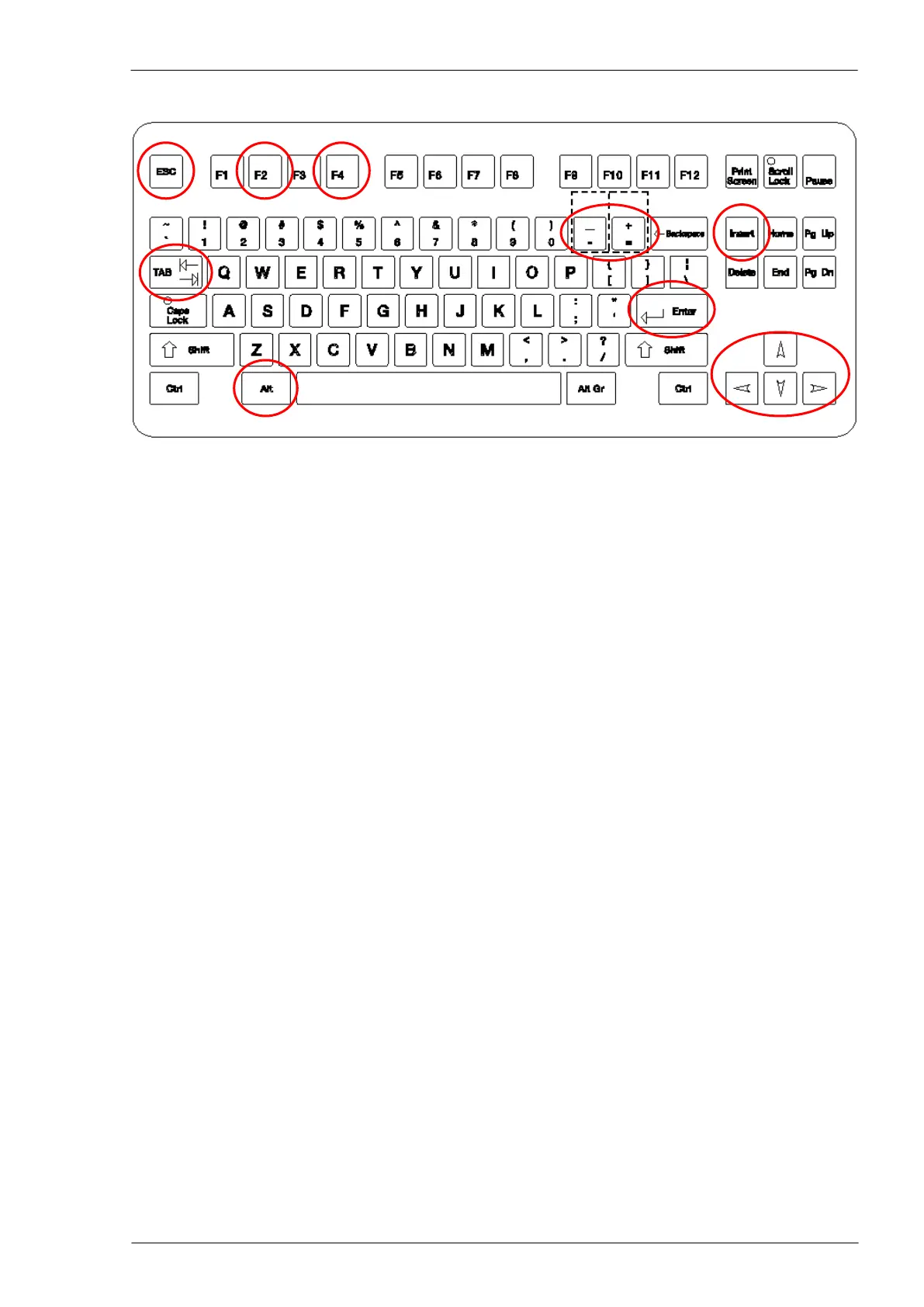
Alphanumeric PC keyboard
Some keys have particulars functions:
To escape from an application, coming back to the previous level.
To move the cursor on different boxes.
To open the selecting window evidenced by the cursor, or to confirm the execution
of a common request (OK).
To move the cursor in the selected direction, on a field or on a list.
To modify data already input or to confirm modifications executed.
To open lists of options to be used when programming or in processing operations
(Aided programming).
To move the curser on a blank table, and input new working data (it is named INS
in the example).
To increase (+) or decrease (-) the axes speed, or to program negative/positive
incremental or absolute coordinates.
To delete characters on the right of the cursor position
To delete characters on the left of the cursor position
Keys combinations:
Opens the windows describing messages.
Enables to select one of the already opened applications or activates the actual
page on the video
Opens the Windows menu list (ESC to close)
Stores and removes the data evidenced by the cursor
Stores the data evidenced by the cursor to be copied
Paste the stored data in the actual position of the cursor



 To Next Page