Programming and operating manual Model 1001 DFB
62 FICEP S.p.A.
Programming: marking operations
Meaning of the fields and possible choices
- DA with marking unit
- DD with optional mark-
ing axis
- DA, DB or DC with drill-
ing head and special
scribing tool
- The marking unit is always positioned on the datum line side; for “L”
profiles, it is necessary to set up a special extension for the counter-
acting device
- The optional “U” axis must be available; it must be equipped with a
special scribing tool
- The drilling head must be equipped with a special optional tool for
scribing operations (Note that DC side is not available for “L” profiles).
A string with max 12 char-
acters or blank
The content of this field will be marked on the piece; otherwise, if the
field is empty, the content of “Mark” field (see page 54) will be marked.
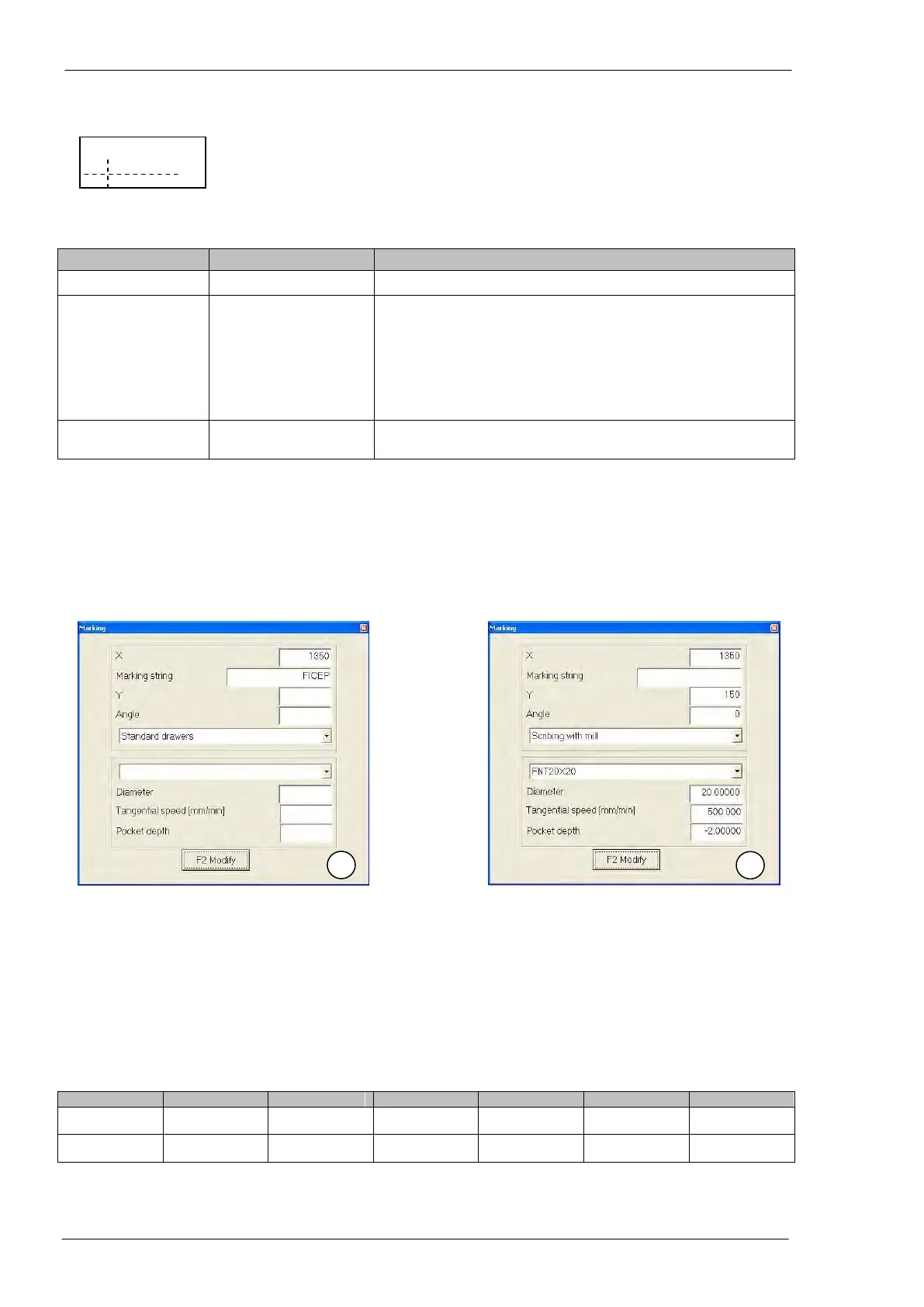
Selecting “MARK” in the “TYPE” field, a window is displayed to insert the marking parameters and the
other field of the programming line.
Example: Marking of “FICEP” string by the marking unit on the flange (see following picture n. 1) + mark-
ing of the content of “Mark” field by the optional scribing unit on the lower side of the web (see following
picture n. 2).
When operating with the marking unit, it is enough to insert only the X coordinate whereas the Y coordi-
nate is adjusted manually and it is suitable for all marking operations.
When operating with the optional scribing unit, it is necessary to specify also the Y coordinate and, if nec-
essary, the angle value if a sloping execution is needed. Moreover, it is necessary to define the character
dimension (from FNT 10x10 up to FNT 50x50) and the tool scribing speed (tangential speed); when mark-
ing on “D” side, the other fields are not used. The CNC will use the values in the setup table, if the field
“Pocket depth” is left empty when marking “A”, “B” and “C” sides.
NOTE The values of X and Y coordinates are only as instances.



 To Next Page