76
────────────────────────────────────────────────────
6.4 Taking Measurements
────────────────────────────────────────────────────
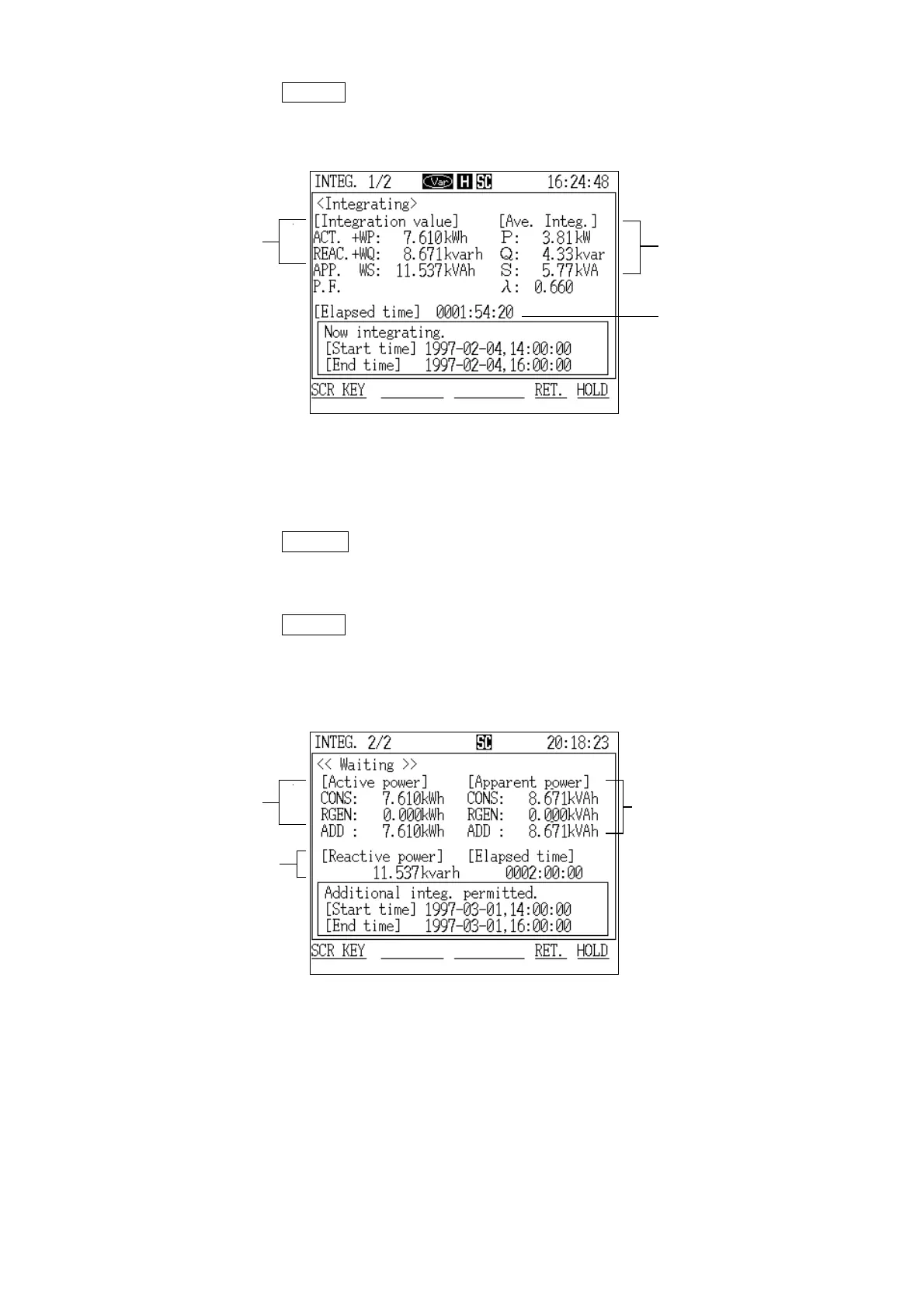
Active power integratio
(during consumption)
Average value
within a time perio
Integration tim
Integration Screen (page 1/2)
Reactive power integratio
Apparent power integratio
(consumption,
regeneration,
addition)
Active power integratio
(consumption,
regeneration,
addition)
Integration Screen (page 2/2)
(When not using the reactive power meter method)
4. Press the
DETERM function key.
5. The "Integration" screen (page 1/2) is displayed.
(2) Displaying the "Integration" screen (page 2/2)
1. Press the
SCR.KEY function key.
2. The "Display Selection" window appears.
3. Position the cursor at "Integration 2/2 (INTEG.2/2)."
4. Press the DETERM function key.
5. The "Integration" screen (page 2/2) is displayed.



 To Next Page