6-40 ELECTRICAL SYSTEM / BATTERY
ICON A5 / MAINTENANCE MANUAL CHANGE C2
WARNING: Do NOT jump start the aircraft battery.
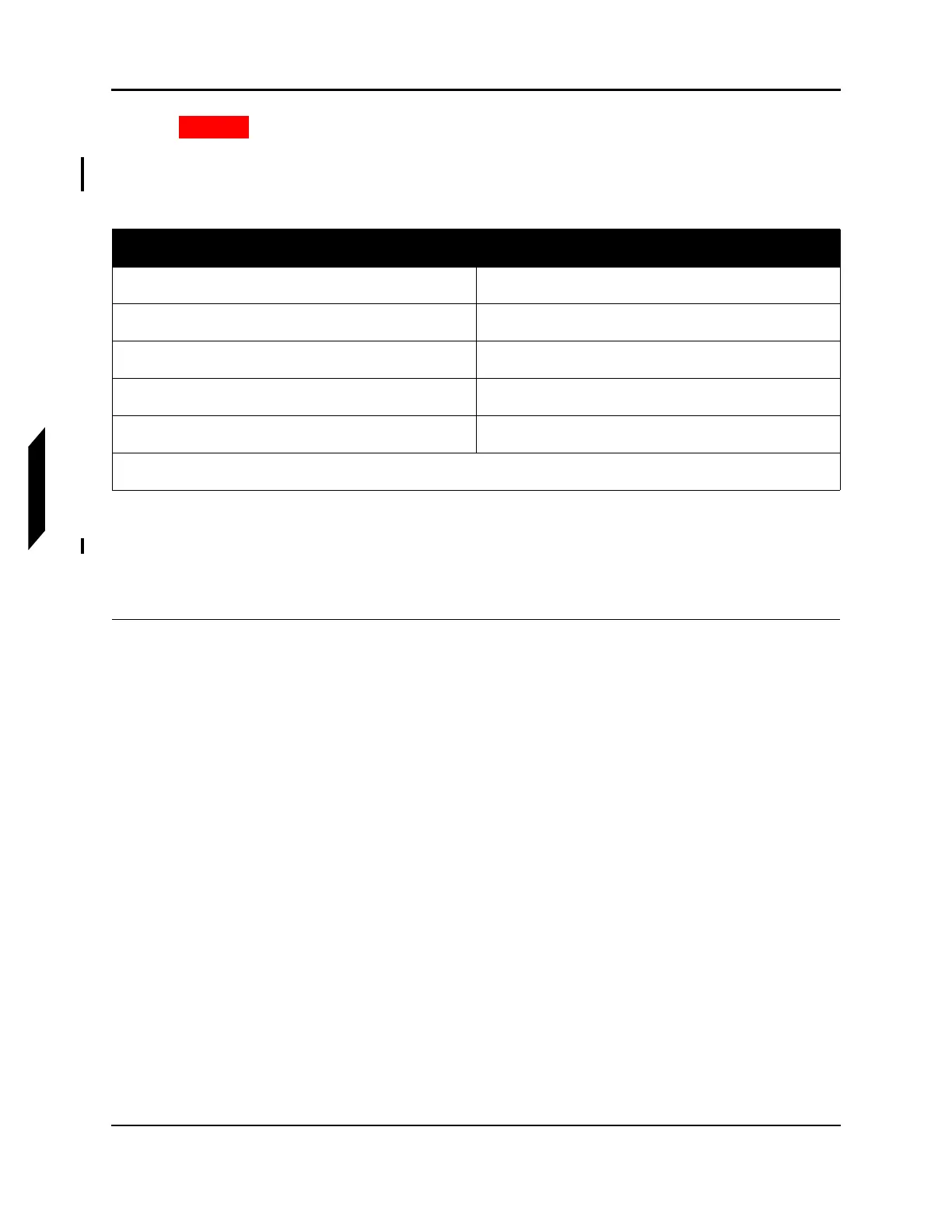
9. Continue charging for four more hours after the charge current drops to 1.2 amperes. See Table
6-2 for state of charge (SOC). Turn off charging unit once charging is complete.
Tab l e 6 - 2 : Battery Charging Status Reference
10. Remove negative charging clamps from the aircraft battery charging terminals.
11. Remove positive charging clamps from the aircraft battery charging terminals.
12. Use a multimeter to verify that the battery voltage is at or above 12.6 VDC.
13. Replace the red and black terminal caps. (See Figure 6-3.)
VERIFICATION METHOD:
Turn the master switch ON. Verify that the BATTERY indicator does not stay lit in the annunciator
panel.
NOTE: If the battery requires charging after normal aircraft operation, the
battery may be faulty and must be replaced. See “Battery Diag-
nostic” on page 6-32.
Open Circuit Voltage (VDC) SOC(%)
12.9 or above 100
12.6 75
12.3 50
12.0 25
11.7 or below 0
Source: Concord RG Series Aircraft Battery Owner/Operator Manual (5-0324 Rev D)



 To Next Page