FUEL SYSTEM / FUEL TANK (MY18+) 10-17
CHANGE C2 ICON A5 / MAINTENANCE MANUAL
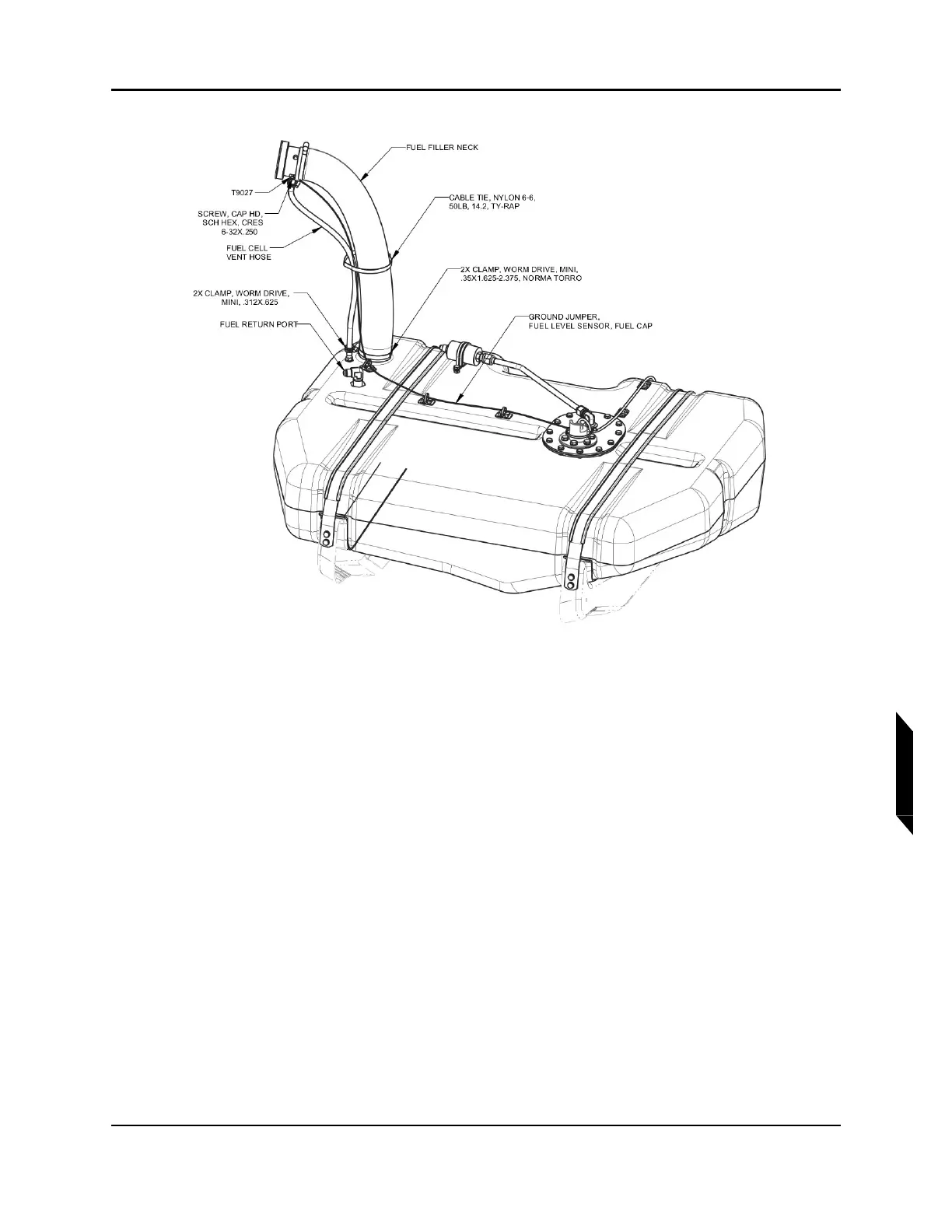
FIGURE 10-3
FUEL FILLER NECK INSTALL AND ELECTRICAL CONNECTIONS
11. Remove cable tie from fuel filler neck.
12. Disconnect fuel line from coarse fuel filter using a 11/16 wrench. Cap and plug open lines
throughout.
13. Disconnect fuel return line from the elbow fuel return port in the tank using a 11/16 wrench. (See
Figure 10-3.)
14. Disconnect fuel cell vent hose from barb in fuel cap adapter by removing the mini worm drive
clamp.
15. Remove worm drive clams from both ends of the fuel filler neck. (See Figure 10-3.)
16. Remove the fuel filler neck from fuel cap adapter and fuel tank opening flange to expose fuel
sump hose. (See Figure 10-2.)
17. Disconnect fuel sump hose by prying off its clamp and pulling the hose off the barb. (See Figure
10-3.) Remove fuel filler hose completely.
18. Remove self-locking nut from both T-bolt shanks located at FWD end of fuel tank. (See Figure
10-4. Detail A.)



 To Next Page