EQUIPMENT AND FURNISHINGS / EQUIPMENT AND FURNISHINGS GENERAL MAINTENANCE 8-9
CHANGE C1 ICON A5 / MAINTENANCE MANUAL
Special Tools Required
None
Parts Required
None
Aircraft System and Number
05—Equipment and Furnishing
Consumables
None
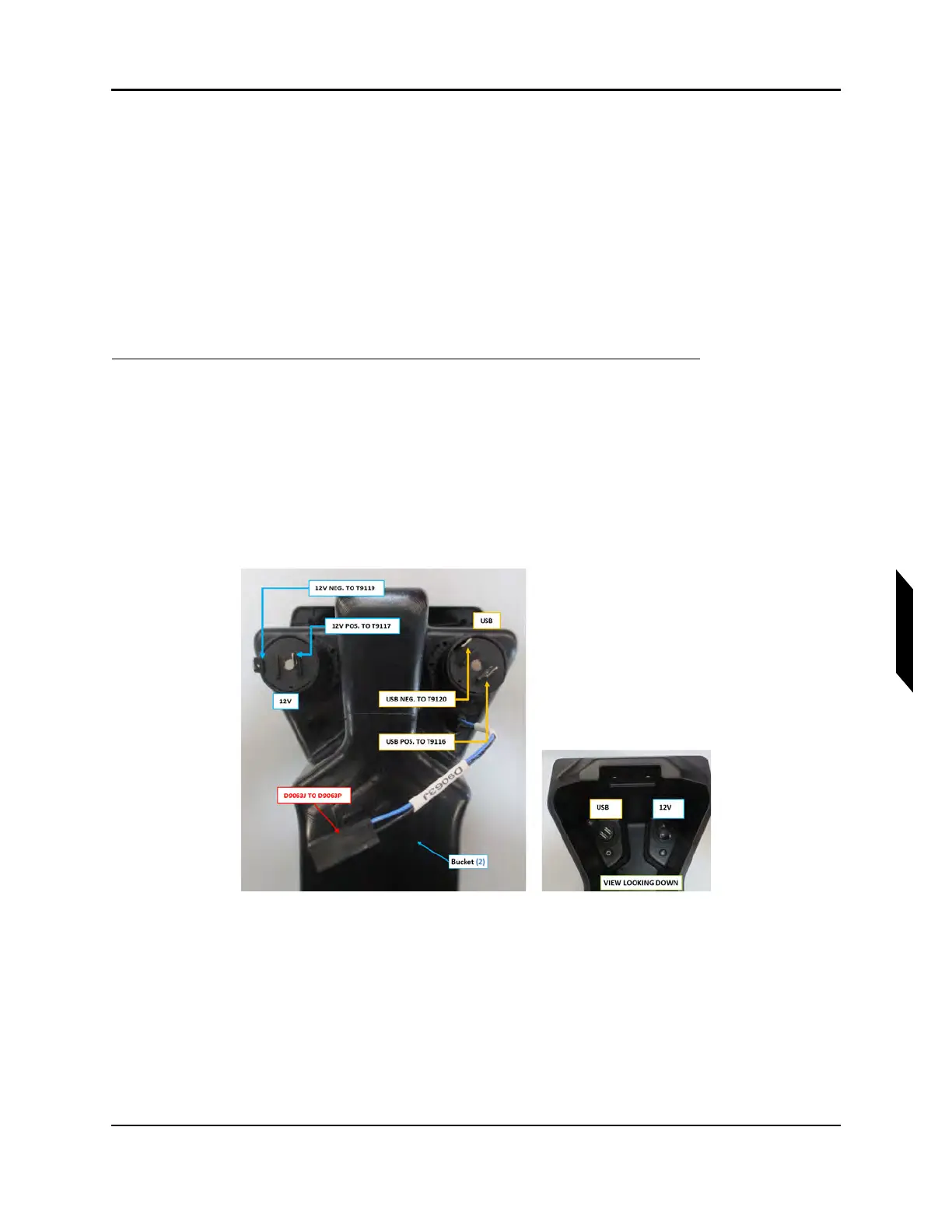
1. Connect electrical connections as follows, refer to Figure 8-6:
a. Connector D9063J in bucket assembly connects to connector D9063P on fuselage wiring
harness
b. Terminal T9117 on fuselage wiring harness connects to positive terminal on 12V
c. Terminal T9119 on fuselage wiring harness connects to negative terminal on 12V
d. Terminal T9116 on fuselage wiring harness connects to positive terminal on USB
e. Terminal T9120 on fuselage wiring harness connects to negative terminal on USB
FIGURE 8-6
CENTER CONSOLE BUCKET ELECTRICAL CONNECTIONS
2. Install center console bucket. See Figure 8-5.



 To Next Page