INSTRUMENTS (AND AVIONICS) / ELT 13-53
CHANGE C2 ICON A5 / MAINTENANCE MANUAL
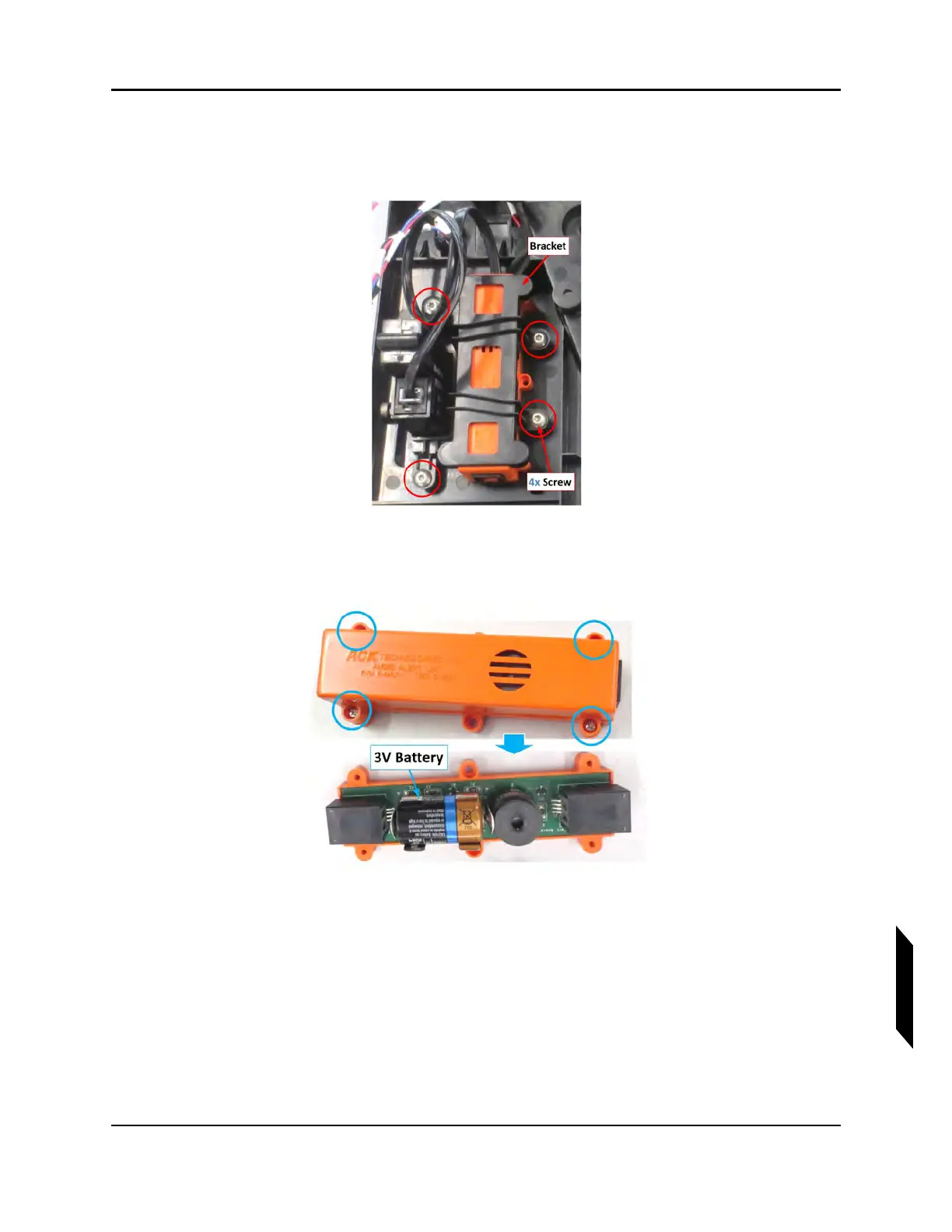
2. Locate the ELT remote control panel.
3. Use a T10 Torx driver to remove the four 6-32 screws attaching the black ICA009273 Bracket
to the orange audio alert indicator and RCPI.
4. Remove the four retaining screws which secure the top cover to the audio alert indicator P/N
E-04.7
5. Carefully remove the top of the indicator exposing the battery compartment.
6. Install a Duracell CR-2,3 or equivalent battery. Make sure to observe the battery polarity.
7. Replace the top cover, making sure the grill portion of the indicator cover is positioned over the
buzzer.
8. Mount the audio alert indicator and RCPI back into the overhead console, securing them with the
ICA009273 Bracket and four screws.
9. Replace the overhead console mount.



 To Next Page