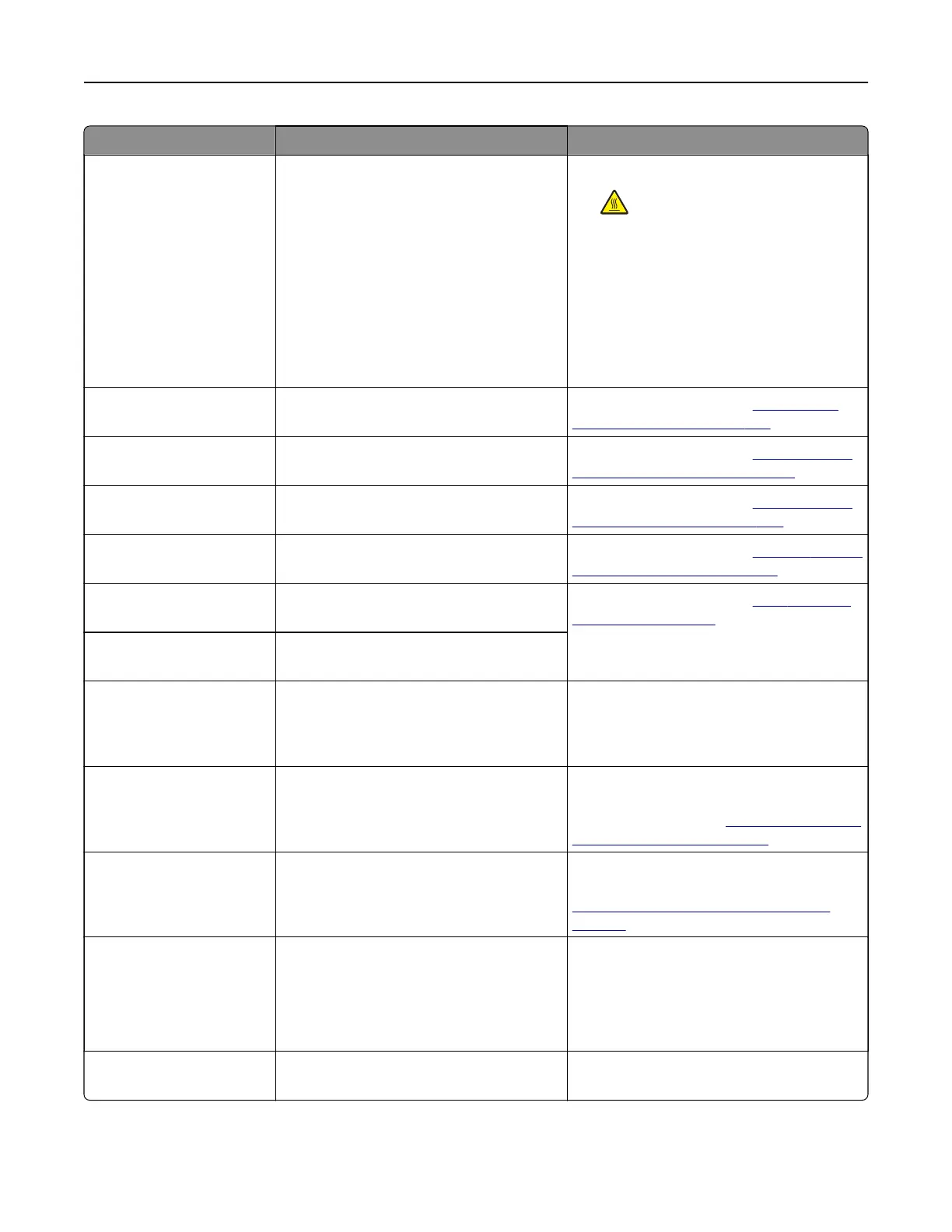
Error codes Error message Solution
31.80z Reinstall missing or
unresponsive fuser.
1 Open door B.
CAUTION—HOT SURFACE: The
inside of the printer might be hot. To
reduce the risk of injury from a hot
component, allow the surface to cool
before touching it.
2 Unlock, and then remove the fuser.
3 Insert the fuser, and then lock it in
place.
4 Close door B.
32.40z, 32.41z, 32.42z,
32.43z
Replace unsupported [color]
toner cartridge.
For more information, see
“Replacing a
toner cartridge” on page 387.
32.60z Replace unsupported black
imaging unit.
For more information, see
“Replacing the
black imaging unit” on page 389.
32.65z Replace unsupported color
imaging kit.
For more information, see
“Replacing the
color imaging kit” on page 396.
33.40z, 33.41z, 33.42z,
33.43z
Refilled regular [color]
cartridge
For more information, see
“Refilled regular
[color] cartridge” on page 524.
33.60z Non-genuine black imaging
unit, see User's Guide.
For more information, see
“Non‑Lexmark
supply” on page 524.
33.64z Non-genuine color imaging kit,
see User's Guide.
34.00 Paper too short. Set the paper size setting to match the
paper loaded in the tray. From the control
panel, navigate to Settings > Paper > Tray
> Configuration > Paper Size/Type.
34.10, 34.20, 34.30, 34.40,
34.50
Check [source], adjust guides
and orientation.
Pull out the indicated tray, and then make
sure that the paper is loaded correctly. For
more information, see
“Loading paper and
specialty media” on page 80.
34.90 Check multipurpose feeder,
adjust guides and orientation.
Make sure that the paper is loaded
correctly. For more information, see
“Loading the multipurpose feeder” on
page 91.
37.1 Insufficient memory to collate
job.
Try either of the following:
• Select Continue to print the part of the
job that is stored and to begin collating
the rest of the print job.
• Cancel the current print job.
37.3 Insufficient memory, some held
jobs were deleted.
Select Continue to clear the message and
continue printing.
Troubleshoot a problem 446



 To Next Page