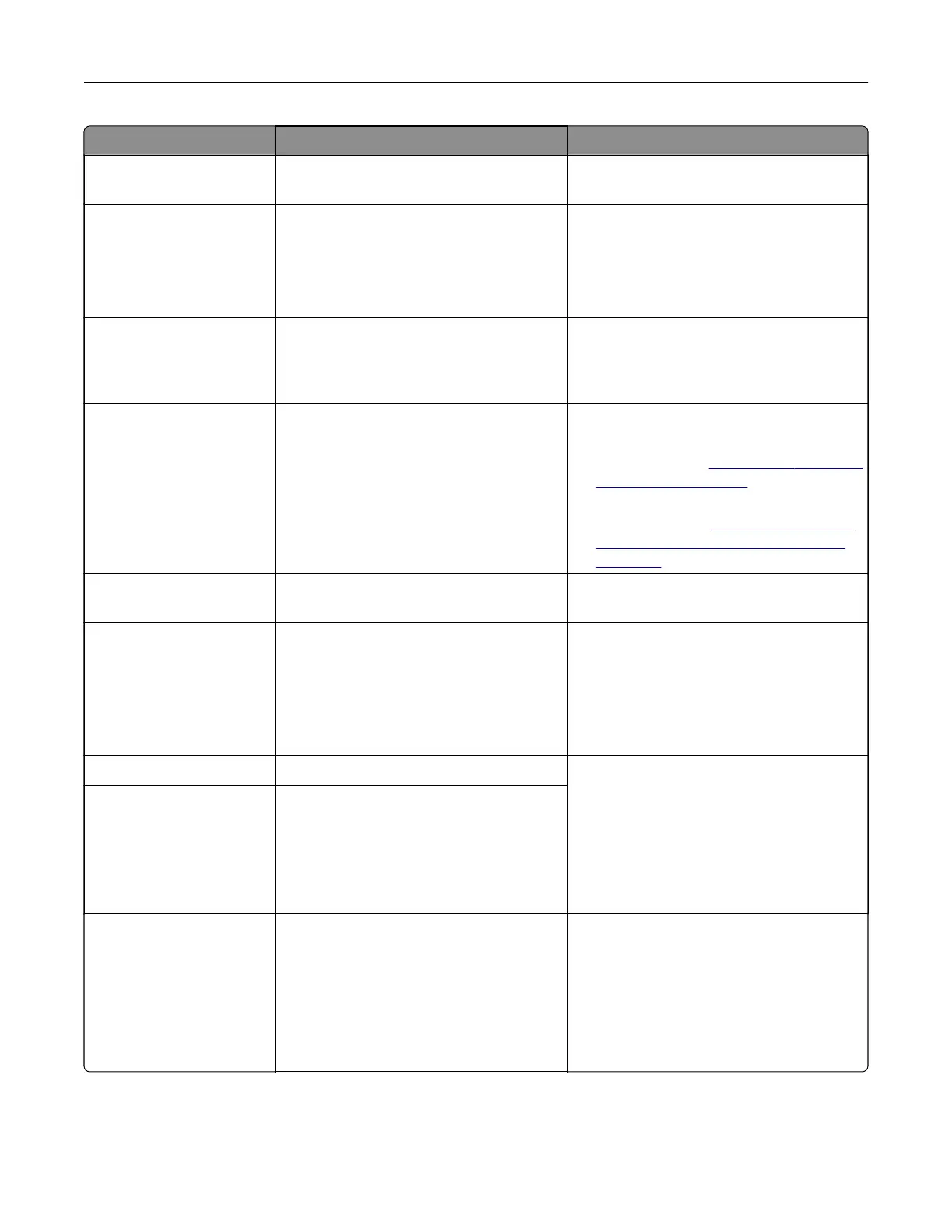
Error codes Error message Solution
71.12 Memory full, cannot print
faxes.
Select Print All to print as many of the faxes
as have been saved.
71.13 Memory full. Cannot send
faxes.
Try either of the following:
• Continue and try sending the fax again.
• Scan the original document one page at
a time, dial the fax number, and then fax
the document.
71.4 Printer's time is incorrect. Configure the printer time. From the control
panel, navigate to Settings > Device >
Preferences > Date and Time >
Configure.
72.01 Email SMTP server not set up.
Contact system administrator.
Try either of the following:
• Set up the email function. For more
information, see
“Configuring the SMTP
settings” on page 266.
• Disable the error message. For more
information, see
“Disabling the 'SMTP
server not set up' error message” on
page 527.
72.02 Web Link server not set up.
Contact system administrator.
Contact your system administrator.
72.04 Fax server To Format not set
up. Contact system
administrator.
Try either of the following:
•
Configure
the To F o rmat . From the
control panel, navigate to Settings >
Fax > Fax Server Setup > General Fax
Settings.
• Contact your system administrator.
75.01 Secure Element detected. Do either of the following:
• Use the installed Secure Element.
Note: The printer erases all existing
certificates and may also erase and
reformat the storage drive.
• Turn o the printer, and then remove the
Secure Element.
75.02 Secure Element not recognized.
75.03 Error communicating with
Secure Element.
Do either of the following:
• Stop using the Secure Element.
Note: The printer erases all existing
certificates and may also erase and
reformat the storage drive.
• Turn o the printer, remove, and then
install the Secure Element.
Troubleshoot a problem 449



 To Next Page