ipLDK-60 Issue 2.0
Admin Programming Manual July, 2010
218
3.16 Print Prot. Database (PGM 451)
PGM 451 outputs the database values for the various program sections.
Procedure:
1. Press the [TRANS PGM] button.
2. Dial 451.
3. Select the desired Flexible button.
4. For CO and Station programs, enter the range to output
5. Press the [Hold/Save] button, to output data.
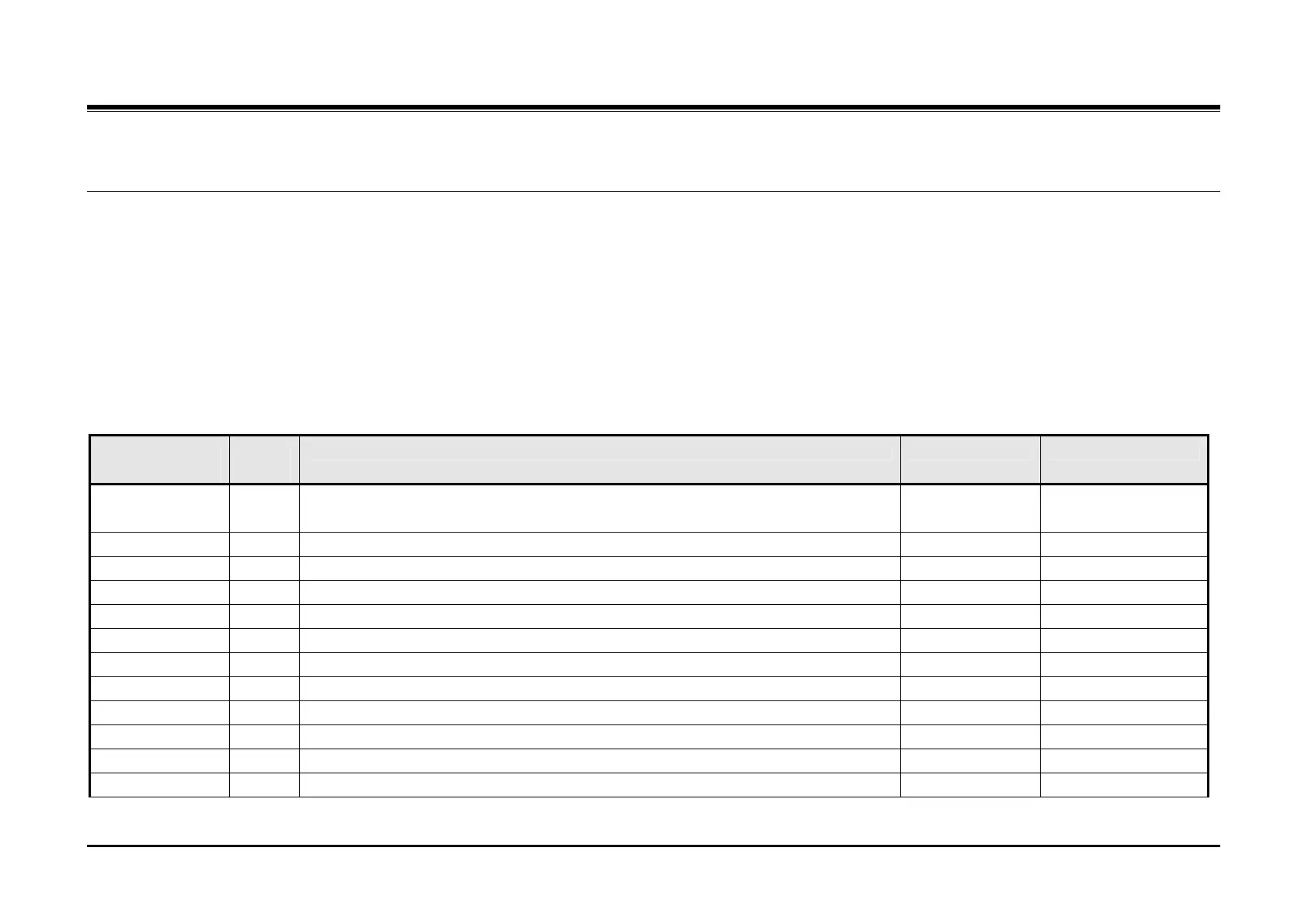
PGM
451
Flex
Btn
Description Default Values
Flexible
Numbering Plan
1 This selection outputs the Flexible Numbering Plan.
Station 2 This selection outputs the Station Database. Enter station range
CO line 3 This selection outputs the CO Line Database. Enter CO line range
System 4 This selection outputs the System Feature Database.
ISDN 5 This selection outputs the Station Group Database.
ISDN Tables 6 This selection outputs the ISDN Tables Database.
System Timers 7 This selection outputs the System Timer Database.
Toll Table 8 This selection outputs the Toll Table Database.
LCR 9 This selection outputs the LCR Database.
Other Tables 10 This selection outputs the Other Tables.
Nation Specific 11 This selection outputs the Nation Specific Database.
Flexible buttons 12 This selection outputs the Flexible Button Program. Enter station range


 To Next Page