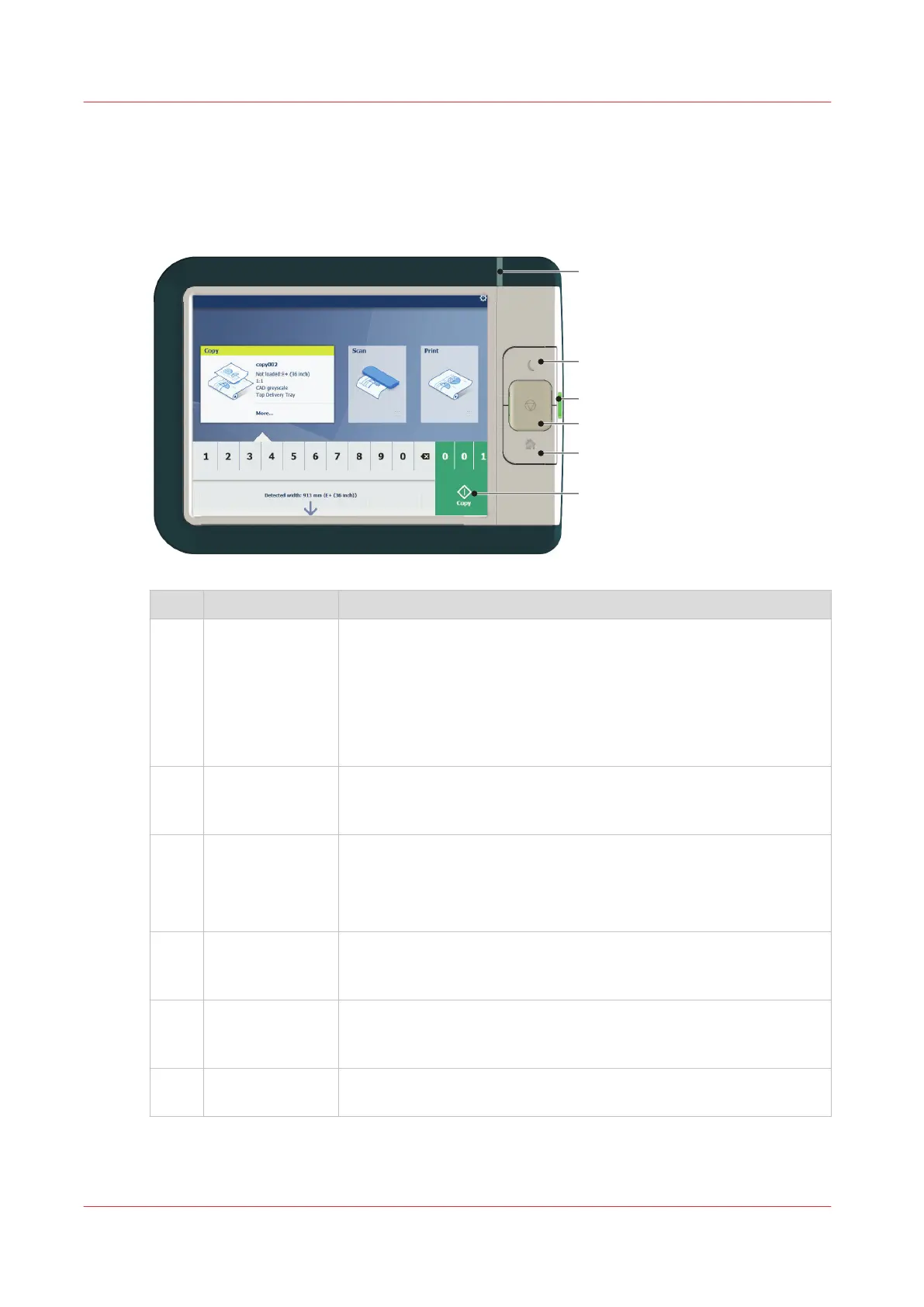
The user panel: Océ ClearConnect
Introduction
The Océ ClearConnect is the multi-touch user panel of the printer.
No. Component Function
1. [status light] Light that gives feedback on the status of the printer.
• A green light indicates that the printer is scanning or printing.
• A green blinking light indicates that the printer is in a transition
state (start-up, shut-down, pause).
• A red light indicates that an error occurred or the print queue is
paused.
• When the light is off the system is ready or shutdown.
2. [wake-up button] Button to:
• Get the printer out of sleep mode.
• Wake the printer up to full functionality.
3. [USB port] Insert a USB key to:
• Print a file directly from the USB key.
• Save a scan file directly on the USB key.
The port green light starts to blink during data transfer.
4. [stop button] Button, with a red light, to:
• Immediately interrupt a scan job.
• Stop a print job after the page that is being printed.
5. [home button] Button to:
• Return to the user panel home screen.
• Reset settings to default by pressing the button twice.
6. [green button]
(touch)
Dynamic tile on the user panel display to:
• Start a scan job, a print job or a copy job on the user panel.
The user panel: Océ ClearConnect
26
Chapter 2 - Get to Know the Printing System













 To Next Page