100
Settin
Checkers
Cha
ter 6
6.7.2 What Is Gray Edge?
The Gray Edge function can detect the pixels more than a certain level of brightness based on the gray value of
each pixel and outputs the detected pixels and the coordinates in a gray image. This function detects up to 256
edges fulfilling the preset conditions within an area. If as many edges as you have set are detected, the object will
be judged as "OK". If edges less than the value you have set are detected, the object will be judged as "NG". Up
to 99 edges from the start point can be used for calculating the coordinate positions of the edges and the
calculation results can be output to the external device.
Area Shape Line Scan/Plane Scan
The Area Size Adjustment
function is available.
The Number of Settable Mask Areas None
Number of Detections 0 to 256
X coordinate 0 to 511.9
Y coordinate 0 to 479.9
Measurement Data and the Range of
Measurement Results
Differential Value 0 to 255
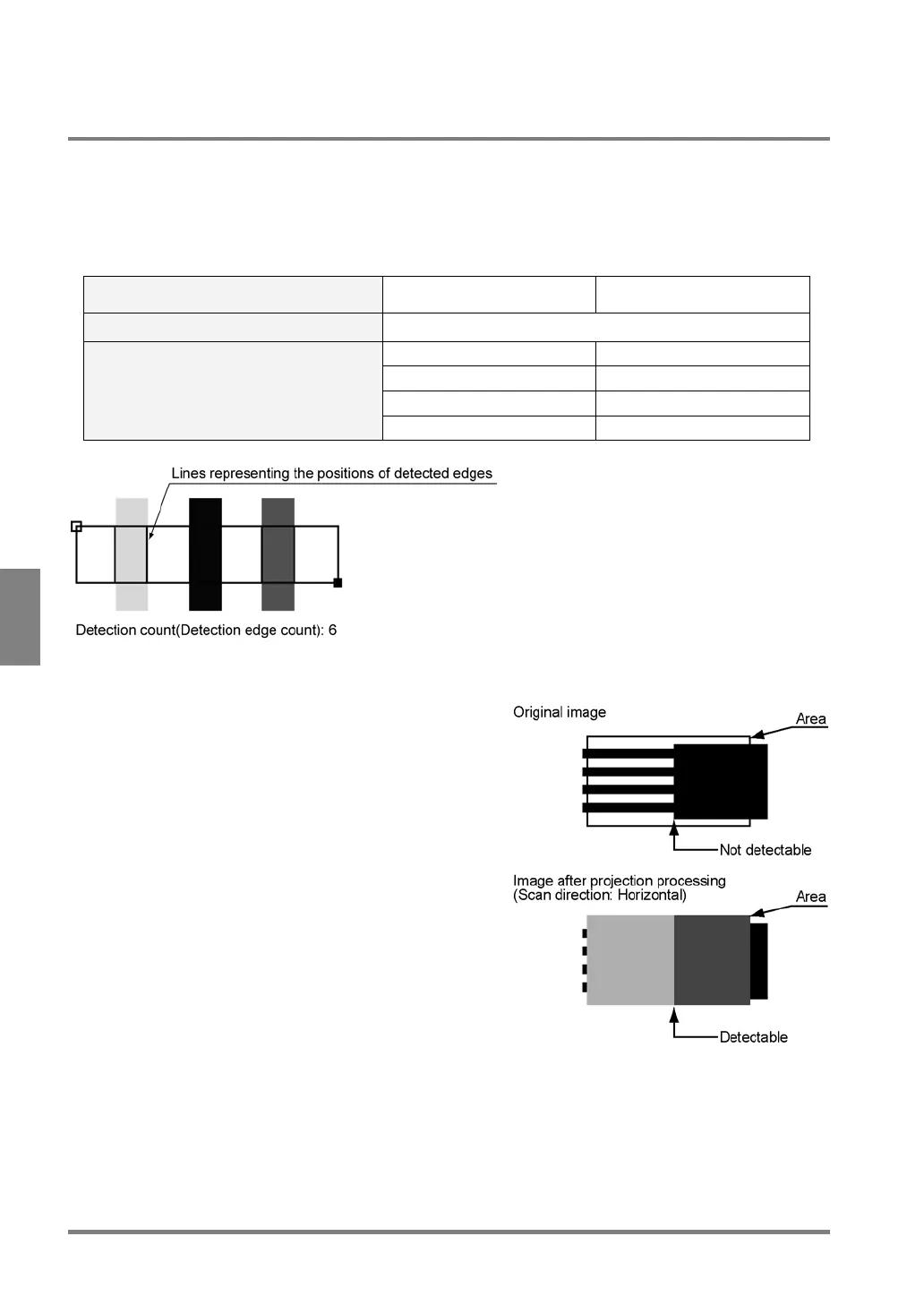
Projection Scan:
The Projection Scan function processes images when
detecting edges. It calculates average brightness in the
vertical direction against the scan direction per column (or
row) and detects the edges based on the composite image.



 To Next Page