187
Cha
ter 7
Calculation
Anal
sis
and Out
ut of Ins
ection Results
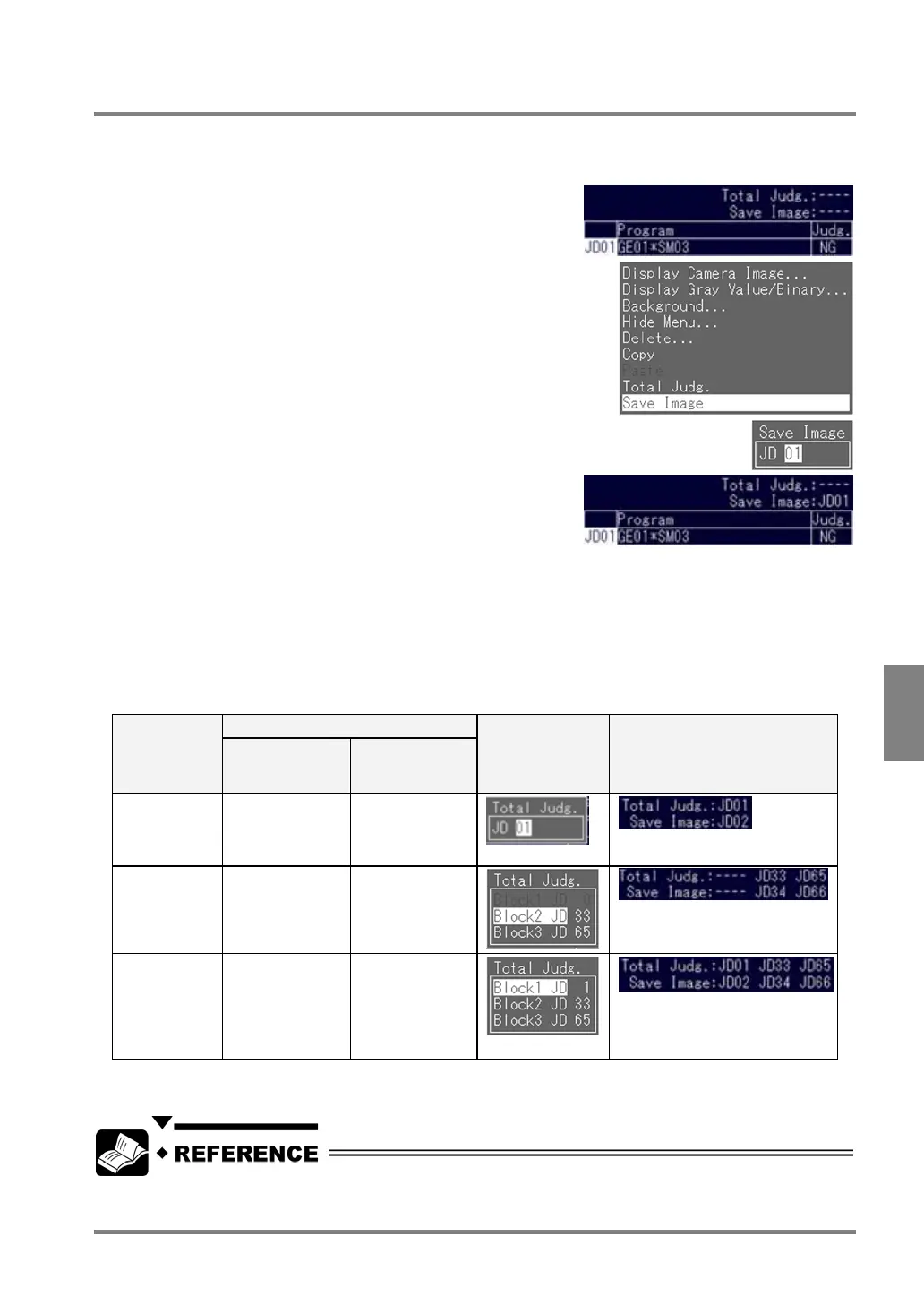
7.3.5 Saving a Conditional Formula for Save Image
When the conditional formula saved here was judged as "NG", the image is saved. Only the Judgment formulas
that have already been created can be saved as a conditional formula for Save Image. Follow the instructions
below to save a conditional formula for Save Image while the Judgment menu is open.
1. Press the B key while the cursor is on a Judgment
number.
The subwindow is displayed.
2. Select "Save Image".
The subwindow is displayed.
3. Highlight "JD".
The cursor moves to the number right next to “JD”.
4. Specify a Judgment number to save as a conditional
formula.
Now you finished saving the formula.If “ENVIRONMENT” >”Save Image Mode” > “Save Image” > "Judge.
Result" from the menu bar is selected, the memory image of which conditional formula was judged as "NG"
will be stored in the PV310.
Conditional Formula for Save Image in Automatic Switch or User-Defined Mode
The setting conditions differ upon the mode. This is because the Judgment No. to be executed is also different
depending on the mode.
Condition Execution
mode
The number of
judgment that
can be set
Details
Setting screen Example screen display for
Judgment
Execute All One One for each of
the following
range:
JD01 - JD96
Automatic
Switch
Two One for each of
the following
ranges:
JD33 - JD64,
JD65 - JD96
Setting values for blocks 3 and 2
(from the right column)
User-Defined Three One for each of
the following
rages:
JD01 - JD32
JD33 - JD64
JD65 - JD96
Setting values for blocks 3, 2 and
1 (from the right column)
“---“: Unset
If you switch the execution modes, the saved data of Total Judgment are erased. In this case, you must save the
same data as the erased data again.
Refer to page 225 for more details of settings of image saving.



 To Next Page