EasyManua.ls Logo

Panasonic Micro-Imagechecker PV310 - Functions and Settings

Panasonic Micro-Imagechecker PV310
363 pages
Print Icon
To Next Page IconTo Next Page
To Previous Page IconTo Previous Page
Loading...
323
Cha
p
ter 16
Camera Switchin
g
Unit
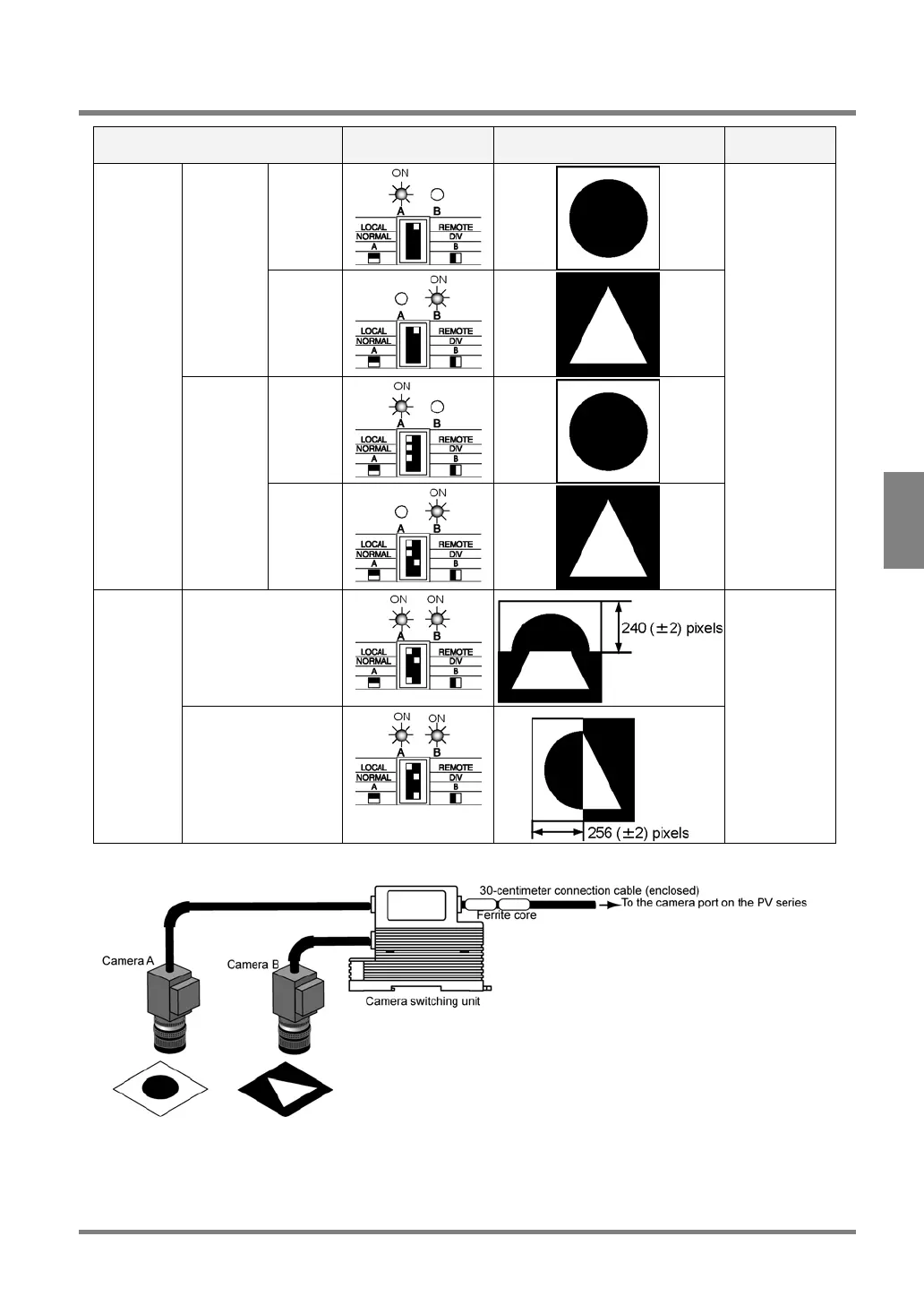
16.2 Functions and Settings
Operation mode Dip Switch Setting*
and lights status
Output Image Remarks
External
Signal
Input =
OFF
A
Remote
Switching
External
Signal
Input =
ON
B
Camera
A
A
Camera
Switching
Manual
Switching
Camera
B
B
Outputs the
image
captured by
the desired
camera
Upper/Lower
Camera
Division
Left/Right
Outputs a
composite
image that
consists of
upper and
lower half
parts or left
and right half
parts of the
images
captured by
two cameras
*Even if you use the DIP switches unavailable in the mode, the operation will be invalid.

Table of Contents

Related product manuals