46
Basic O
eration
Cha
ter 4
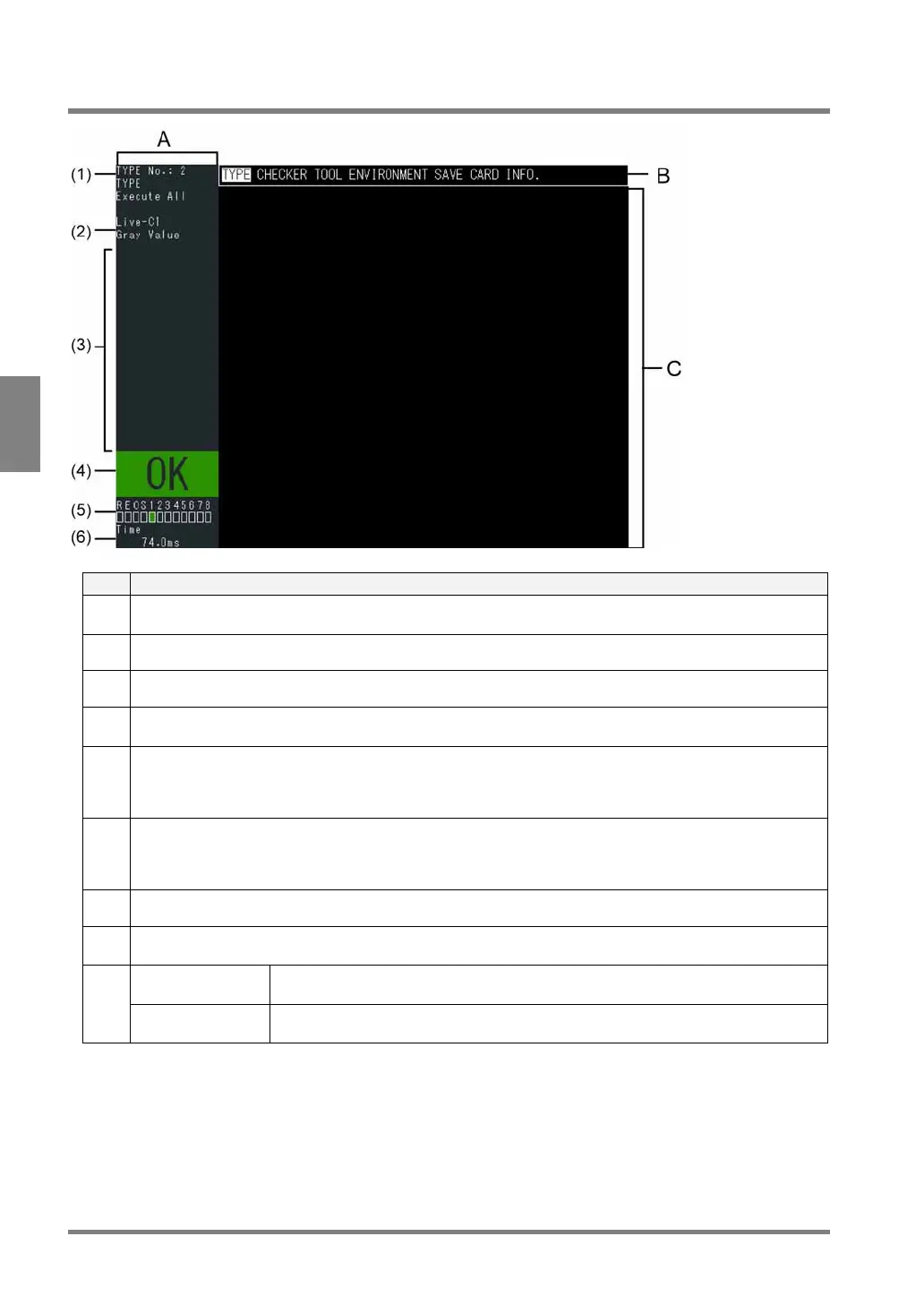
4.1 About Screen Monitor
No. Description
A Status display area:
Mainly displays the status of the PV310
(1) The currently selected product type No. and title and execution mode
(2) Image type that is currently displayed
(3) Message area:
Displays messages, subwindows for checker setting, and results of the checker test
(4) Total judgment result:
Displays "OK" in green if the judgment formula that is set to " Total Judgment" returns true by selecting
“TOOL” > “Calcu.-Stat.-Output” and then opening Judgment tab. (Refer to page 185 about registration of
total judgement.)
(5) Output status of signals:
If the signals shown below are output signals, the squares located under each signal are displayed in green
(or in red for ERROR) only in RUN mode).
R: Ready signal / E: Error signal / O: Overflow signal / S: STROB signal / 1-8: D1-D8 signals
(6) Inspection time (unit: ms): OFF time of READY signal after START signal input
B Menu bar:
Displays the menu to set the inspection conditions and inspection environment.
In RUN mode Images, checker shapes, inspection results, etc. are displayed according to the
settings in SETUP mode.
C
In SETUP mode Images, inspection areas, etc. are displayed. Every setting window that is selected
from the menu bar is also displayed in this area.



 To Next Page