28
In
ut and Out
ut Interface Ports
Cha
ter 3
3.1 Parallel Ports
3.1.1 Wiring to the Terminal Blocks
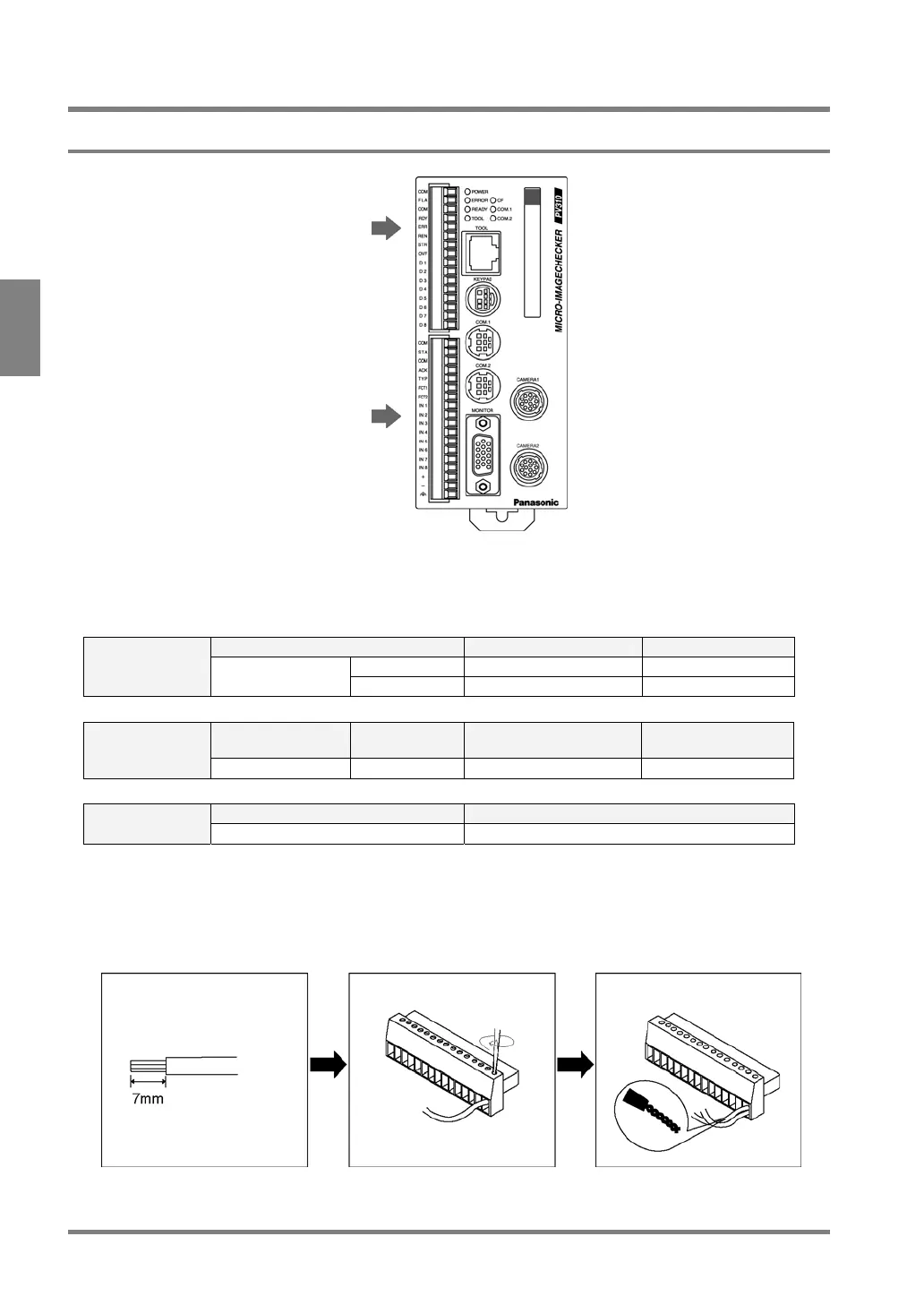
Output terminal block
Terminal block for power supply input
About terminal block
The PV310 is equipped with the attachable input/output terminal blocks. Use fittings and cables show in the
tables below.
Manufacturer Model No. Product No.
Input MC1.5/18-ST-3.5 1840528
Terminal block
socket
Phoenix Contact
Output MC1.5/16-ST-3.5 1840502
Manufacturer Model No. Conductor surface area
(cross-section)
Tightening torque Tightening
fittings
Phoenix Contact SZ 0.4 x 2.5 0.4 x 2.5 mm
2
Less than 0.25 N•m
Size Conductor surface area (cross-section) Acceptable Wire
(Twisted wire)
AWG#24 to 26 0.3 to 1.25 mm
2
How to Wire
1 Remove the wire shield. 2 Insert the wire into a
terminal block hole until it
stops and screw it down.
3 When connecting multiple
wires, twist them together
before inserting.



 To Next Page