218
Environment Settin
s
Cha
ter 9
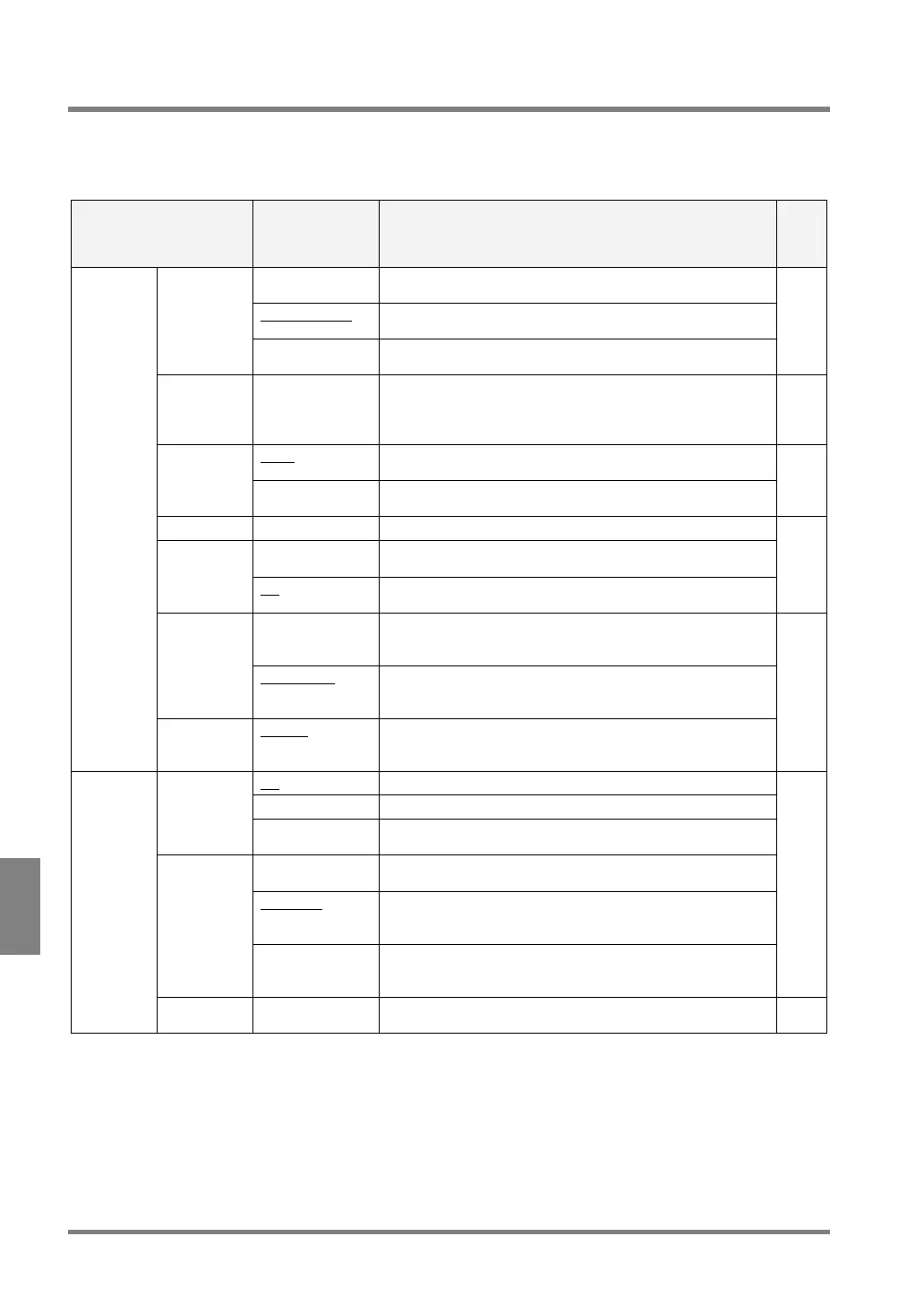
9.1 About “Environment Settings”
In the PV310, Environmental Settings refer to the settings commonly used for all product types.
A Table of Environment Settings
Item
Option
(Initial value:
With an
underline)
Function
Ref.
page
D.S. Random
Frame / Field
Select when using a double-speed random camera.
Normal Frame /
Field
Select when using a standard camera or an ultra compact
camera.
Camera
Mode
Int. Sync Mode
Frame / Field
Select when using NTSC input signal.
57
Shutter
Speed
1/30 to 1/20000s This function is available if the Camera function is set to
“double-speed random”, “normal field”, or “int. sync. field”
mode (excluding when using an ultra compact camera). The
shutter speed is fixed to 1/30s in other modes.
59
Once To start inspection using input signals from an external
device.
Start
Repeat To start and keep inspection before receiving input signals
from an external device.
222
Password Up to eight digits Used for switching from RUN to SETUP mode.
Yes Password is requested when switching from RUN mode to
SETUP mode.
Password
Request
No
Password is not requested when switching from RUN to
SETUP mode.
223
Solid If you choose “Solid”, the background color of the menu
window is set to opaque. Therefore, you cannot check the
image which is displayed in the position of the menu window.
Background
Color (when
starting the
PV310)
Translucent
If you choose “Translucent”, the background color of the
menu window is set to translucent. You can check the image
which is displayed in the position of the menu window.
Initial
settings
Language English
/
Japanese*
To change display languages.
* It depends on the product number of PV310. Please refer
to page 236.
222
No To cancel the execution of image save in RUN mode.
Per start To save the image inspected in RUN mode “per start”.
Save Image
Judge. Result To save the image when a specified formula returns FALSE
(NG) in RUN mode
Not Overwrite To finish saving the image when the number of images
reached 16.
Overwrite To continue to save images by recording the new image over
the oldest image after the number of images to be saved
reached 16.
Save Mode
Display Save
Image
To execute inspection while the latest save image is
displayed. This feature is available only if a memory image is
displayed in RUN mode.
225
Save
Image
Mode
Reset
Image Data
--- To erase all the saved images. 231



 To Next Page