59
Cha
ter 5
Procedure for Settin
Ins
ection Conditions
5.3 Setting a Shutter Speed
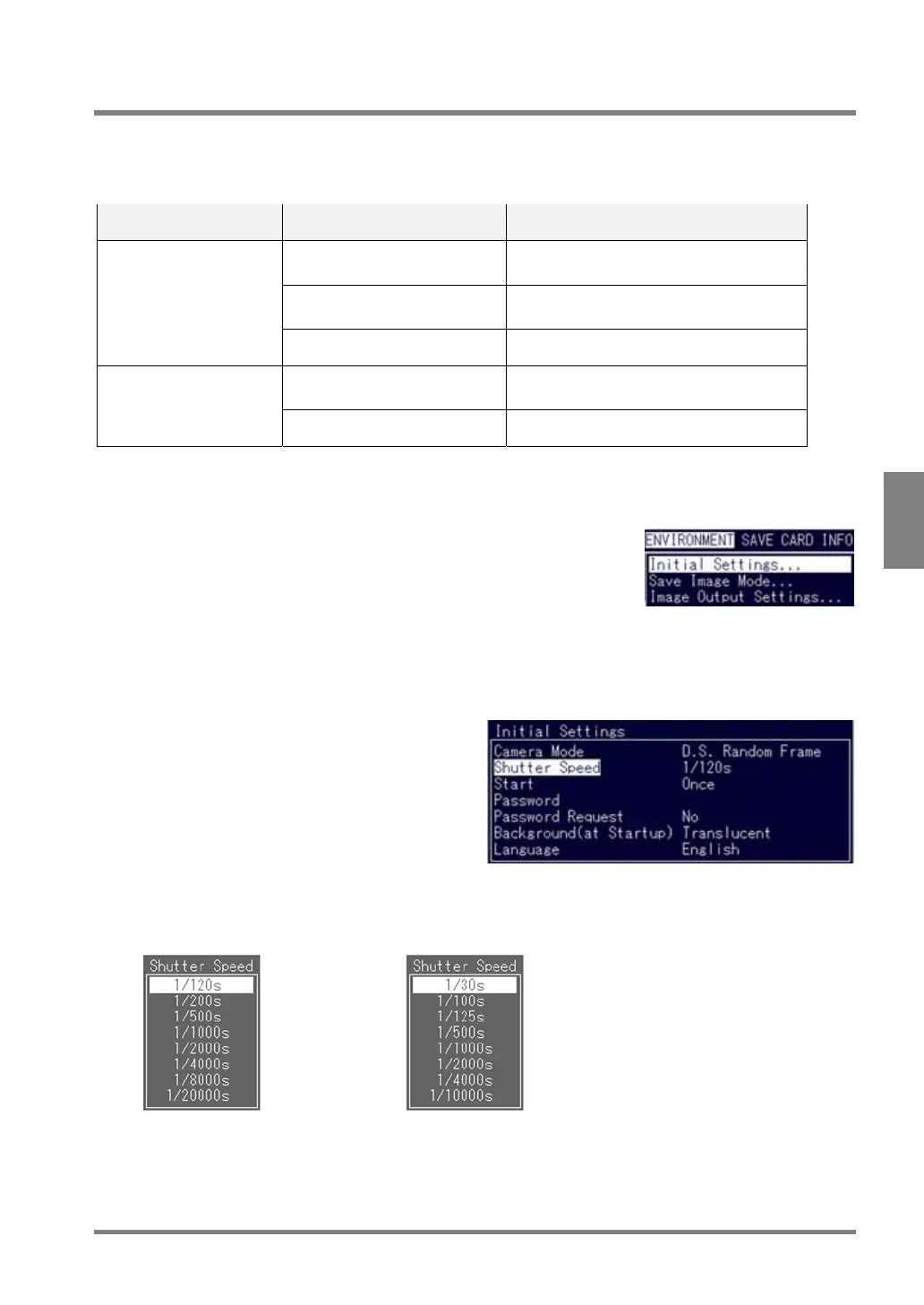
You need to select a proper shutter speed for a camera mode, moving speed of the inspection object and lighting
conditions. You cannot change the shutter speed in Normal Frame or Int. Sync Mode Frame mode.
To set the shutter speed for an ultra compact camera: ANPVCA1012, use the camera control unit. The value set
by PV310 is ineffective.
Shutter speed change Camera mode Camera
Double-Speed Random Frame
Double-Speed Random Field
Double-Speed Random camera: ANM831
Normal Field Normal camera: ANM832
Ultra small camera: ANPVCA1012
Possible
Internal Sync Mode Field
---
Normal Frame Normal camera: ANM832
Ultra compact camera: ANPVCA1012
Impossible
Internal Sync Mode Frame
---
1. Highlight "ENVIRONMENT" in the menu bar.
The ENVIRONMENT menu is displayed.
2. Select "Initial Settings".
The Initial Setting menu is displayed.
3. Highlight "Shutter Speed".
4. Select a proper shutter speed.
Double-Speed Random Frame
Double-Speed Random Field
Normal Field (Normal camera: ANM832)
Internal Sync Mode Field



 To Next Page