36
In
ut and Out
ut Interface Ports
Cha
ter 3
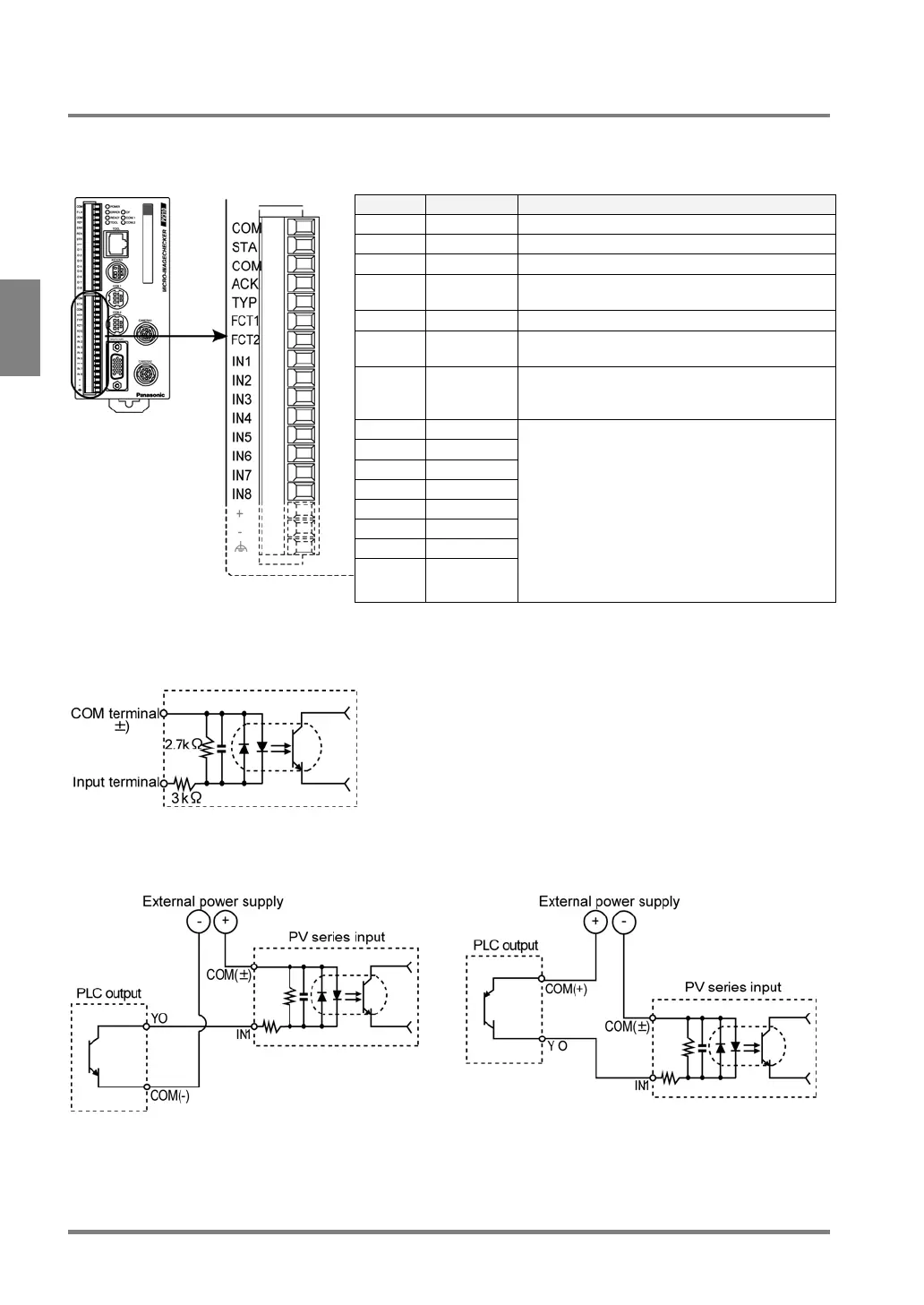
3.1.6 Input Terminals
Pin Assignments
Signal Name Detail
COM COMMON START common
STA START Inspection start signal
COM COMMON COMMON, other than START input
ACK ACKNOW
LEDGE
ACKNOWLEDGE signal (Data reception
completion signal during handshake)
TYP TYPE Switches product types
FCT1 FUNCTIO
N1
Selectable from 3 functions (refer to section
9.1). Initial value: Display switch signal.
FCT2 FUNCTIO
N2
Selectable from 3 functions (refer to section
9.1). Initial value: Template re-registration
signal.
IN1 IN1
IN2 IN2
IN3 IN3
IN4 IN4
IN5 IN5
IN6 IN6
IN7 IN7
IN8 IN8
Data input: IN1 to IN8
• Specify a product type when switching
product types.
• Specify an image type when switching
display camera images
• Specify a checker number when
re-registering a template
• Specify a setting data number when
restoring the data from Compact Flash
memory card
Input Circuit
Parallel input circuit
Rated operating voltage: 12 to 24 V DC
Max. applied voltage: 30 V DC
Example of connection with PLC
NPN output PNP output



 To Next Page